6.14
SEL-2032 Communications Processor Instruction Manual Date Code 20120126
Database
Region Descriptions
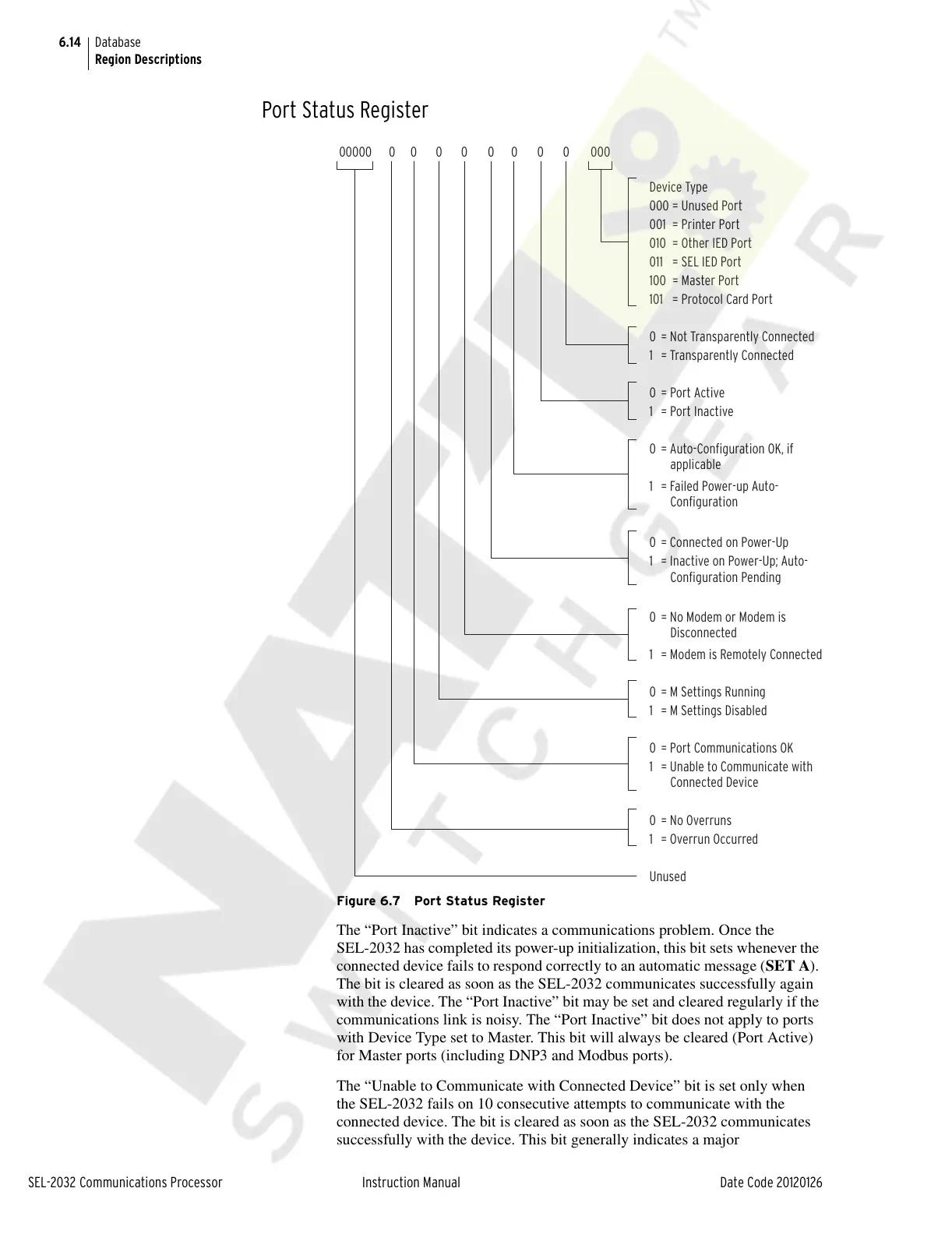
Port Status Register
Figure 6.7 Port Status Register
The “Port Inactive” bit indicates a communications problem. Once the
SEL-2032 has completed its power-up initialization, this bit sets whenever the
connected device fails to respond correctly to an automatic message (SET A).
The bit is cleared as soon as the SEL-2032 communicates successfully again
with the device. The “Port Inactive” bit may be set and cleared regularly if the
communications link is noisy. The “Port Inactive” bit does not apply to ports
with Device Type set to Master. This bit will always be cleared (Port Active)
for Master ports (including DNP3 and Modbus ports).
The “Unable to Communicate with Connected Device” bit is set only when
the SEL-2032 fails on 10 consecutive attempts to communicate with the
connected device. The bit is cleared as soon as the SEL-2032 communicates
successfully with the device. This bit generally indicates a major
Device Type
000 = Unused Port
001 = Printer Port
010 = Other IED Port
011 = SEL IED Port
100 = Master Port
101 = Protocol Card Port
0 = Not Transparently Connected
1 = Transparently Connected
0 = Port Active
1 = Port Inactive
0 = Auto-Configuration OK, if
applicable
1 = Failed Power-up Auto-
Configuration
0 = Connected on Power-Up
1 = Inactive on Power-Up; Auto-
Configuration Pending
0 = No Modem or Modem is
Disconnected
1 = Modem is Remotely Connected
0 = M Settings Running
1 = M Settings Disabled
0 = Port Communications OK
1 = Unable to Communicate with
Connected Device
Unused
0 = No Overruns
1 = Overrun Occurred
000000 0 0 0 0 0 0 0 000
Courtesy of NationalSwitchgear.com



 To Next Page