B.2
SEL-2032 Communications Processor Instruction Manual Date Code 20120126
Firmware Upgrade Instructions
Upgrade Procedure
Upgrade Procedure
A Prepare for Firmware Upgrade
Follow the steps listed below to prepare for a firmware upgrade:
Step 1. Capture your settings using the SEL-5020 Settings Assistant
Software or otherwise document them so that you can reinstall
them.
Some circumstances may require that you reinstall settings to
complete the firmware upgrade process. For example, if you
are upgrading many revisions (R101 to R115) or if the upgrade
is interrupted by a power loss, you will need to reinstall
settings.
Step 2. Review the firmware upgrade considerations listed above. If
you have extensive SET M programming or want to reinstall
the present firmware version, contact SEL for copies of your
present firmware version on digital media.
Step 3. Disconnect communications cables from the SEL-203x to
attached relays if those relays are presently in service and can
operate power system equipment.
Step 4. Prepare to load the firmware.
➢ Insert the disk containing the new firmware into the
appropriate disk drive on the computer.
For a faster upload (and less potential for file
corruption), copy the new firmware to the local hard
drive and upload the new firmware from the hard drive.
➢ Some firmware is in self-extracting compressed files
(files with .exe extensions). For firmware in such files,
from Windows Explorer double-click on the file and
select the directory on the hard drive where you want to
access the uncompressed files. Verify that these
uncompressed files have an .s19 extension.
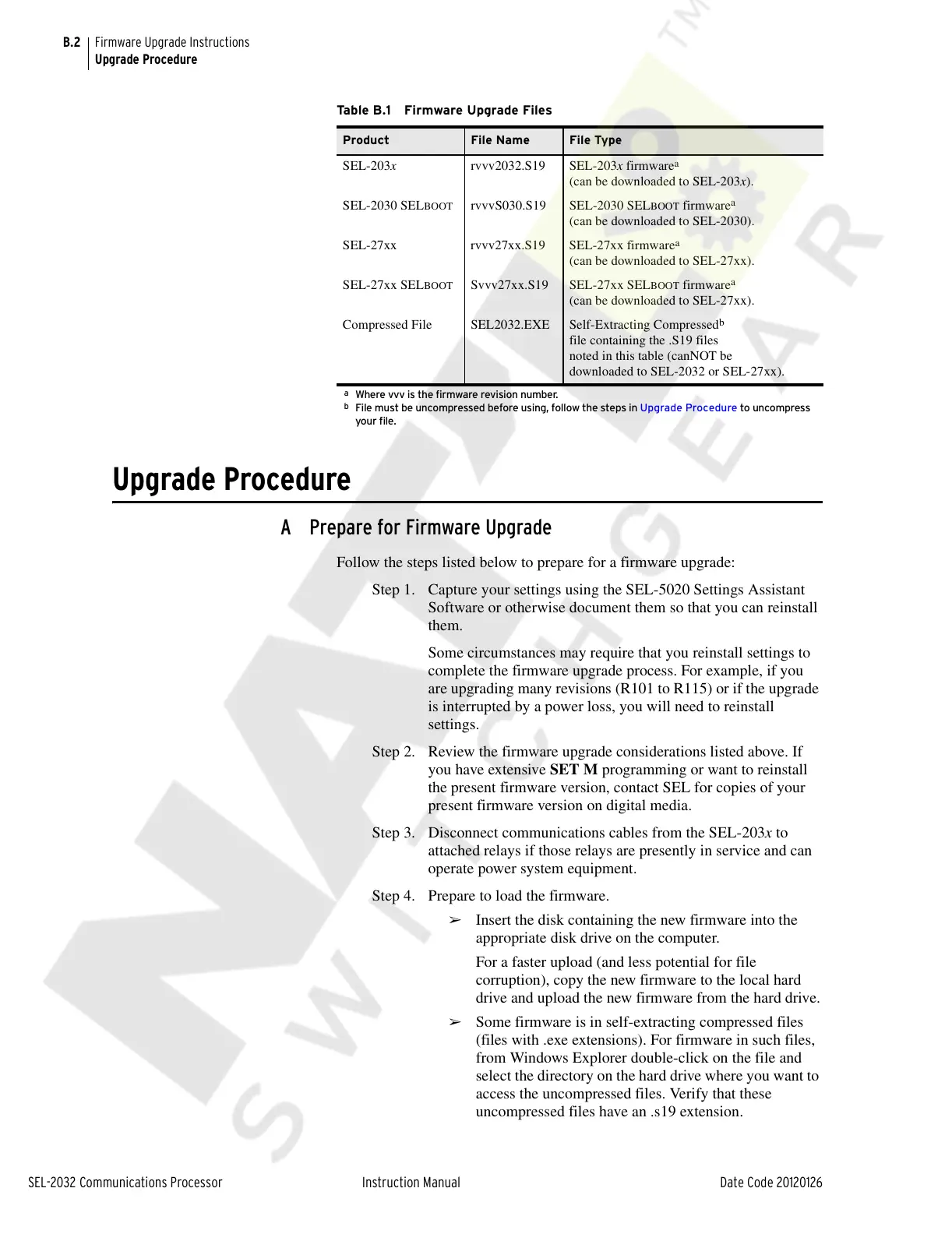
Table B.1 Firmware Upgrade Files
Product File Name File Type
SEL-203x rvvv2032.S19 SEL-203x firmware
a
(can be downloaded to SEL-203x).
a
Where vvv is the firmware revision number.
SEL-2030 SELBOOT rvvvS030.S19 SEL-2030 SELBOOT firmware
a
(can be downloaded to SEL-2030).
SEL-27xx rvvv27xx.S19 SEL-27xx firmware
a
(can be downloaded to SEL-27xx).
SEL-27xx SEL
BOOT Svvv27xx.S19 SEL-27xx SELBOOT firmware
a
(can be downloaded to SEL-27xx).
Compressed File SEL2032.EXE Self-Extracting Compressed
b
file containing the .S19 files
noted in this table (canNOT be
downloaded to SEL-2032 or SEL-27xx).
b
File must be uncompressed before using, follow the steps in Upgrade Procedure to uncompress
your file.
Courtesy of NationalSwitchgear.com



 To Next Page