3.23
Date Code 20120126 Instruction Manual SEL-2032 Communications Processor
Job Done Examples
Example 5: Getting Data From a Non-SEL IED
Step 10. Configure the DNP3 LAN/WAN Master with a DNP3 data map
that corresponds to the synchrophasor data points of the Math/
Move equations in Step 8.
Example 5: Getting Data From a Non-SEL IED
Example 5 demonstrates the ability of the SEL-2032 to communicate with
non-SEL IEDs using the nearly universal EIA-232 communications interface.
The EIA-232 interface is a standard with specified electrical signal parameters
that ensure compatibility between two devices. For devices that use this
standard, you must know how to make the proper electrical connection
between the two devices to permit communication. Additionally, each of these
devices must recognize the “language” that the other “speaks;” therefore, you
need the “dictionary,” or command set, that defines each language.
In this example, the SEL-2032 communicates with a DGH 1000 RTD
Interface Module. This example assumes that you have connected the DGH
1000 to Port 12 on the SEL-2032, as shown in Figure 3.22, using the proper
cable, and that you know the communication parameters (baud rate, data bits,
parity, stop bits, and flow control) required by the DGH 1000. The example
also assumes that you have the command set, or “dictionary” of terms, for
each device. In this case you know that when you send the message string
“$1RD” to the DGH 1000, the device returns the temperature as an ASCII
floating-point number.
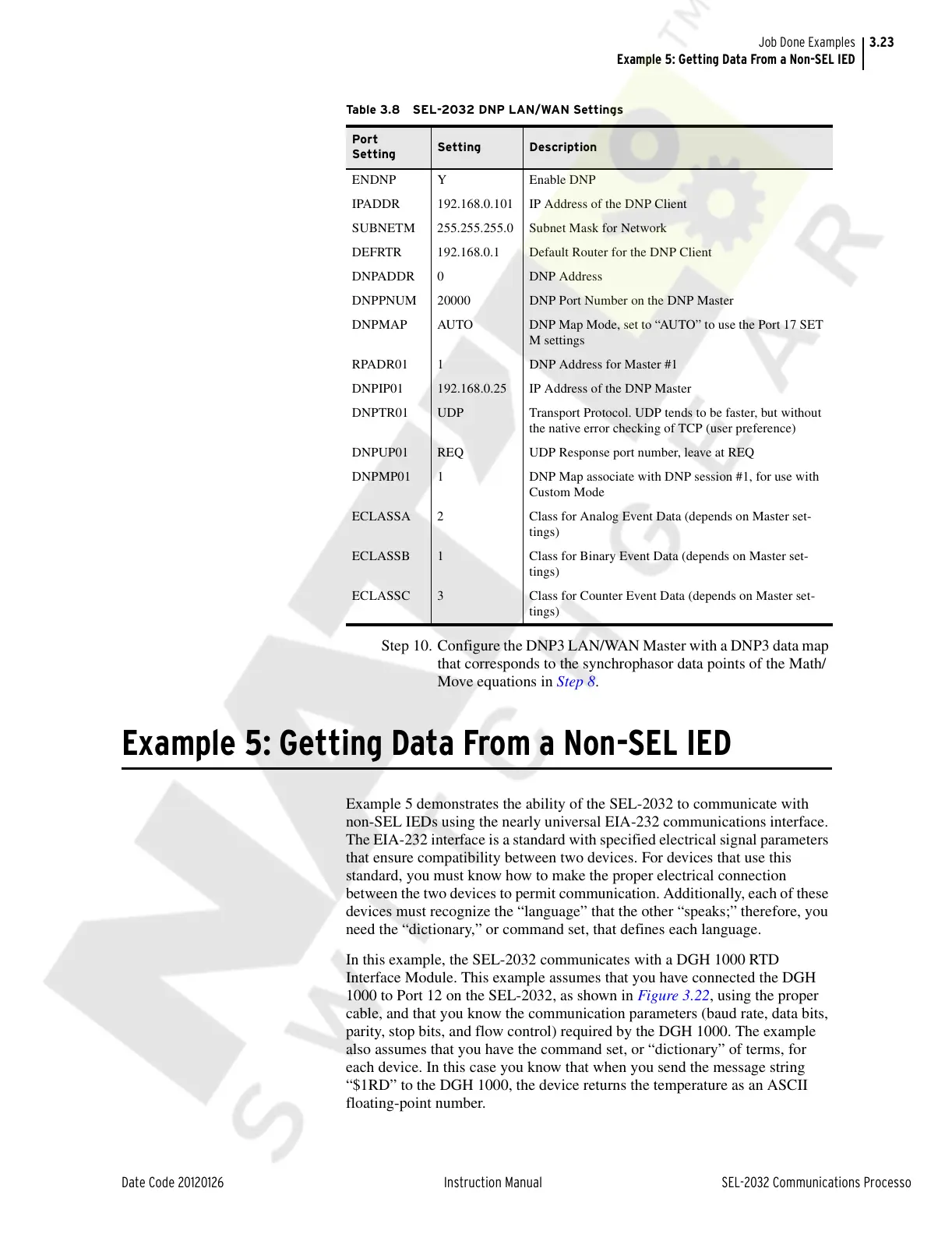
Table 3.8 SEL-2032 DNP LAN/WAN Settings
Port
Setting
Setting Description
ENDNP Y Enable DNP
IPADDR 192.168.0.101 IP Address of the DNP Client
SUBNETM 255.255.255.0 Subnet Mask for Network
DEFRTR 192.168.0.1 Default Router for the DNP Client
DNPADDR 0 DNP Address
DNPPNUM 20000 DNP Port Number on the DNP Master
DNPMAP AUTO DNP Map Mode, set to “AUTO” to use the Port 17 SET
M settings
RPADR01 1 DNP Address for Master #1
DNPIP01 192.168.0.25 IP Address of the DNP Master
DNPTR01 UDP Transport Protocol. UDP tends to be faster, but without
the native error checking of TCP (user preference)
DNPUP01 REQ UDP Response port number, leave at REQ
DNPMP01 1 DNP Map associate with DNP session #1, for use with
Custom Mode
ECLASSA 2 Class for Analog Event Data (depends on Master set-
tings)
ECLASSB 1 Class for Binary Event Data (depends on Master set-
tings)
ECLASSC 3 Class for Counter Event Data (depends on Master set-
tings)
Courtesy of NationalSwitchgear.com



 To Next Page