9.10
SEL-2032 Communications Processor Instruction Manual Date Code 20120126
Protocols
Modbus RTU Protocol
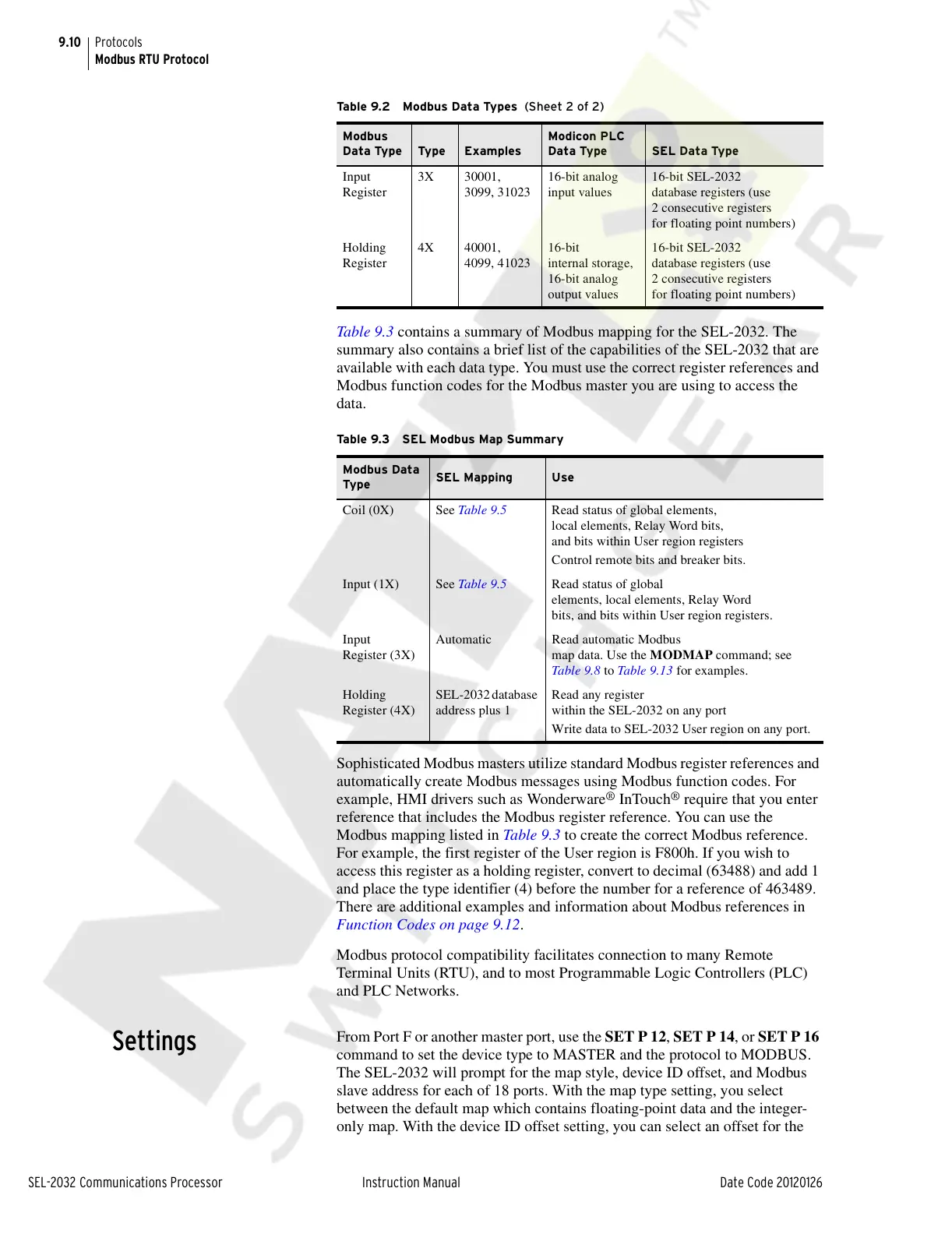
Table 9.3 contains a summary of Modbus mapping for the SEL-2032. The
summary also contains a brief list of the capabilities of the SEL-2032 that are
available with each data type. You must use the correct register references and
Modbus function codes for the Modbus master you are using to access the
data.
Sophisticated Modbus masters utilize standard Modbus register references and
automatically create Modbus messages using Modbus function codes. For
example, HMI drivers such as Wonderware
®
InTouch
®
require that you enter
reference that includes the Modbus register reference. You can use the
Modbus mapping listed in Table 9.3 to create the correct Modbus reference.
For example, the first register of the User region is F800h. If you wish to
access this register as a holding register, convert to decimal (63488) and add 1
and place the type identifier (4) before the number for a reference of 463489.
There are additional examples and information about Modbus references in
Function Codes on page 9.12.
Modbus protocol compatibility facilitates connection to many Remote
Terminal Units (RTU), and to most Programmable Logic Controllers (PLC)
and PLC Networks.
Settings
From Port F or another master port, use the SET P 12, SET P 14, or SET P 16
command to set the device type to MASTER and the protocol to MODBUS.
The SEL-2032 will prompt for the map style, device ID offset, and Modbus
slave address for each of 18 ports. With the map type setting, you select
between the default map which contains floating-point data and the integer-
only map. With the device ID offset setting, you can select an offset for the
Input
Register
3X 30001,
3099, 31023
16-bit analog
input values
16-bit SEL-2032
database registers (use
2 consecutive registers
for floating point numbers)
Holding
Register
4X 40001,
4099, 41023
16-bit
internal storage,
16-bit analog
output values
16-bit SEL-2032
database registers (use
2 consecutive registers
for floating point numbers)
Table 9.3 SEL Modbus Map Summary
Modbus Data
Type
SEL Mapping Use
Coil (0X) See Table 9.5 Read status of global elements,
local elements, Relay Word bits,
and bits within User region registers
Control remote bits and breaker bits.
Input (1X) See Table 9.5 Read status of global
elements, local elements, Relay Word
bits, and bits within User region registers.
Input
Register (3X)
Automatic Read automatic Modbus
map data. Use the MODMAP command; see
Tabl e 9.8 to Table 9.13 for examples.
Holding
Register (4X)
SEL-2032 database
address plus 1
Read any register
within the SEL-2032 on any port
Write data to SEL-2032 User region on any port.
Table 9.2 Modbus Data Types (Sheet 2 of 2)
Modbus
Data Type
Type Examples
Modicon PLC
Data Type
SEL Data Type
Courtesy of NationalSwitchgear.com



 To Next Page