2.8
SEL-2032 Communications Processor Instruction Manual Date Code 20120126
Installation
Communications
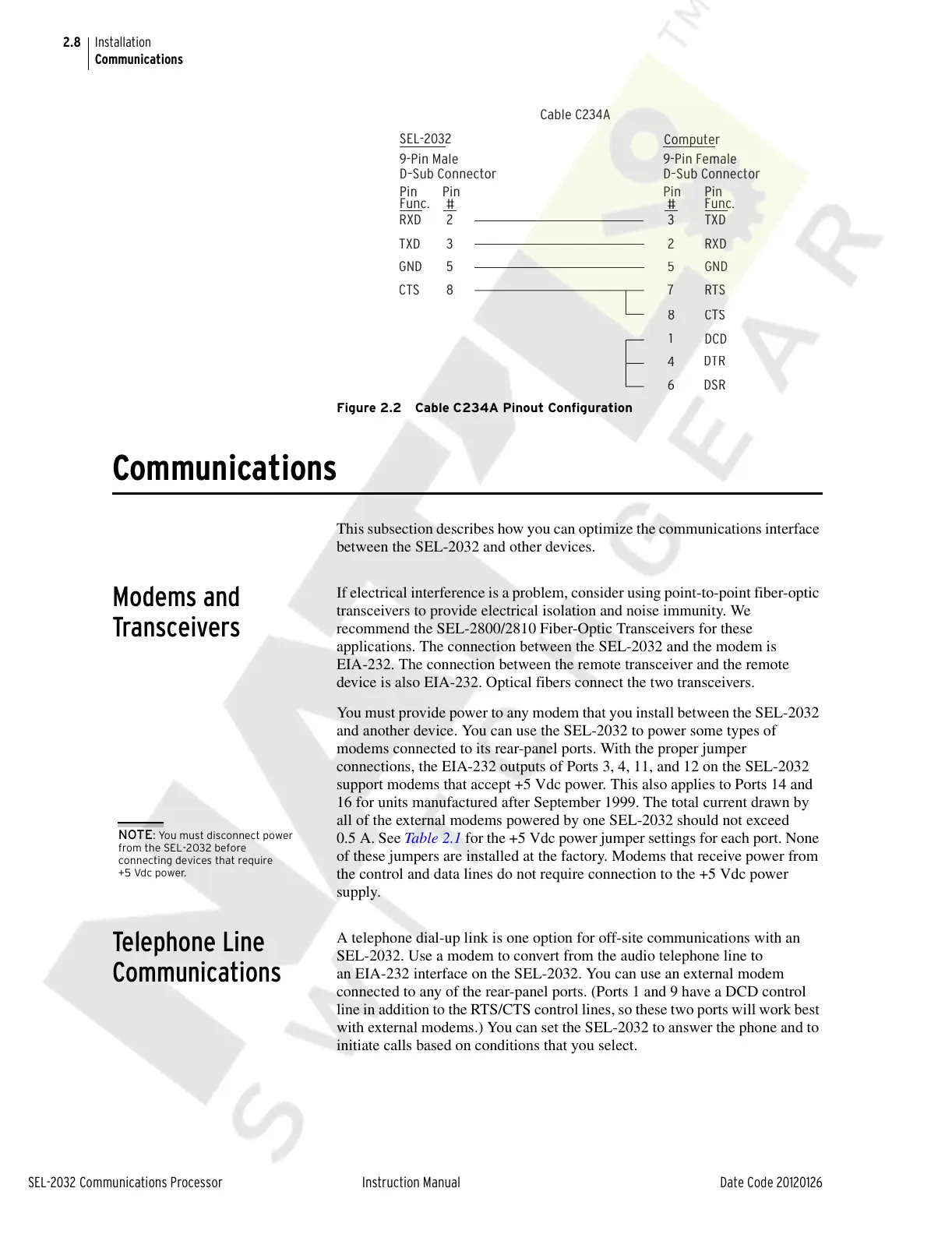
Figure 2.2 Cable C234A Pinout Configuration
Communications
This subsection describes how you can optimize the communications interface
between the SEL-2032 and other devices.
Modems and
Transceivers
If electrical interference is a problem, consider using point-to-point fiber-optic
transceivers to provide electrical isolation and noise immunity. We
recommend the SEL-2800/2810 Fiber-Optic Transceivers for these
applications. The connection between the SEL-2032 and the modem is
EIA-232. The connection between the remote transceiver and the remote
device is also EIA-232. Optical fibers connect the two transceivers.
You must provide power to any modem that you install between the SEL-2032
and another device. You can use the SEL-2032 to power some types of
modems connected to its rear-panel ports. With the proper jumper
connections, the EIA-232 outputs of Ports 3, 4, 11, and 12 on the SEL-2032
support modems that accept +5 Vdc power. This also applies to Ports 14 and
16 for units manufactured after September 1999. The total current drawn by
all of the external modems powered by one SEL-2032 should not exceed
0.5 A. See Table 2.1 for the +5 Vdc power jumper settings for each port. None
of these jumpers are installed at the factory. Modems that receive power from
the control and data lines do not require connection to the +5 Vdc power
supply.
Telephone Line
Communications
A telephone dial-up link is one option for off-site communications with an
SEL-2032. Use a modem to convert from the audio telephone line to
an EIA-232 interface on the SEL-2032. You can use an external modem
connected to any of the rear-panel ports. (Ports 1 and 9 have a DCD control
line in addition to the RTS/CTS control lines, so these two ports will work best
with external modems.) You can set the SEL-2032 to answer the phone and to
initiate calls based on conditions that you select.
EL-2
9-Pin
al
nn
nn
-Pin F
m
l
N
N
T
RT
T
D
D
F
n
F
n
NOTE: You must disconnect power
from the SEL-2032 before
connecting devices that require
+5 Vdc power.
Courtesy of NationalSwitchgear.com



 To Next Page