1.19
Date Code 20120126 Instruction Manual SEL-2032 Communications Processor
Introduction and Specifications
Functions
region is associated with a message created using the SET A command. For
example, the response from Message 1 will be captured in Data region D1 and
the Message 2 response in Data region D2.
Responses from “20” messages are parsed automatically. Data received in
response to non-“20” messages are parsed according to the parsing option you
selected in the SET A automatic message settings. Each response is time-
tagged by the SEL-2032 at the time it begins receiving the message. Data
collected in regions D1–D8 are held until the next data are received; the new
data overwrite the old data. The SEL-2032 will assign a data label to each
region, depending on the message content and parsing method you choose.
For example, if you set Message 1 on Port 1 to collect meter data from an SEL
relay using the 20METER command, the region 1:D1 will be assigned a data
label of METER. This label can be very helpful when you address the region
to MAP or VIEW the data, or to retrieve specific data items from the region.
A1 to A3 Regions
The Archive data regions, A1–A3, are designed for long-term storage of
information, such as SEL relay long event reports and meter demand data.
Each Archive data region works on a First-In-First-Out (FIFO) basis. The
number of records that can be stored in each region depends on the size of
each record. Individual records can be viewed, retrieved, and cleared.
User Region
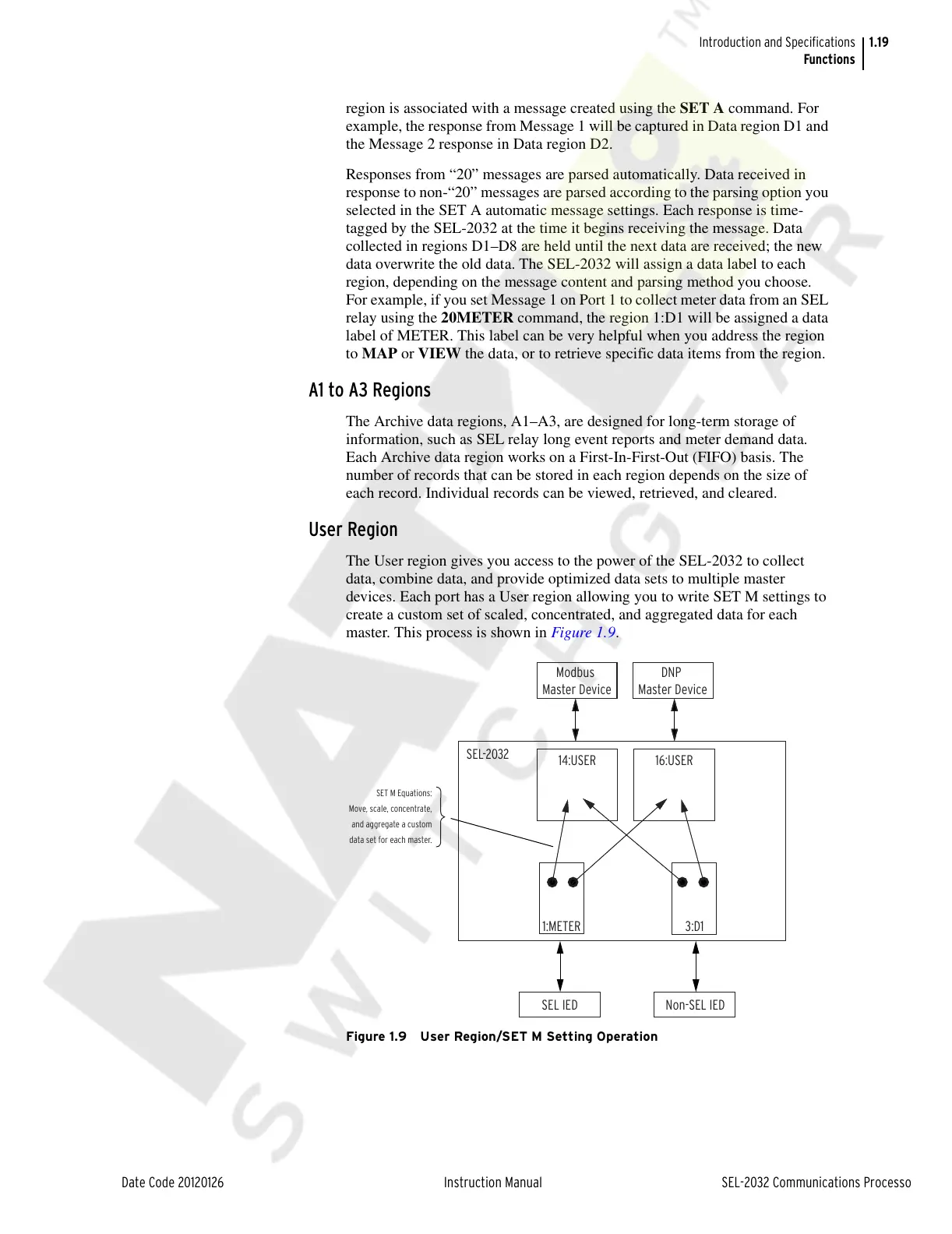
The User region gives you access to the power of the SEL-2032 to collect
data, combine data, and provide optimized data sets to multiple master
devices. Each port has a User region allowing you to write SET M settings to
create a custom set of scaled, concentrated, and aggregated data for each
master. This process is shown in Figure 1.9.
Figure 1.9 User Region/SET M Setting Operation
SEL-2032
Modbus
Master Device
DNP
Master Device
SEL IED
14:USER 16:USER
1:METER 3:D1
Non-SEL IED
SET M Equations:
Move, scale, concentrate,
and aggregate a custom
data set for each master.
Courtesy of NationalSwitchgear.com



 To Next Page