9.30
SEL-2032 Communications Processor Instruction Manual Date Code 20120126
Protocols
Serial Distributed Network Protocol (Serial DNP3)
Where an item in the device profile is indicated to be configurable, it is
controlled by the SEL-2032 settings (see Section 7: Settings).
Object List
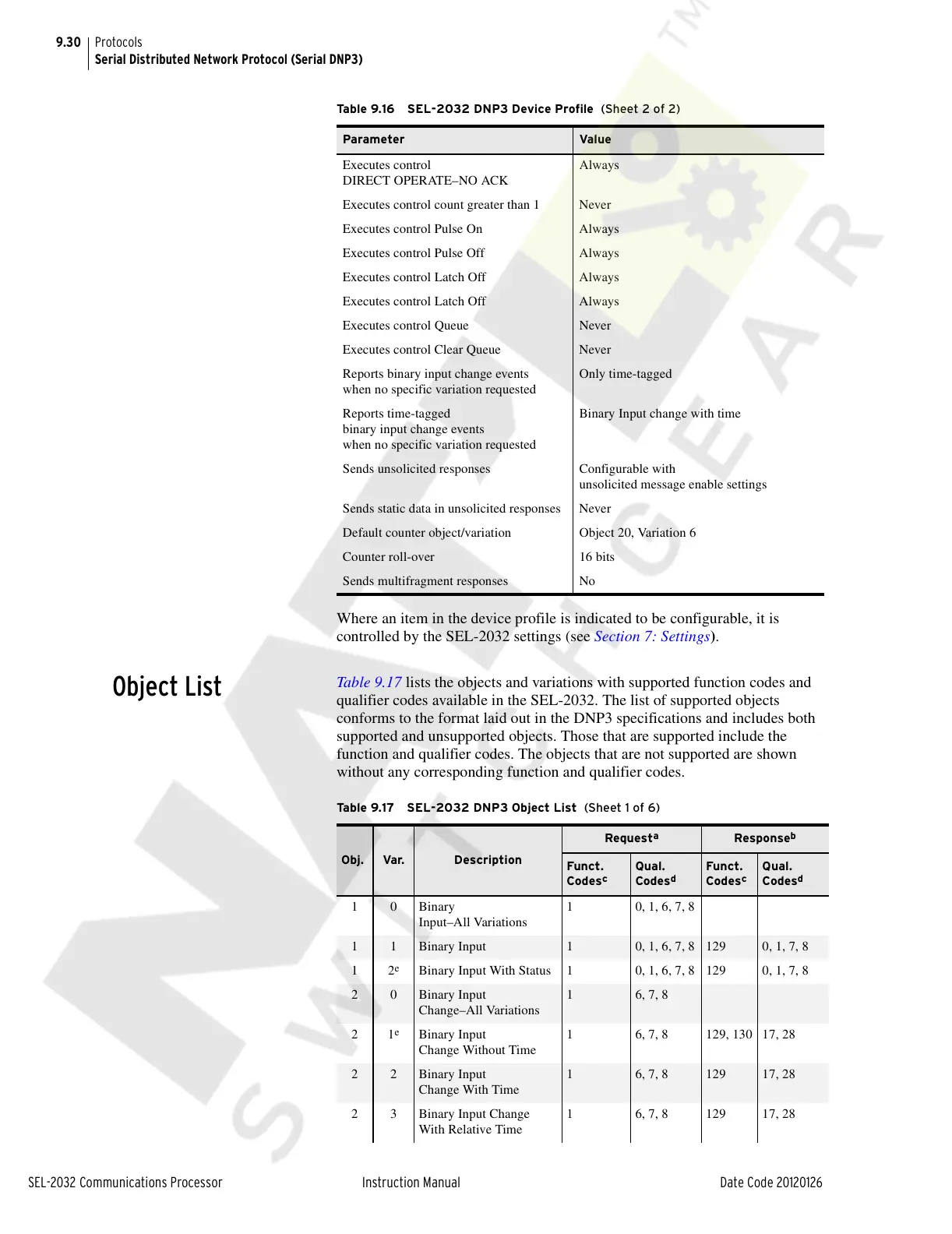
Table 9.17 lists the objects and variations with supported function codes and
qualifier codes available in the SEL-2032. The list of supported objects
conforms to the format laid out in the DNP3 specifications and includes both
supported and unsupported objects. Those that are supported include the
function and qualifier codes. The objects that are not supported are shown
without any corresponding function and qualifier codes.
Executes control
DIRECT OPERATE–NO ACK
Always
Executes control count greater than 1 Never
Executes control Pulse On Always
Executes control Pulse Off Always
Executes control Latch Off Always
Executes control Latch Off Always
Executes control Queue Never
Executes control Clear Queue Never
Reports binary input change events
when no specific variation requested
Only time-tagged
Reports time-tagged
binary input change events
when no specific variation requested
Binary Input change with time
Sends unsolicited responses Configurable with
unsolicited message enable settings
Sends static data in unsolicited responses Never
Default counter object/variation Object 20, Variation 6
Counter roll-over 16 bits
Sends multifragment responses No
Table 9.16 SEL-2032 DNP3 Device Profile (Sheet 2 of 2)
Parameter Value
Tab l e 9. 17 S EL - 20 3 2 DNP3 Object List (Sheet 1 of 6)
Obj. Var. Description
Request
a
Response
b
Funct.
Codes
c
Qual.
Codes
d
Funct.
Codes
c
Qual.
Codes
d
10Binary
Input–All Variations
1 0, 1, 6, 7, 8
1 1 Binary Input 1 0, 1, 6, 7, 8 129 0, 1, 7, 8
12
e
Binary Input With Status 1 0, 1, 6, 7, 8 129 0, 1, 7, 8
2 0 Binary Input
Change–All Variations
1 6, 7, 8
21
e
Binary Input
Change Without Time
1 6, 7, 8 129, 130 17, 28
2 2 Binary Input
Change With Time
1 6, 7, 8 129 17, 28
2 3 Binary Input Change
With Relative Time
1 6, 7, 8 129 17, 28
Courtesy of NationalSwitchgear.com



 To Next Page