SureTrack® & Repair Information SureTrack Screens
185
15.4.4 SureTrack Results Page
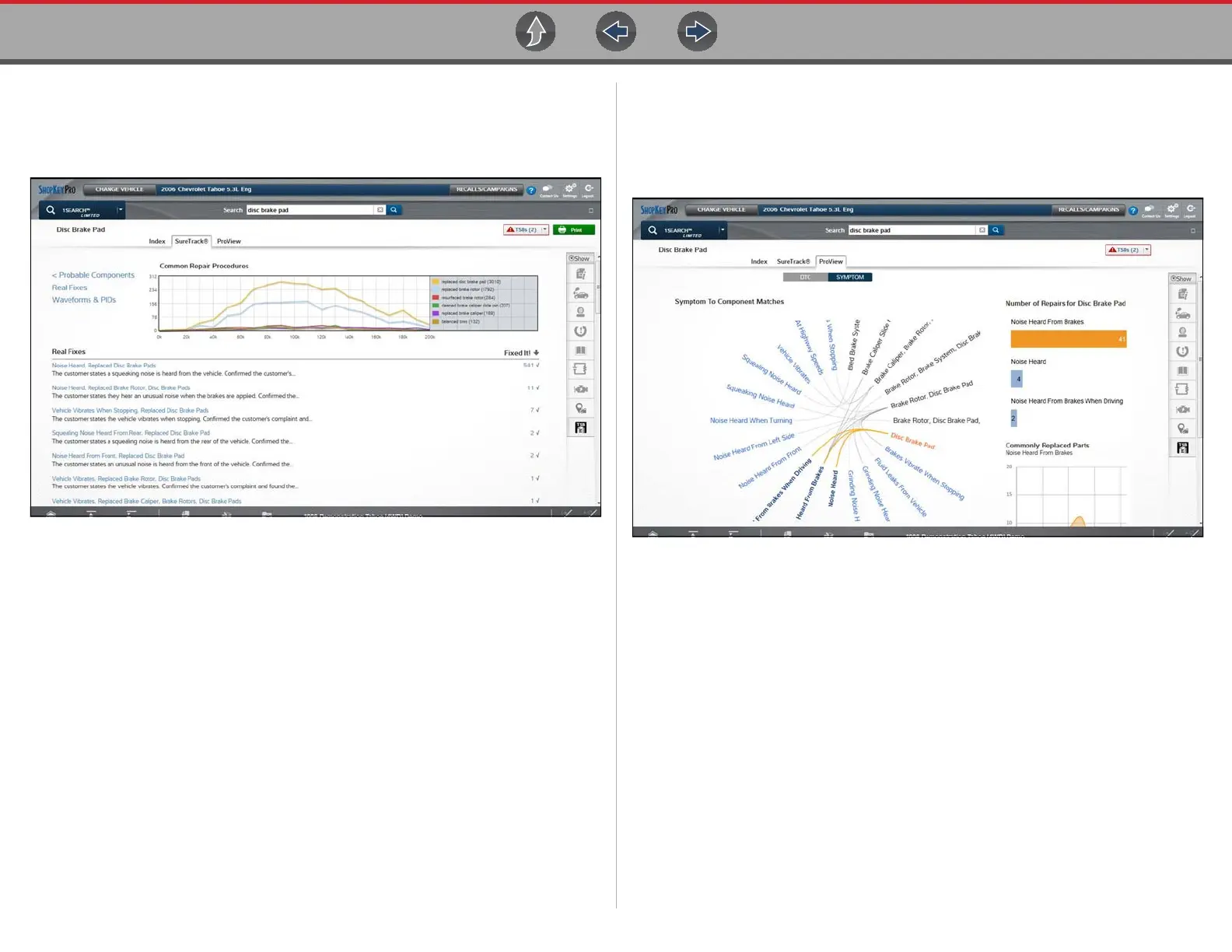
Selecting an item from the Results Index page displays applicable repair
information on the SureTrack results page.
Figure 15-4
Information may include:
• Real Fixes and Troubleshooter - real-world fixes and repair tips captured
from actual repair orders and the experiences of professional technicians.
• Common Repair Procedures Graph - graphical display of the specific parts
and procedures most frequently used to fix the selected code or symptom.
• Component Tests - includes instructions on how to test the component, and
descriptions of component operation, component locations, test locations,
connector end views and even sample waveforms.
• TSB's - OEM technical service bulletins.
• Safety Recalls and Campaigns - safety recall and service campaign
information.
15.4.5 ProView Results Page
Selecting the ProView tab from the SureTrack results page opens ProView.
ProView provides graphical displays showing the direct relationship between a
code or symptom to the component used to fix them.
Figure 15-5
Information may include:
• Radial Graph - showing the relationship of the code or symptom to possible at
fault components.
• Component Frequency Graphs - showing the most commonly replaced
component for that code or symptom.
• Common Replaced Parts Graphs - showing the mileage at which the most
common component is replaced.


 To Next Page