12-32 Sysmex XP-300
Cleaning and Maintenance
Revised March 2012
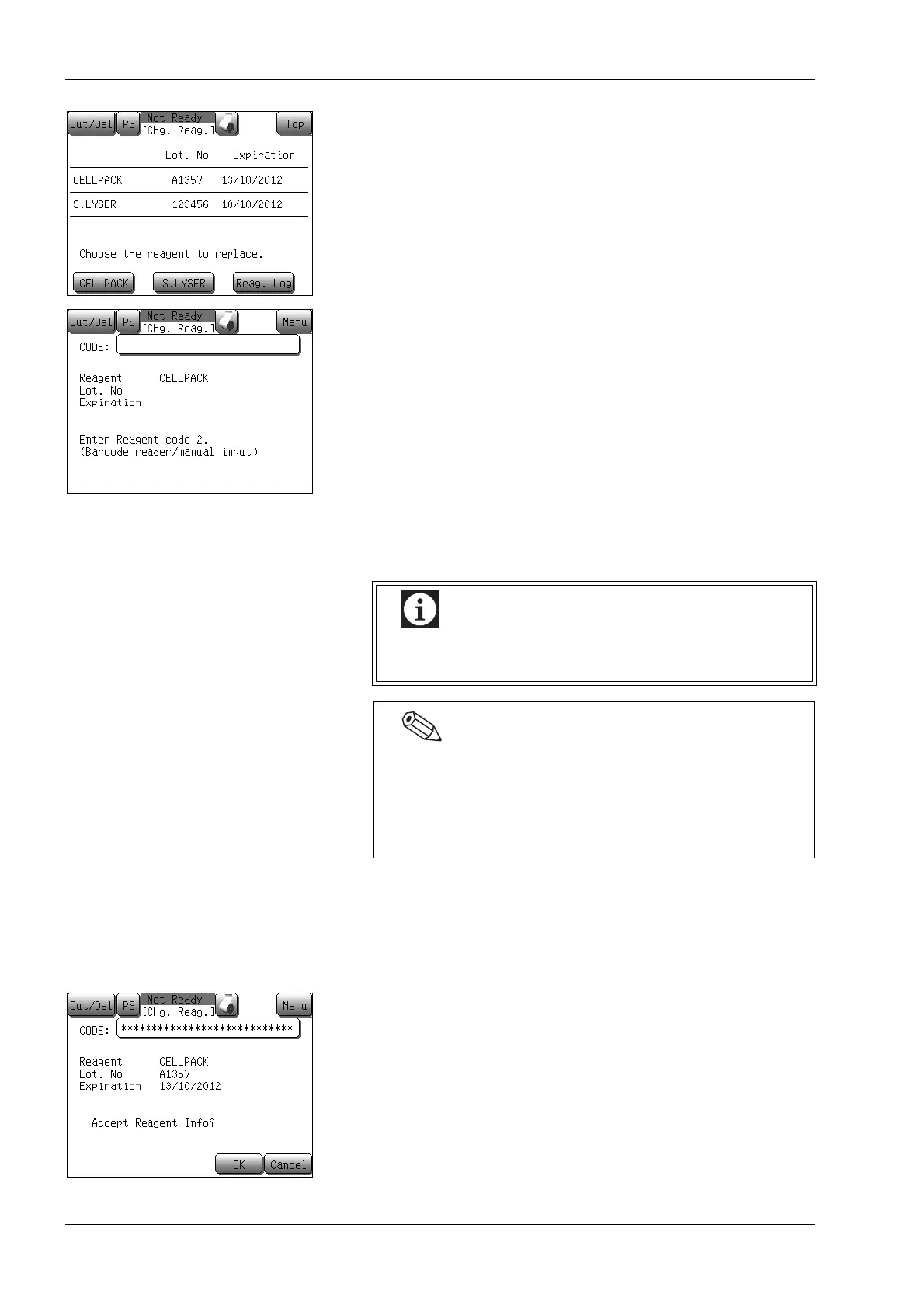
(7) Press the [CELLPACK] button to replace CELLPACK.
Press the [S.LYSER] button to replace STROMATOLYSER-
WH.
The reagent bar code entering screen will appear.
* Pressing the [Top] button on the reagent information screen
displays the replace reagent quit conformation dialog. Press
the [OK] button to return to the Main screen without
replacing the reagent or the [Cancel] button to close the
dialog to continue the reagent replacement operation.
(8) Input the bar code of the new reagent.
Use the numerical keys dialog or handheld bar code reader to
enter the reagent bar code.
• Input from the numerical keys dialog
Press the [CODE] display column on the reagent bar code
entering screen.
A numeric keypad is displayed. Input the alphanumeric
characters described on the bar code label affixed on the new
reagent, then press [Ent.].
• Input from the handheld bar code reader
Have the bar code reader read the bar code label of the
reagent with the reagent bar code entering screen displayed.
When the bar code is read successfully, the reagent information
is displayed on the bar code entering screen and the input
confirmation dialog is displayed.
A 5-digit number starting with an alphabetical character is
displayed for the Lot No.
(9) Press the [OK] button.
The replace reagent confirmation dialog is displayed.
* Pressing the [Top] button on the reagent bar code entering
screen displays the replace reagent quit conformation dialog.
Press the [OK] button to return to the Main screen without
replacing the reagent or the [Cancel] button to close the
dialog to continue the reagent replacement operation.
Make sure to read [Reagent code2]. Reading
[Reagent code] will result in an error.
If an input error or reading error occurs, the reagent bar
code reentry confirmation dialog appears. The value that
was entered last time is displayed in gray. Pressing the
[Reentry] button turns the CODE display column blank
and allows reentry of the reagent bar code.



 To Next Page