USTER
®
HVI SPECTRUM
Instruction Manual
3.2 Designing a New Report
The
HVI SPECTRUM
is designed to be flexible with the type and format
of the test data that is presented. The REPORTS selection located on the
HVI
SPECTRUM
MAIN MENU accesses REPORT screens that are used to
design, delete, and modify reports.
EPORTS selection located on the
HVI
SPECTRUM
MAIN MENU accesses REPORT screens that are used to
design, delete, and modify reports.
1. First, select the R
EPORTS button from the
HVI
SPECTRUM
MAIN
MENU.
1. First, select the R
EPORTS button from the
HVI
SPECTRUM
MAIN
MENU.
2. The REPORTS MENU screen will appear. Select R2. The REPORTS MENU screen will appear. Select REPORTS from the
menu options.
3. Select the D
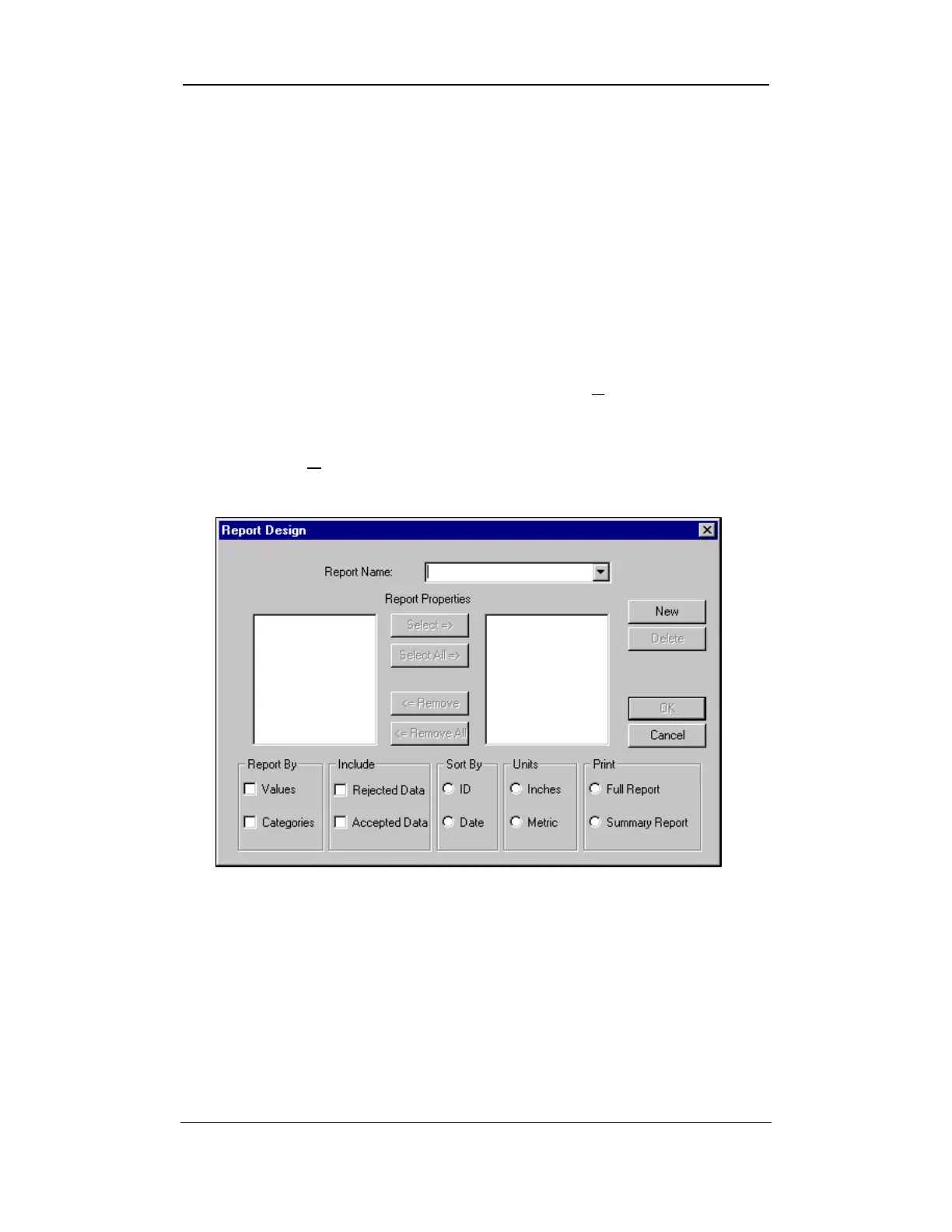
ESIGN item from the pull-down menu. This brings you
to the R
EPORT DESIGN screen shown below:
Figure 8-6: Report Design Screen
4. Once you have considered the design, select the NEW button on
the R
EPORT DESIGN screen to begin creating the report.
Uster Technologies, Inc. Chapter 8
Reports • Page 8-8
5. Position the cursor in the Report Name field. Replace the words
New Report with the name of the report you are creating. This
name will appear in the report selection list on the RUN A REPORT
screen and will become the actual title of the report.



 To Next Page