Chapter 8. Protection
Vol. IV-8-12 Alcatel-Lucent
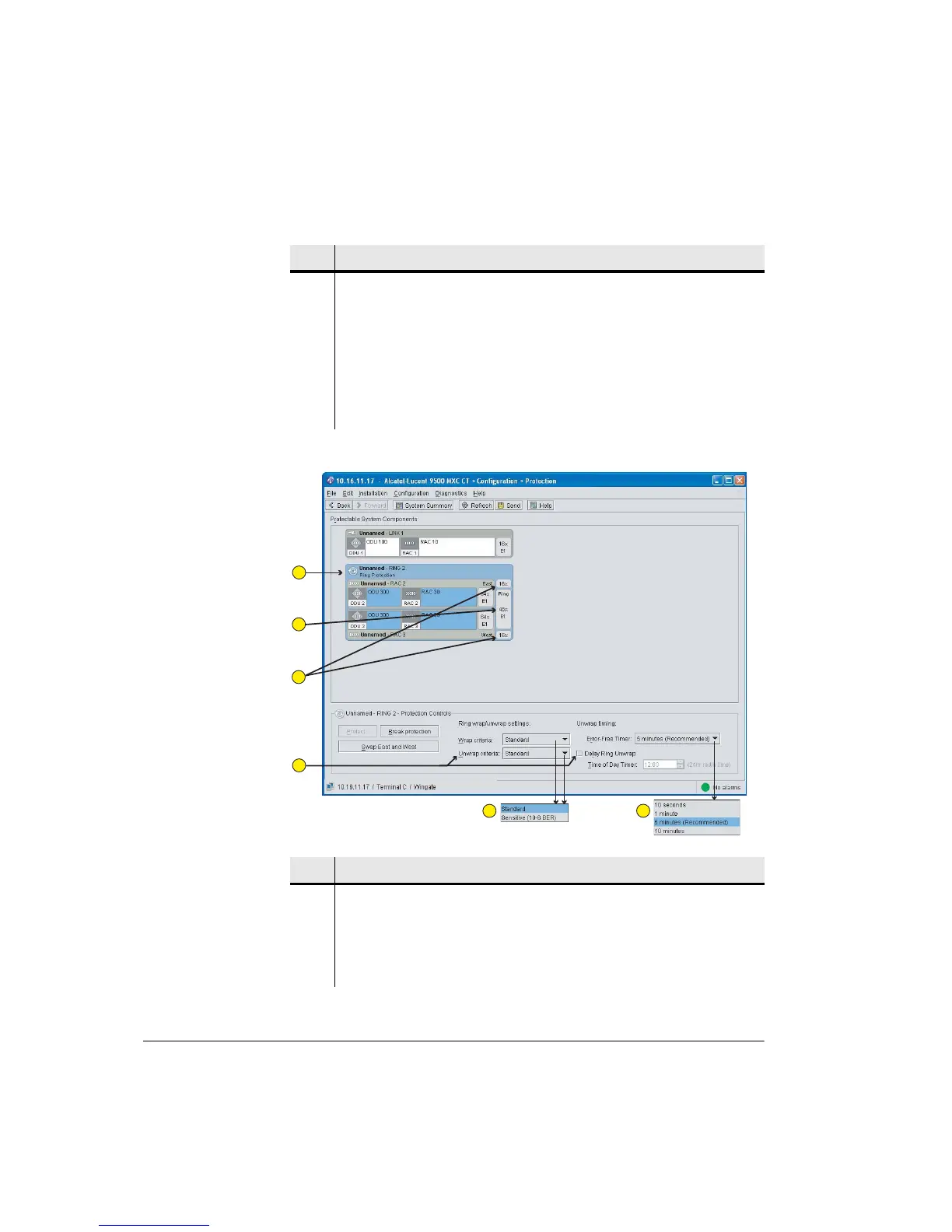
Figure 8-4. Typical Ring Protection Screen
3 The example screen shows that Link 3 (RAC in slot 3) has been selected
(highlighted). Click Protect to select a protection partner.
4 The example shows that only Link 6 is available/valid for protection pairing
with Link 3.
5 Select a protection type.
6 The note indicates the consequences of protection action for each protection
type.
Item Description
1 Shows a ring pairing with its configured ring capacity and balance of available
LINK capacities.
2 In this example the east and west RACs have been configured for a capacity of
64xE1, but with a ring capacity of 48xE1. (Note that a 1xE1/DS1 capacity is
auto-configured when ring protection is first set).
Item Description
1
2
3
4
5
6



 To Next Page