82.3-0000010 OM
32
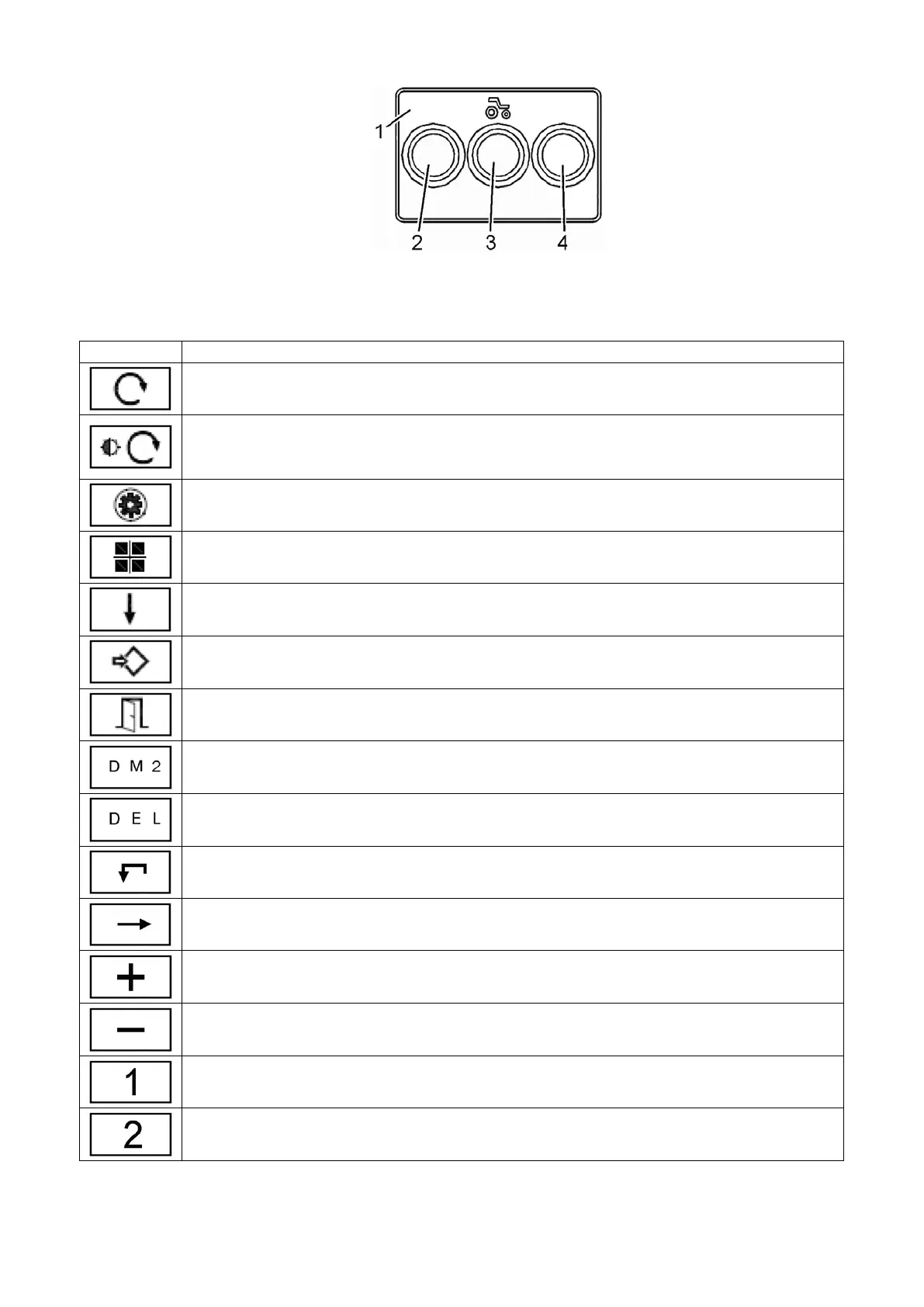
1 – panel; 2, 3, 4 – buttons.
Figure 2.6.6 – Display control panel
Table 2.6.3 – Assignment of display control panel buttons
Reset of tractor running time for a period.
Short pressing on the button changes brightness of display illumination if the
central light switch 7 (Figure 2.2.1) is set to position “II” or “III”.
Holding the button resets tractor running time for a period.
Switching to ‘settings’ mode.
Changing the current screen.
Moving down the list with jumping to the top of list in a cycle.
Entering the selected mode.
Exit to the basic mode.
Entering passive failures mode (DM2). After displaying the passive faults
(DM2) the button takes assignment DEL.
Starting the delete mode of passive failures (DM2).
Entering the selected mode.
Exit to the previous mode of failures review.
Moving right in the list with jumping to the beginning of list in a cycle.
Cyclic scrolling of fixed values of adjustable parameters.
Decreasing the value.
Starting the mode of instrument panel serviceability check.



 To Next Page