82.3-0000010 OM
35
Field 1 displays a linear indicator of oil pressure in the engine.
Field 5 displays tractor running time for a period (h).
Field 6 displays a linear indicator of air pressure in the pneumatic system.
Field 9 displays the tractor on-board supply voltage.
Field 8 displays icons for control buttons’ functions.
The icons correspond in their location to the control panel buttons. The assignment
of each button depends on the selected display operation mode.
The icons for display control buttons’ functions disappear after 5 seconds in case
there is no pressing of any button if the display is in the ‘settings’ mode.
These icons for control buttons are shown continuously in the ‘settings’ mode and in
the basic operation mode, if there is a window displaying failures.
When holding the button 2 ( ) (Figure 2.6.6) in the basic operation mode for
more than 5 seconds, the counter of tractor running time for a period is set to zero.
With the instrument panel illuminated (with the central light switch 7 (Figure 2.2.1)
activated in position “II” or “III”) the button 2 ( ) (Figure 2.6.6.) has double designation.
Short-timed pressing of the button changes the brightness of instrument panel illumination.
The brightness adjustment is performed in cyclic mode.
Button 3 (Figure 2.6.6) in the basic operation mode serves to switch to the ‘Settings’
mode.
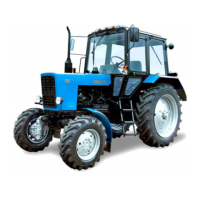
When activating the power take-off shaft (when there is signal from the rear PTO
sensor), field 8 (Figure 2.6.5) reveals speed readings of the power take-off shaft instead of
control buttons icons, if there is no pressing any button for more than 5 seconds. The rear
PTO speed indication is shown in Figure 2.6.11.
Figure 2.6.11 – Displaying of the power take-off shaft speed
On tractors "BELARUS-82.3" the front PTO is not installed. In this regard, on the left side of
the field of figure 2.6.11 the speeds value of the front PTO is displayed with number "0" or is not
displayed.
Field 7 (Figure 2.6.5) displays the current time.
Field 10 is not in use on the screen of tractors “BELARUS-82.3”.
The background color of scales and numerical readings of linear indicator parame-
ters shown on display 3 (Figure 2.6.1) of the instrument panel depends of the range of
readings (emergency – red, operating – green, permissible – yellow).
2.6.4.3. Display settings mode
When the basic mode is displayed, it is possible to switch to the “Settings” mode.
The “Settings” mode consists of the following sections:
- emergency messages;
- critical operation modes;
- date/time;
- functions test;
- language selection;
- units of measurement;
- sensor adjustment;
- maintenance interval;
- reference information.
The “Emergency messages” mode provides a list of critical and non-critical mes-
sages.
The “Critical operation modes” displays an archive of critical operation modes of the
main tractor units.



 To Next Page