Uni-Probe LB 490
BERTHOLD TECHNOLOGIES GmbH & Co. KG
5 – 437
Volume 5 3 Getting Started with SIMATIC PDM
5
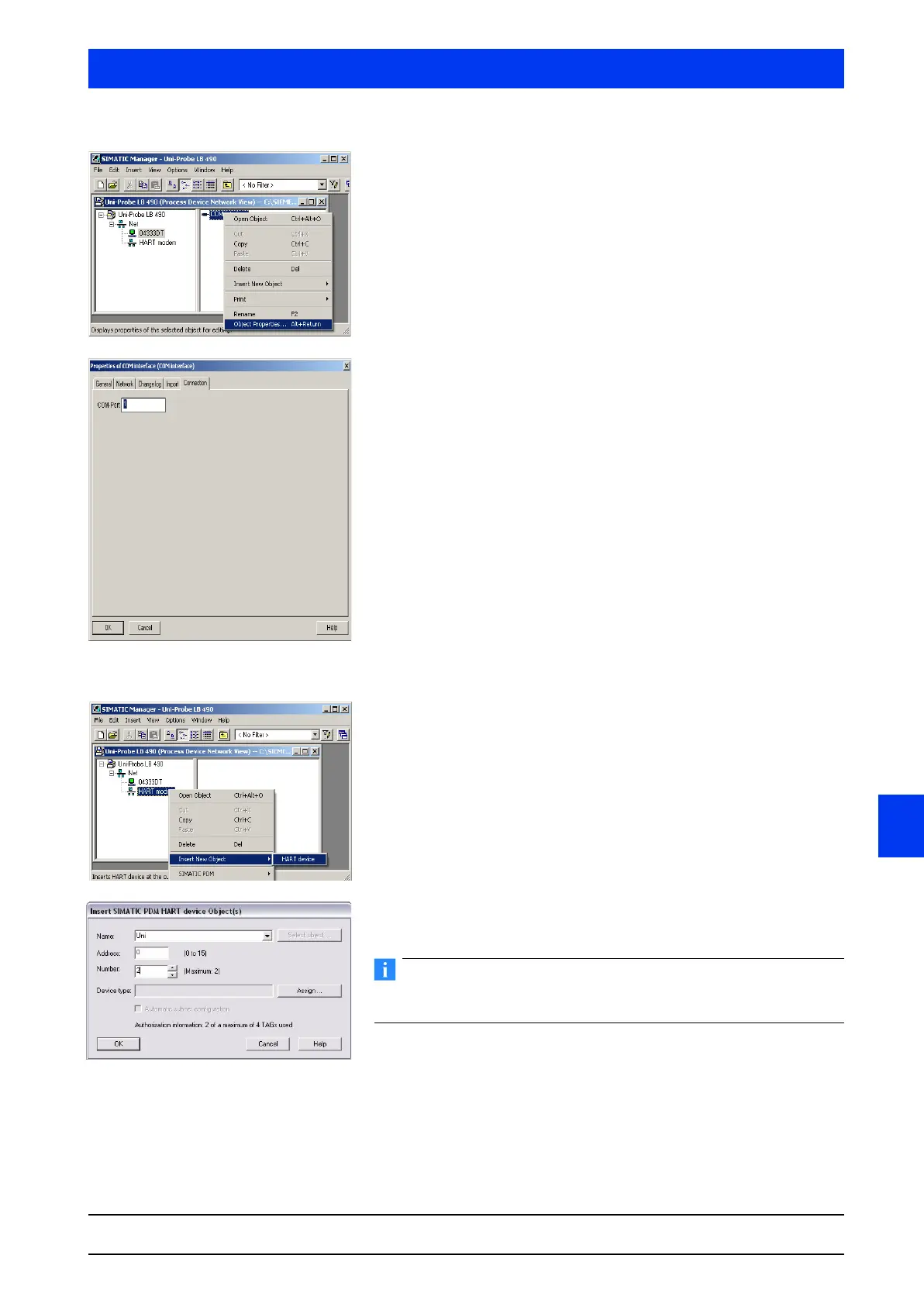
Open the window to configure the COM interface by clicking
with the right mouse button on the
COM INTERFACE used (1 or 2,
depending to which port you have connected the HART
®
modem, in our example COM interface 1) and select the menu
item OBJECT PROPERTIES.
Select the
CONNECTION tab and in the COM PORT text box enter
the port address you are using for connection of the HART
®
modem (in our example 1).
Inserting Uni-Probe devices
To add a Uni-Probe device, right-click on the HART MODEM icon
and select the menu item
INSERT NEW OBJECT HART DEVICE.
In the
NAME box, enter a name for the HART
®
device (max. 8
characters), in our example Messst12.
You do not need to make any entries in the ADDRESS BOX. This
value is automatically entered by the program.
Select ASSIGN, to add a HART
®
device.


 To Next Page
 Loading...

