Uni-Probe LB 490
BERTHOLD TECHNOLOGIES GmbH & Co. KG
5 – 513
Volume 5 6 Functional Processes
5
6 Functional Processes
The following chapter describes the major functional process that
occur when working with the Uni-Probe.
6.1 Plateau Measurement
6.1.1 Run Measurement
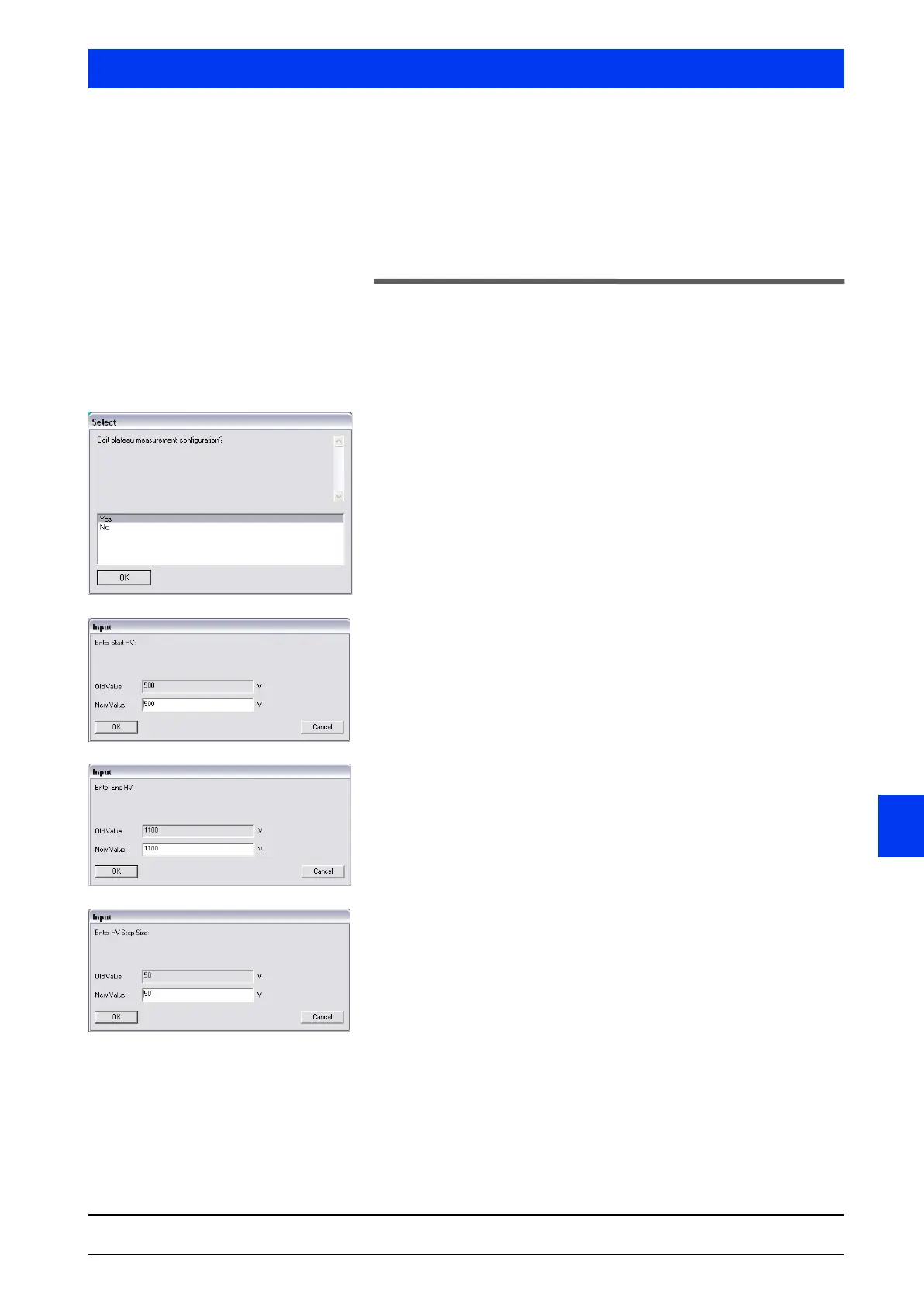
Select DEVICE SERVICE PLATEAU MEASURE PLATEAU.
Select
YES and confirm the entry with OK.
Select NO if you want to continue with the standard setting. The
next four dialog boxes will then be skipped and you continue with
the dialog box showing the message START PLATEAU BY PUSHING OK
BUTTON!
Enter the high voltage to start the plateau measurement and
click
OK to confirm the entry.
Enter the high voltage to end the plateau measurement and
click OK to confirm the entry.
Enter the step size of measurement points and confirm the
entry with
ENTER.
The step size determines the number of value pairs. The larger the
step size, the lower the number of value pairs!


 To Next Page