Uni-Probe LB 490
BERTHOLD TECHNOLOGIES GmbH & Co. KG
3 – 371
Volume 3 5 Functional Processes
3
5.3 Set Multi-Detector Mode
The multi-detector mode is needed if several detectors are con-
nected in series to cover a larger measuring range.
In the multi-detector mode, one detector is used as Main-Unit. Typ-
ically, this is the detector which is mounted at the highest or lowest
point at the tank. All other detectors, the Auxiliary Units, are con-
nected to the Main-Unit.
For more information on multi-detector operation please see
page 2–121.
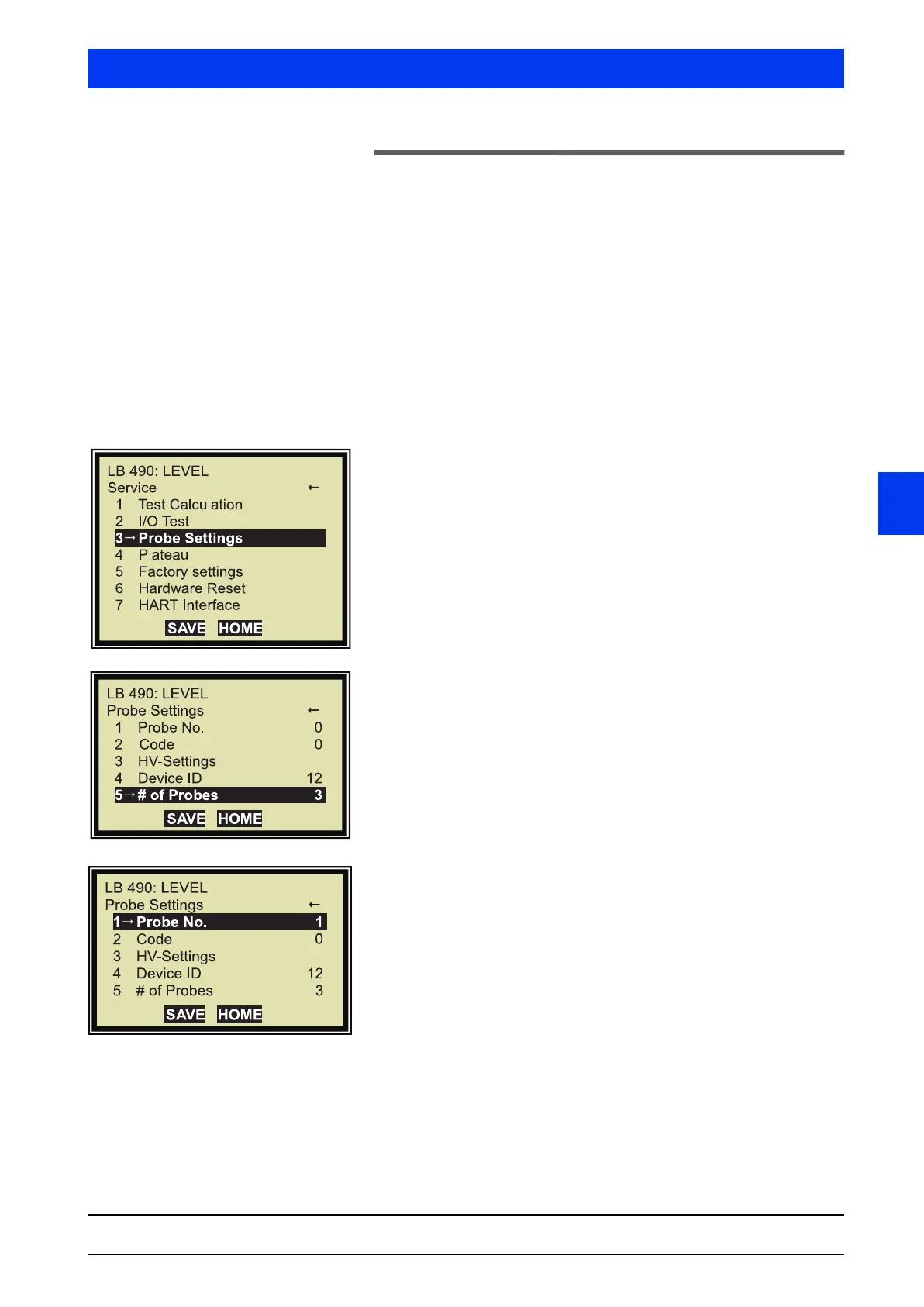
If the following display does not come up, then select it, starting
from the Start menu, via the following path:
ACCESS TO SETUP FULL ACCESS SERVICE
Select PROBE SETTINGS.
Select # OF PROBES.
Enter the number of connected Uni-Probes, e.g. 3.
Up to 8 Uni-Probes can be linked in a network. In our example
we proceed from the assumption that 3 Uni-Probes are linked
with each other, i.e. two Auxiliary Units and one Main Unit.
Save the changes with SEND.
Select
PROBE NO.
Enter 1 (for the first Auxiliary Unit)
(see also page 3–332).
Save the changes with SEND.


 To Next Page