07K5-02H
1
Perform the following procedure.
From the [Start] menu, select [Control Panel], and then click [Add or Remove Programs].
From the [Start] menu, select [Control Panel], and then click [Uninstall a program].
)URPWKH>6WDUW@PHQXVHOHFW>&RQWURO3DQHO@ĺ>$GGRU5HPRYH3URJUDPV@
From the [Start] menu, select [Control Panel], and then double-click [Programs and Features].
2
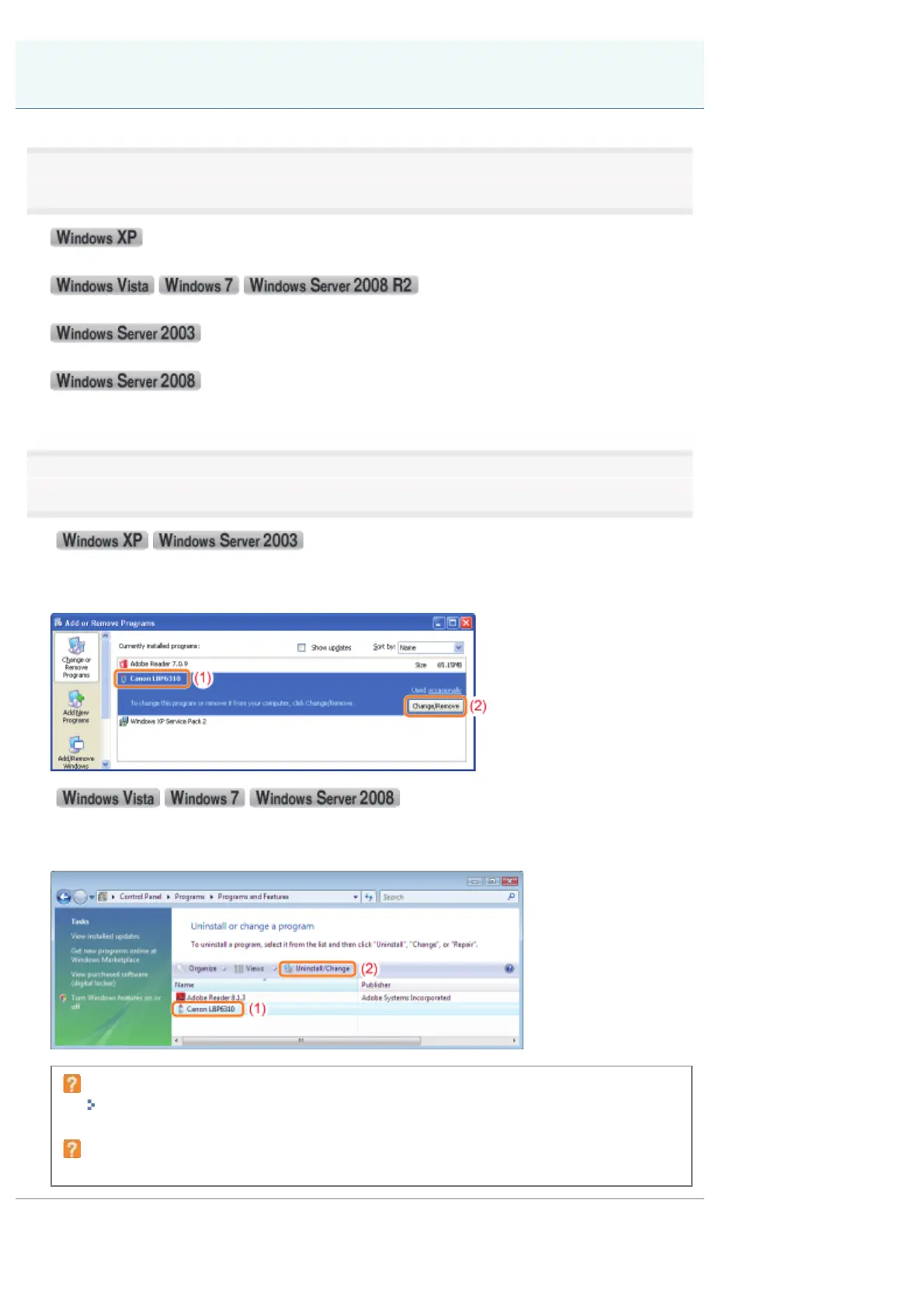
Perform the following procedure.
(1) Select [Canon LBP6310].
(2) Click [Change/Remove].
(1) Select [Canon LBP6310].
(2) Click [Uninstall/Change].
If [Canon LBP6310] is not listed
"Starting the Uninstaller from the CD-ROM"
If the [User Account Control] dialog box appears
Click [Continue] or [Yes].
Starting the Uninstaller from [Control Panel]
㻝㻟㻞㻌㻛㻌㻠㻡㻞














 To Next Page