07K5-077
If you cannot print when the printer is used via the print server, check the problem following the questions below.
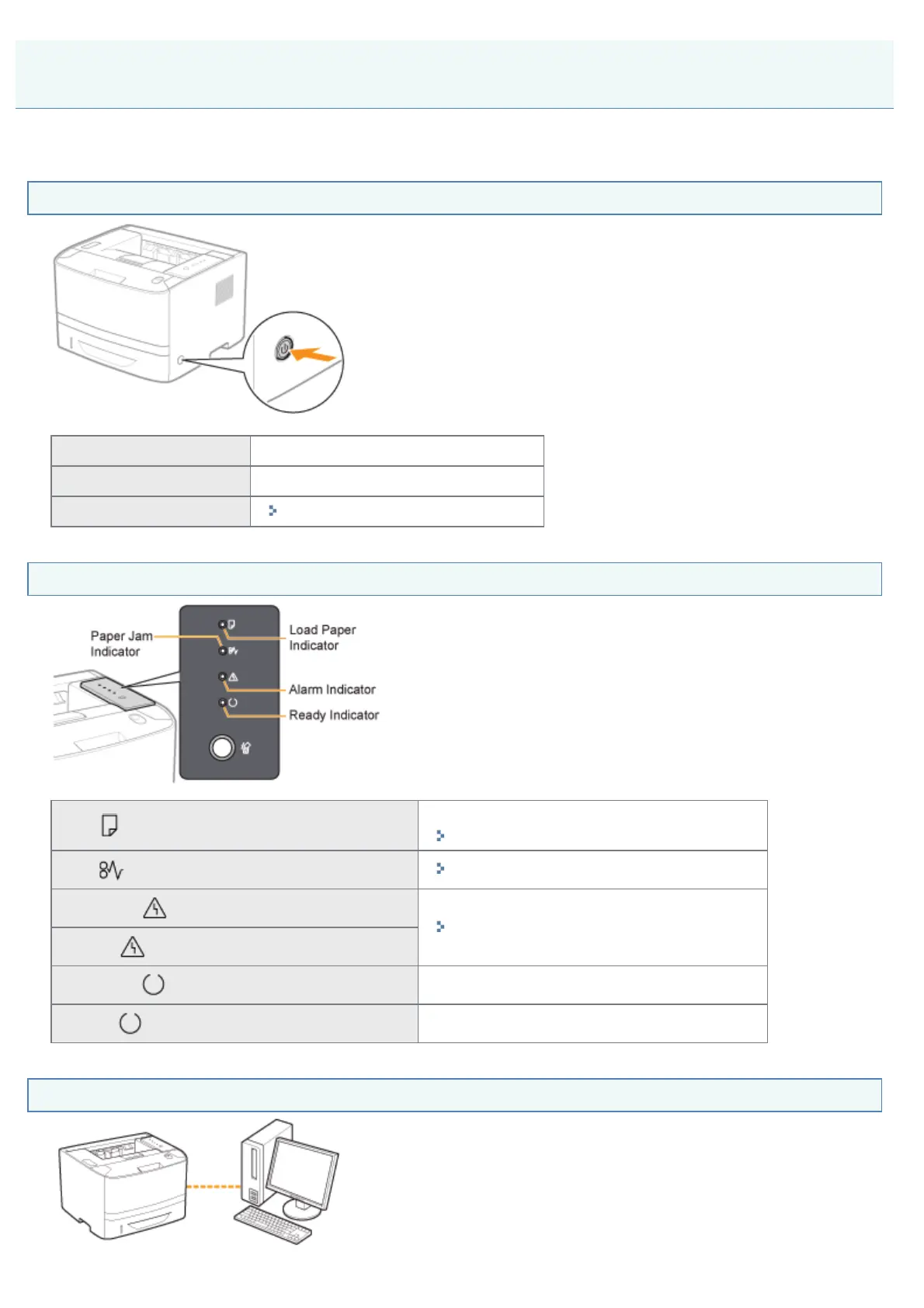
<Question 1> Is the printer turned ON?
ON To <Question 2>
OFF Turn the printer ON.
Cannot be turned ON
"You Cannot Turn the Printer ON"
<Question 2> Check the indicators on the printer unit.
The (Load Paper) indicator is blinking.
Load paper.
"Paper Loading and Output"
The
(Paper Jam) indicator is blinking.
"Paper Jams"
The
(Alarm) indicator is on.
"The Alarm Indicator Is On/Blinking"
The
(Alarm) indicator is blinking.
The
(Ready) indicator is on.
To <Question 3>
The
(Ready) indicator is blinking.
The printer is operating. Please wait a moment.
<Question 3> Is the printer connected to the print server properly?
Printing Cannot Be Performed (via the Print Server)
㻟㻣㻠㻌㻛㻌㻠㻡㻞










 To Next Page