07K5-09K
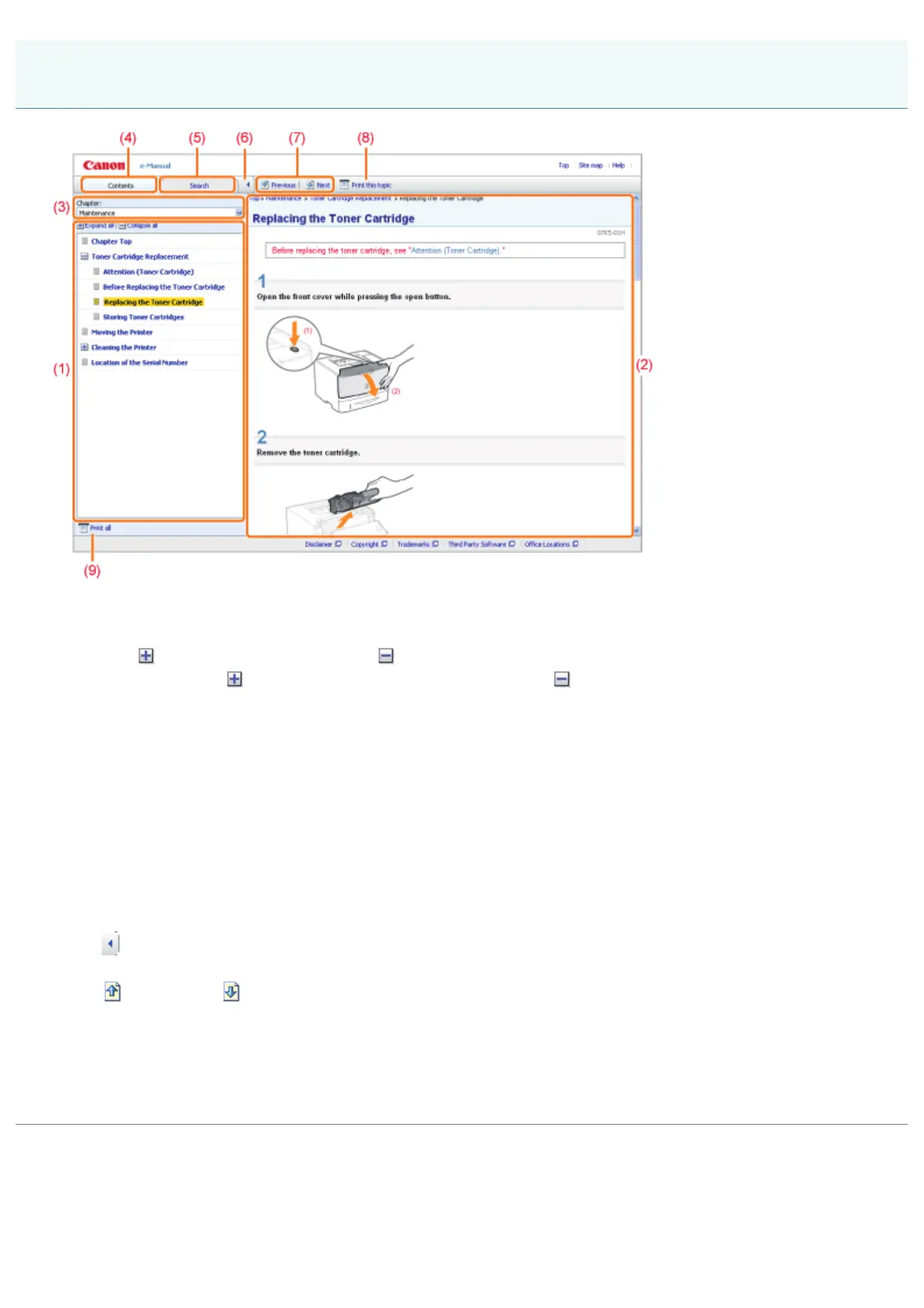
(1) Chapter contents
This is the list of chapter contents. Clicking each item displays the description in the topic page.
Click [
] to expand a menu, and click [ ] to collapse a menu.
Alternatively, click [
Expand all] to expand all menus, and click [ Collapse all] to collapse all menus.
(2) Topic page
The descriptions of each item are displayed.
The current location of the displayed topic is displayed at the upper left of the topic page. Click a link to move to a
higher level.
(3) [Chapter] menu
You can select a different chapter from the pull-down menu.
(4) [Contents] tab
Click to display the chapter contents panel.
(5) [Search] tab
Click to display the search panel.
For details, see "Search Method."
(6)
[
]
Click to display or hide the chapter contents panel/search panel.
(7) [
Previous]/[ Next]
Click to move to the previous or next topic.
(8) [Print this topic]
Prints only the topic page currently displayed.
(9) [Print all]
Prints all the contents in a chapter.
Topic Page
㻞㻠㻌㻛㻌㻠㻡㻞














 To Next Page