07K5-066
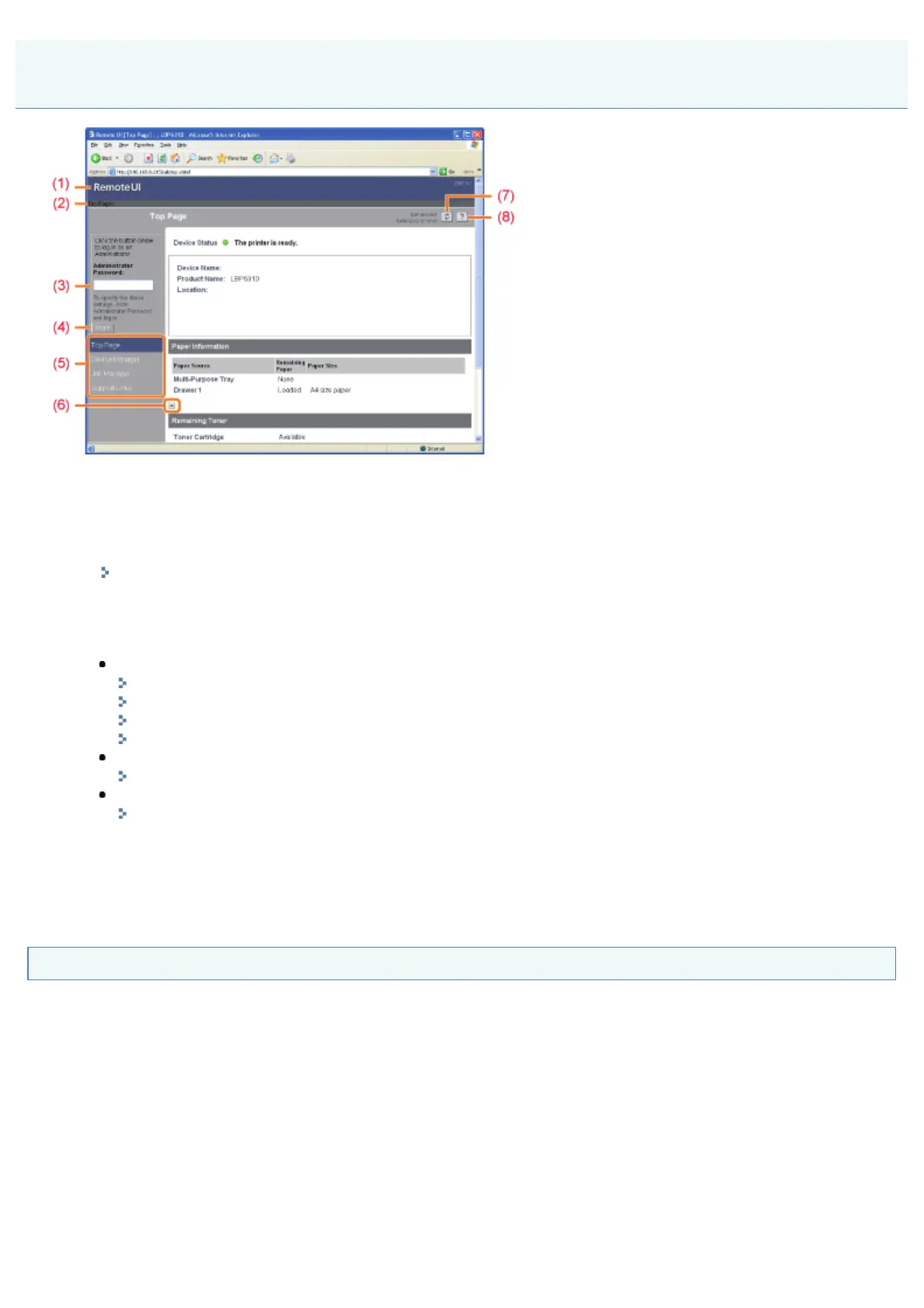
(1) Displays the Remote UI top page.
(2) Displays the hierarchy of the currently displayed page.
Clicking a displayed page name displays the page of which you clicked the name.
(3) When you log in as Administrator, enter the administrator password.
"Setting the Administrator Password"
(4) You can log in as Administrator by entering the administrator password, then clicking this button.
If you are using the Remote UI as Administrator, you can log out by clicking this button.
(5) Displays each setting page.
[Device Manager]
[Status] Page
[Information] Page
[Features] Page
[Network] Page
[Job Manager]
"Managing Print Jobs"
[Support Links]
"Displaying or Changing Support Links"
(6) If the page is scrolled down, moves the scroll box up to the top of the page.
(7) Updates the information in the currently displayed page to the latest one.
(8) Displays Help for the currently displayed page in a new window.
[Status] Page
Displays the statuses of the paper sources and toner cartridge or other information.
Screen Layout of the Remote UI (Details on Each Setting Page)
㻟㻝㻝㻌㻛㻌㻠㻡㻞














 To Next Page