07K5-029
For details on the procedure before selecting an installation method (the procedure before Step 1), see "Easy
Installation."
1
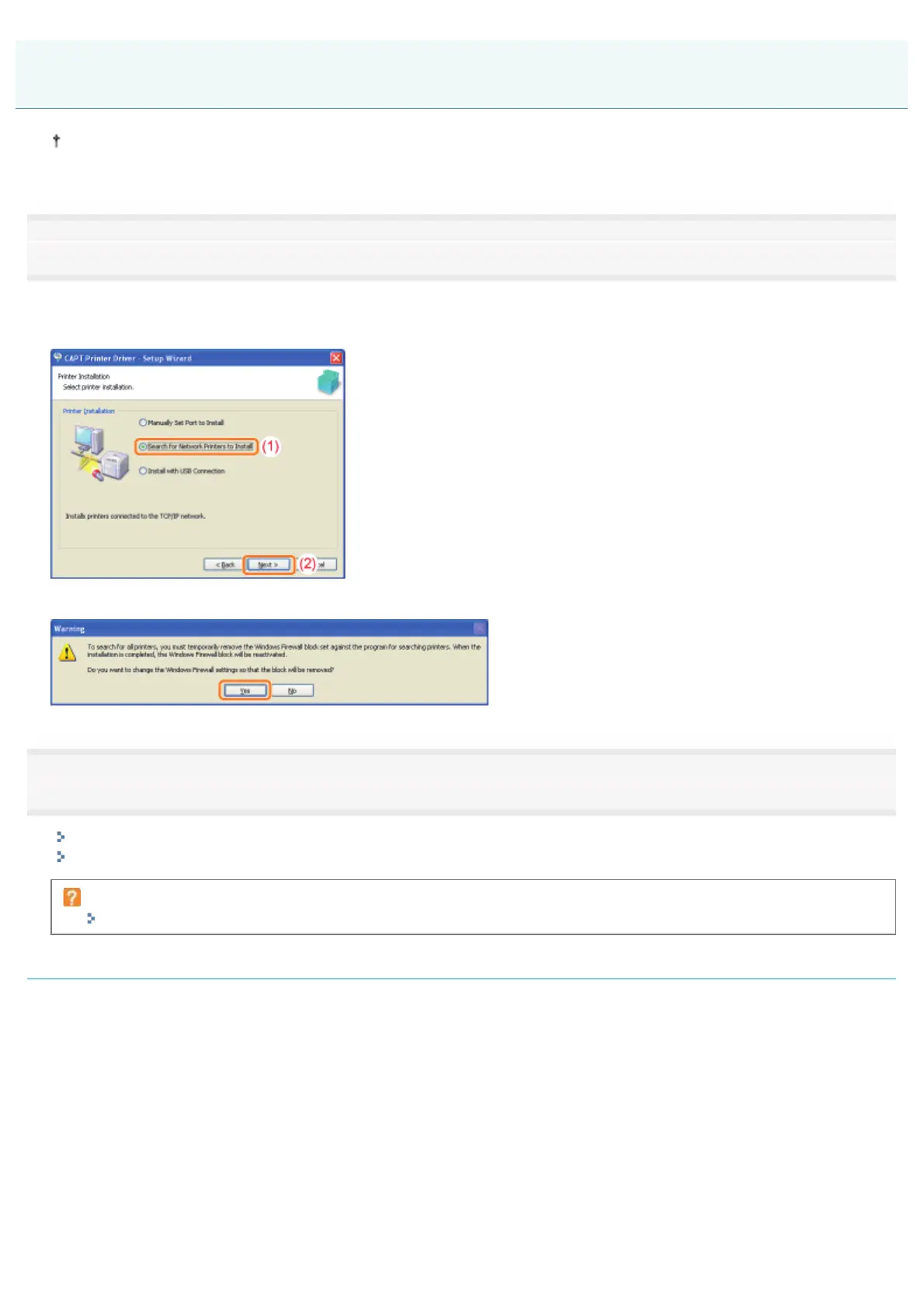
Select the method of installation.
(1) Select [Search for Network Printers to Install].
(2) Click [Next].
When the following screen appears, click [Yes].
2
Operation procedure varies depending on the content displayed in [Product Name] in [Printer List].
If [LBP6310] is displayed in [Product Name]
If [Unknown Device] is displayed in [Product Name]
If no devices are displayed in [Printer List]
"The Printer Cannot Be Searched for (Auto Setup)"
If [LBP6310] is displayed in [Product Name]
1. Add [LBP6310] to [Printer List for Driver Installation].
(1) Select [LBP6310].
(2) Click [Add].
Easy Installation (LAN Connection)
㻝㻝㻝㻌㻛㻌㻠㻡㻞














 To Next Page