07K5-09J
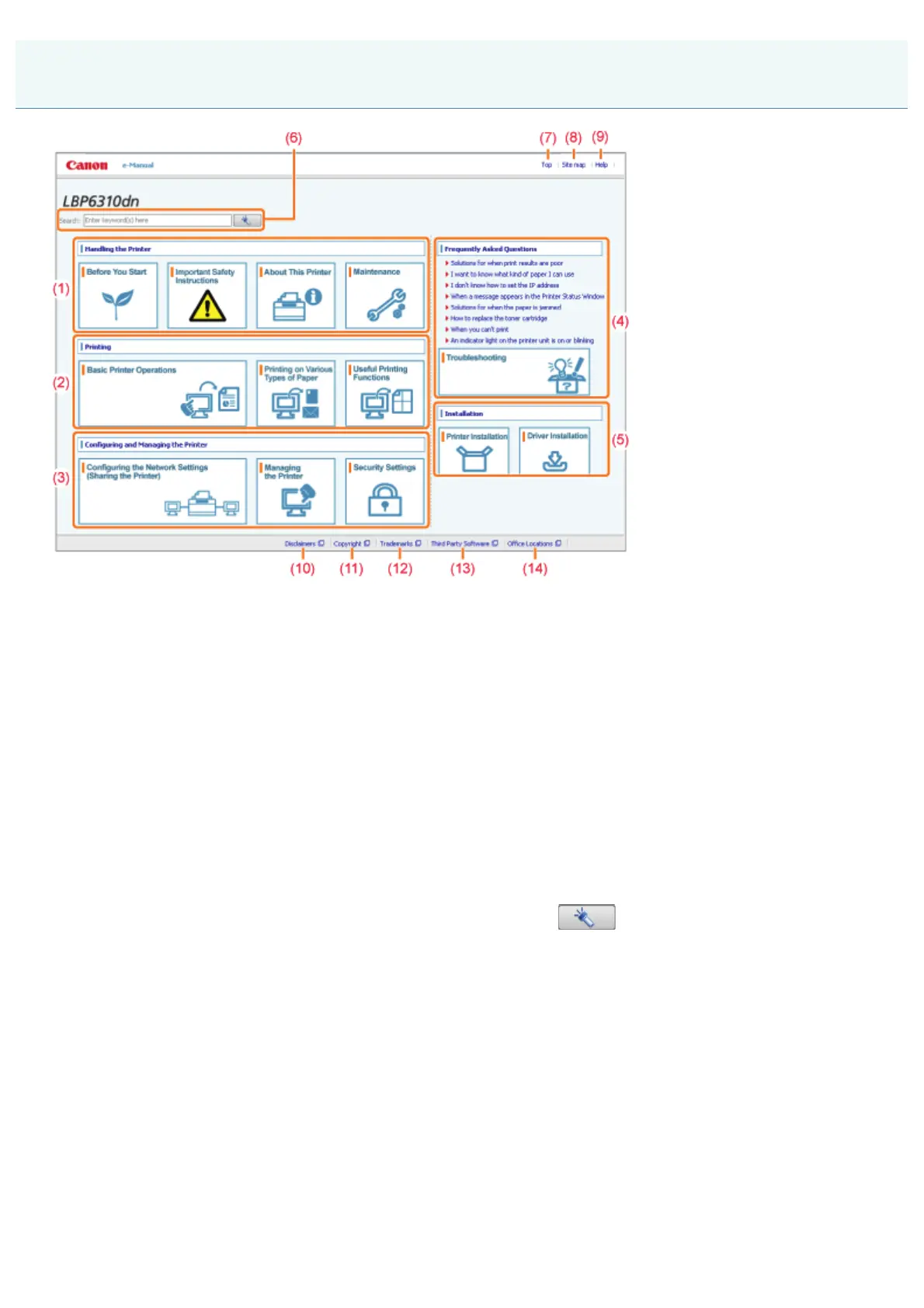
(1) [Handling the Printer]
This section describes the precautions and maintenance methods for handling the printer, and so on.
(2) [Printing]
This section describes a variety of printing methods, such as basic printing and advanced one that uses the various
printing functions.
How to load paper is also described here.
(3) [Configuring and Managing the Printer]
This section describes how to specify the network settings, how to manage the printer, and so on.
(4) [Frequently Asked Questions]
Frequently asked questions are featured.
For details on the solutions for the other problems, see [Troubleshooting].
(5) [Installation]
This section describes how to install this printer, how to install the printer driver, and so on.
(6) [Search]
The search panel is displayed by entering keyword(s) and clicking [
].
For details, see "Search Method."
(7) [Top]
The top page of the e-Manual is displayed.
(8) [Site map]
The entire contents of the e-Manual are displayed.
(9) [Help]
How to use the e-Manual is displayed.
(10) [Disclaimers]
The disclaimers are displayed.
(11) [Copyright]
The information of copyrights is displayed.
(12) [Trademarks]
The trademarks are displayed.
(13) [Third Party Software]
Top Page
㻞㻞㻌㻛㻌㻠㻡㻞














 To Next Page