Home
Canon
Printer
LBP6310dn
Page 387
Canon LBP6310dn - Page 387
452 pages
Manual
Save Page as PDF
To Next Page
To Next Page
To Previous Page
To Previous Page
Loading...
4
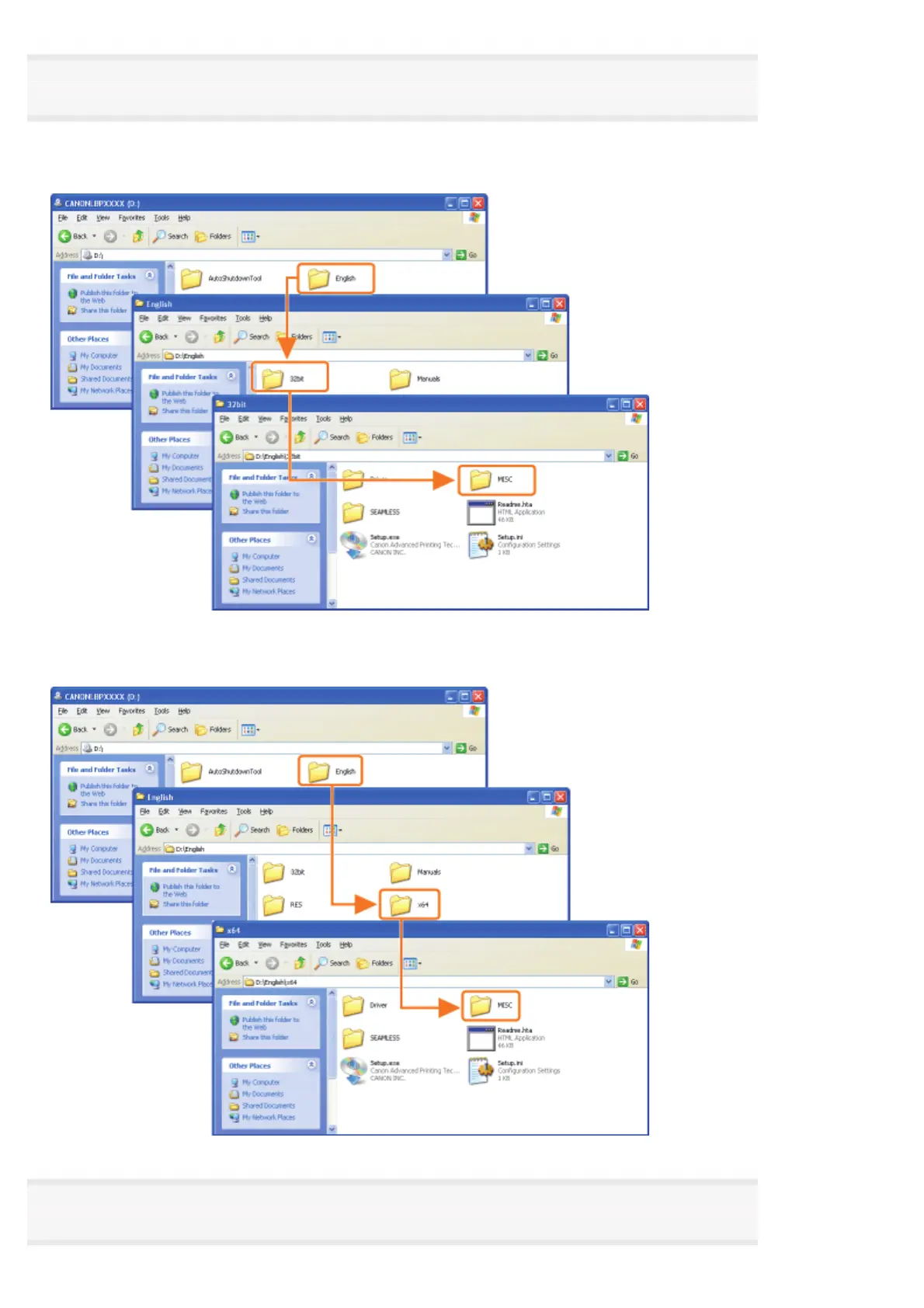
Open the
folder
in which
the
uninstaller is
included.
For
a
32
-
bit operating
system
Open the
[English] -
[32bit]
-
[MISC]
folders.
For
a
64
-
bit operating
system
Open the
[English] -
[x64]
-
[MISC]
folders.
5
Double
-
click
the
exe
file.
㻟㻤㻣㻌㻛㻌㻠㻡㻞
386
388
Table of Contents
Main Page
Table of Contents
2
Before You Start
7
Legal Notices
8
Legal Limitations on the Usage of Your Product and the Use of Images
10
Using the E-Manual
11
How to Use the E-Manual
12
Operating Environment
13
Installing the E-Manual
14
Uninstalling the E-Manual
18
Screen Layout of the E-Manual
21
Topic
24
Site Map
25
Search Method
26
Viewing the E-Manual
27
Disclaimers
29
Copyright
30
Trademarks
31
Third Party Software
32
Important Safety Instructions
33
Installation
34
Power Supply
35
Handling
36
Maintenance and Inspections
38
Consumables
40
Others
41
About this Printer
42
Printer Specifications
43
System Requirements for Printing
46
Introduction of the Optional Accessories
47
Names and Dimensions of each Part
48
Control Panel
51
Printer Status Window
53
Energy-Saving Mode
55
Sleep Mode
56
Auto Shutdown
57
Introduction of the Utilities
59
Cautions for Handling the Printer
61
Consumables
62
Maintenance
63
Toner Cartridge Replacement
64
Attention (Toner Cartridge)
65
Before Replacing the Toner Cartridge
67
Replacing the Toner Cartridge
69
Storing Toner Cartridges
72
Moving the Printer
73
Cleaning the Printer
76
Cleaning the Inside of the Printer
77
Cleaning the Outside of the Printer
79
Attention (Cleaning)
81
Location of the Serial Number
82
Printer Installation
83
Attention (Printer Installation)
84
Confirming the Supplied Accessories and Checking the Installation Site
86
Removing the Packing Materials
88
Installing the Printer
93
Installing the Paper Feeder
95
Driver Installation
99
Installing the Printer Driver
100
Easy Installation
102
Connecting the Printer and Computer
105
Easy Installation (USB Connection)
108
Easy Installation (LAN Connection)
111
Easy Installation (Via the Print Server)
117
After Installation
121
Installing with Plug and Play
123
Uninstalling the Printer Driver
126
Starting the Uninstaller from [Control Panel]
132
Basic Printer Operations
133
Usable Paper
134
Precautions for Paper
136
Printable Area
138
Paper Loading and Output
139
Loading Paper in the Paper Drawer
141
Attention (Paper Drawer)
144
Registering the Paper Size
145
Loading Paper in the Multi-Purpose Tray
147
Attention (Multi-Purpose Tray)
150
Basic Printing Procedure
151
Attention (Basic Printing)
155
How to Use Help
156
Canceling a Job
158
Canceling a Print Job Using the Print Queue
159
Canceling a Print Job Using the Printer Status Window
161
Canceling a Print Job Using the Cancel Job Key
162
Checking the Printer Status
163
Printing on Various Types of Paper
164
Printing on Plain Paper, Heavy Paper, or Index Card
165
Printing on Transparencies
166
Printing on Labels
167
Printing on Envelopes
168
Printing on Custom Size Paper
170
Loading Custom Size Paper
171
Registering a Custom Paper Size
174
Paper Loading Orientation
176
Useful Printing Functions
177
Displaying the Setting Screen
178
Sided Printing and 2-Sided Printing
180
Attention (1-Sided Printing and 2-Sided Printing)
183
Scaling Print Output
184
Layout Printing (N-Page Print)
186
Printing an Image Larger than A4 (Poster Printing)
188
Booklet Printing
190
Adding a Watermark to a Document to be Printed (Watermark Printing)
193
Adding, Editing, or Deleting a Watermark
195
Printing Borders, the Printing Date, and so on
198
Combining Data before Printing
200
Changing the Output Method According to the Print Data or Number of Copies
204
Printing Data with Different Orientations in the same Data
205
Printing with a Gutter
207
Selecting the Paper Output Method
209
Printing with the Page 180 Degrees Rotated
211
Selecting Paper for each
213
Adjusting the Image Quality or Grayscale
215
Performing Printing Appropriate for Particular Print Data
216
Correcting Rough-Textured Images
217
Adjusting the Toner Density
219
Printing with Brightness and Contrast Adjusted
221
Registering the Printing Preferences
223
Changing the Default Values for Printing Preferences
224
Saving Frequently Used Printing Preferences (Adding/Editing/Deleting a "Profile")
225
Selecting a "Profile
229
Configuring the Network Settings (Sharing the Printer)
230
Checking Your Printing Environment
231
If You Use the Printer by Direct Connection
232
Installing the Printer Driver (LAN Connection)
233
Setting the IP Address
234
Setting the IP Address Using Netspot Device Installer
235
Setting the IP Address Using the ARP/PING Command
240
Setting the IP Address Using the Printer Status Window
242
Setting a Port and Installing the Printer Driver
244
Changing the Network Settings for the Printer
257
Configuring the Protocol Settings
258
Attention (Protocol Settings)
264
Changing the Network Transmission Speed or Transfer Mode
265
Initializing the Network Settings
267
Initializing Using the Remote UI
268
Initializing Using FTP Client
270
Initializing Using Netspot Device Installer
272
Initializing Using the Reset Button
274
Network Setting Items
275
When Changing the IP Address (Changing the Port)
280
Values for Setting a Port
284
If You Use the Printer in the Print Server Environment
285
Configuring the Print Server
287
Checking the Settings of Your Network
292
Installation on Clients
294
Installing from the Printer Folder
295
Installing from [Windows Explorer]
301
Managing the Printer
302
Software that Can be Used for Managing the Printer
303
Remote UI
304
Starting the Remote UI
305
Attention (Remote UI)
308
Enabling the Remote UI
309
Screen Layout of the Remote UI (Details on each Setting Page)
311
Displaying or Changing Support Links
316
Changing the Display Language of the Remote UI
319
FTP Client
321
Netspot Device Installer
323
Installing Netspot Device Installer
325
Using Netspot Device Installer
329
Uninstalling Netspot Device Installer
331
Managing Print Jobs
332
Attention (Job Manager)
334
Checking the Printer Settings
335
Setting the Administrator Password
337
Specifying the Device Name or Administrator Information
339
Security Settings
341
Restricting the Users Who Can Print
342
Restricting the Users Who Can Monitor/Change the Settings Using the SNMP Protocol
346
Restricting the Users Who Can Perform Multicast Discovery
351
Restricting the Users Who Can Access
355
Restricting the FTP Access from End-Users
358
Obtaining the Security Access Logs
360
Checking the Security Access Logs
363
Troubleshooting
365
Printing Cannot be Performed
366
Printing Cannot be Performed (USB Connection)
367
Printing Cannot be Performed (LAN Connection)
370
Printing Cannot be Performed (Via the Print Server)
374
The Print Server for Connection Cannot be Found
377
The Shared Printer Cannot be Accessed
378
The Printer Takes a Long Time to Start the Print Job
379
You Cannot Turn the Printer on
380
All the Indicators on the Network Interface Are off
381
You Cannot Install the Printer Driver
382
The Printer Is Not Recognized Automatically (Easy Installation)
383
The Printer Cannot be Searched for (Auto Setup)
384
You Cannot Uninstall the Printer Driver
385
Starting the Uninstaller from the CD-ROM
386
Uninstalling the USB Class Driver
389
The Printer Driver Settings Cannot be Changed
392
Profiles" Cannot be Selected or Edited
393
The Status of the Paper Feeder Cannot be Obtained Automatically
395
Paper Jams
397
Attention (Paper Jams)
398
Clearing Paper Jams (Multi-Purpose Tray)
400
Clearing Paper Jams (Paper Drawer)
401
Clearing Paper Jams (Duplex Unit)
402
Clearing Paper Jams (Inside the Output Area)
405
Clearing Paper Jams (Inside the Front Cover)
406
The Alarm Indicator Is On/Blinking
409
A Message Appears in the Printer Status Window
412
Poor Printout Results
417
Paper Curls
419
Paper Creases
420
White Streaks (Lines) Appear
421
Printing Is Uneven
422
Printed Pages Have White Specks
423
Toner Stain or Toner Peeling Occurs
424
The Printed Paper Has Smudge Marks
425
The Printed Paper Has Vertical Streaks
426
Smudge Marks of Spattering Toner Appear Around the Text or Patterns
427
The Back of the Printed Paper Has Smudge Marks
428
The Overall Print Result Is Dark
429
Residual Images Appear on Non-Printed Areas
430
White Dust Is Attached to the Printed Transparencies
431
The Overall Print Result Is Faint
432
Colored Lines and Text Appear Faded
433
The Printing Position Is Skewed
434
A Portion of the Page Is Not Printed
435
Data Is Reduced and Printed
436
The Next Page Is Printed from Halfway Across the Previous
437
Blank Paper Is Output (Nothing Is Printed on the Paper)
438
The Overall Surface of the Paper Is Printed in Black Completely
439
The Printout Is Different from What Is Displayed on Screen
440
The Flap of the Printed Envelope Sticks
441
Multiple Sheets of Paper Are Fed at a Time
442
Appendix
443
Basic Operations/Various Information for Windows
444
Office Locations
451
For Windows 8 Users
452
Related product manuals
Canon LBP631Cw
124 pages
Canon imageCLASS LBP6300dn
2 pages
Canon Color imageCLASS LBP633Cdw
20 pages
Canon LBP6030B
272 pages
Canon LBP6030w
272 pages
Canon LBP6230dw
296 pages
Canon LBP673Cdw
124 pages
Canon imageClass LBP6030
12 pages
Canon imageClass LBP6030w
12 pages
Canon imageClass LBP6230dw
16 pages
Canon IMAGECLASS LBP654CDW
621 pages
Canon imageCLASS LBP623Cdw
68 pages














 To Next Page