2 - 166 Conversational Part Programming v546CO WinMax Lathe Conversational Part Programming
• SLOT WIDTH—defines the width of the slot
•.START CAP—accesses selections for the shape of the slot end for the Start
of the slot:
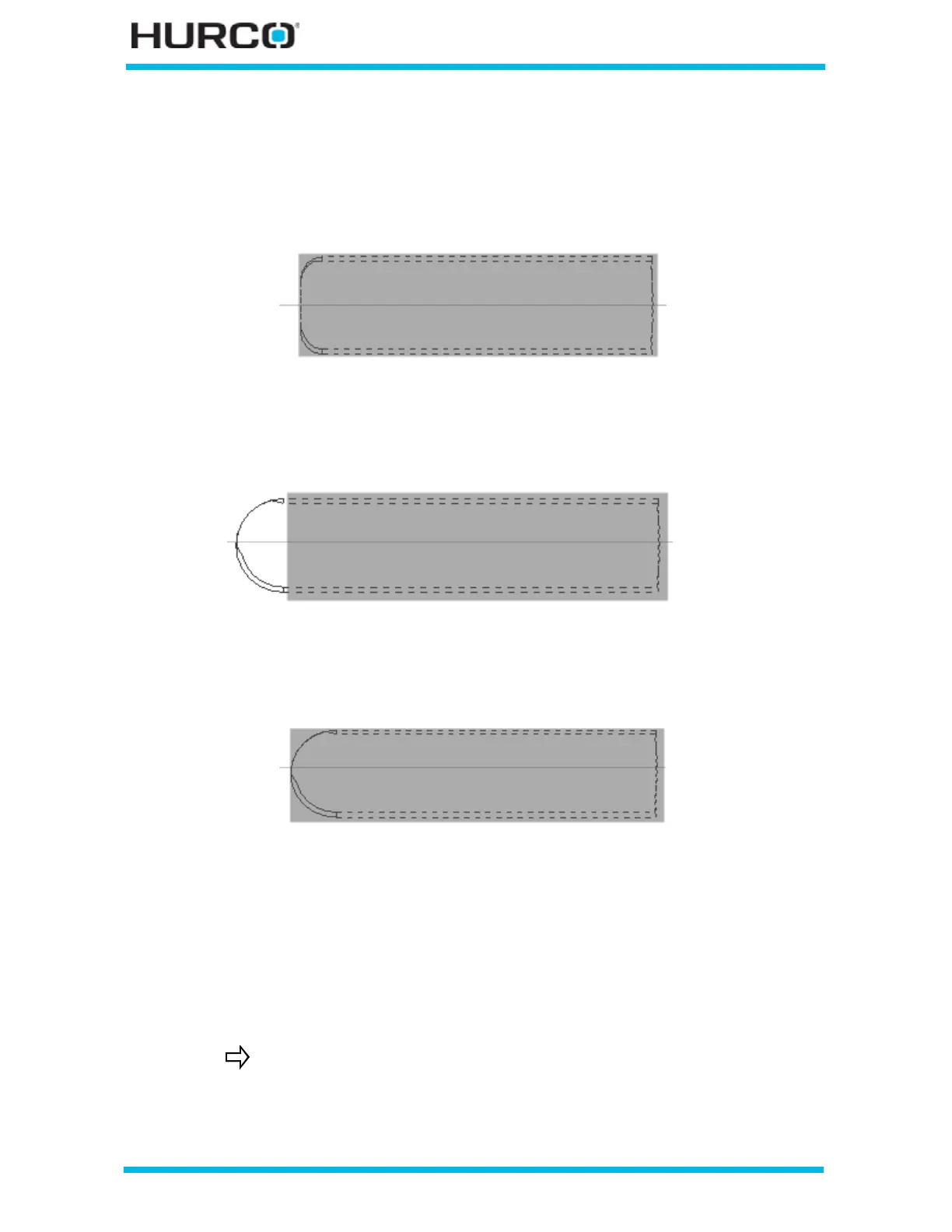
• LINE—produces a straight edge for the start cap with a corner radius the
same size as the tool.
Figure 2–138. End Cap = Line (R = 0.125) Start Cap = Line (R = 0)
• APPEND ARC—produces an arc at the start cap with the arc being
appended or added to the end of the slot.
Figure 2–139. End Cap = Append Arc; Start Cap = Line (R = 0)
• INCLUDE ARC—produces an arc at the start cap with the arc included
within the geometry.
Figure 2–140. End Cap = Include Arc; Start Cap = Line (R = 0)
• CORNER RADIUS—defines the radius of the slot end.
• END CAP—accesses selections for the shape of the slot end for the End of
the slot:
• LINE
• APPEND ARC
• INCLUDE ARC
• CORNER RADIUS—defines the radius of the slot end.
Refer to Start Cap examples above.



 To Next Page