2 - 184 Conversational Part Programming v546CO WinMax Lathe Conversational Part Programming
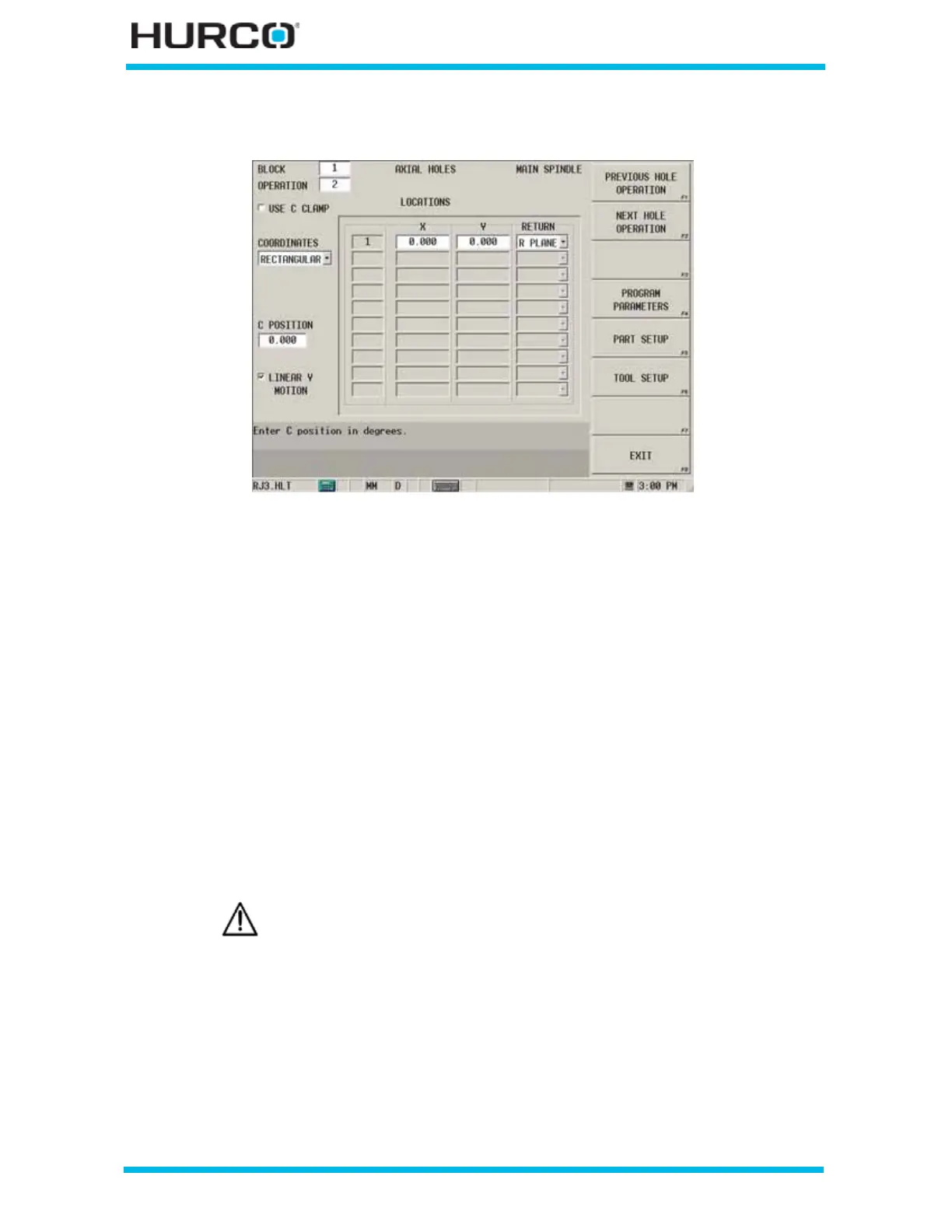
When Rectangular is selected in the COORDINATES field, these fields appear:
Figure 2–152. Live-Tooling Axial Locations screen: Rectangular Coordinates
• USE C CLAMP checkbox—engages the C Axis Clamp during the Hole
operation when this checkbox is selected.
• X—defines the X coordinate on an XY plane with origin at the center of the
face.
• Y—defines the Y coordinate on an XY plane with origin at the center of the
face.
• RETURN—identifies the level to which the tool should retract at the end of
the drill cycle. R Plane is the default.
• I PLANE—returns to the coordinate specified in the X/Z Start field.
• R PLANE—returns to the coordinate specified in the R Plane field.
• LINEAR Y MOTION—select this checkbox to cause Y-Axis Motion using the X
and X’ axes. When this checkbox is clear, Y-Axis Motion occurs using the X
and C axes. Please refer to Programming Coordinates and Linear Y Motion, on
page 2 - 68 for examples. This field is available with TMX MY and TMX MYS
series machines.
Linear Y-Axis Motion is limited. The amount of Y travel is affected by
the X position and by any X-Axis tool length offset.


 To Next Page