2 - 56 Conversational Part Programming v546CO WinMax Lathe Conversational Part Programming
• Z BOTTOM—identifies the part-relative coordinate for the bottom of the
groove. This dimension is shown as 3 in the following figure. This field
replaces X BOTTOM (DIA) or (RAD) when the Orientation is Face.
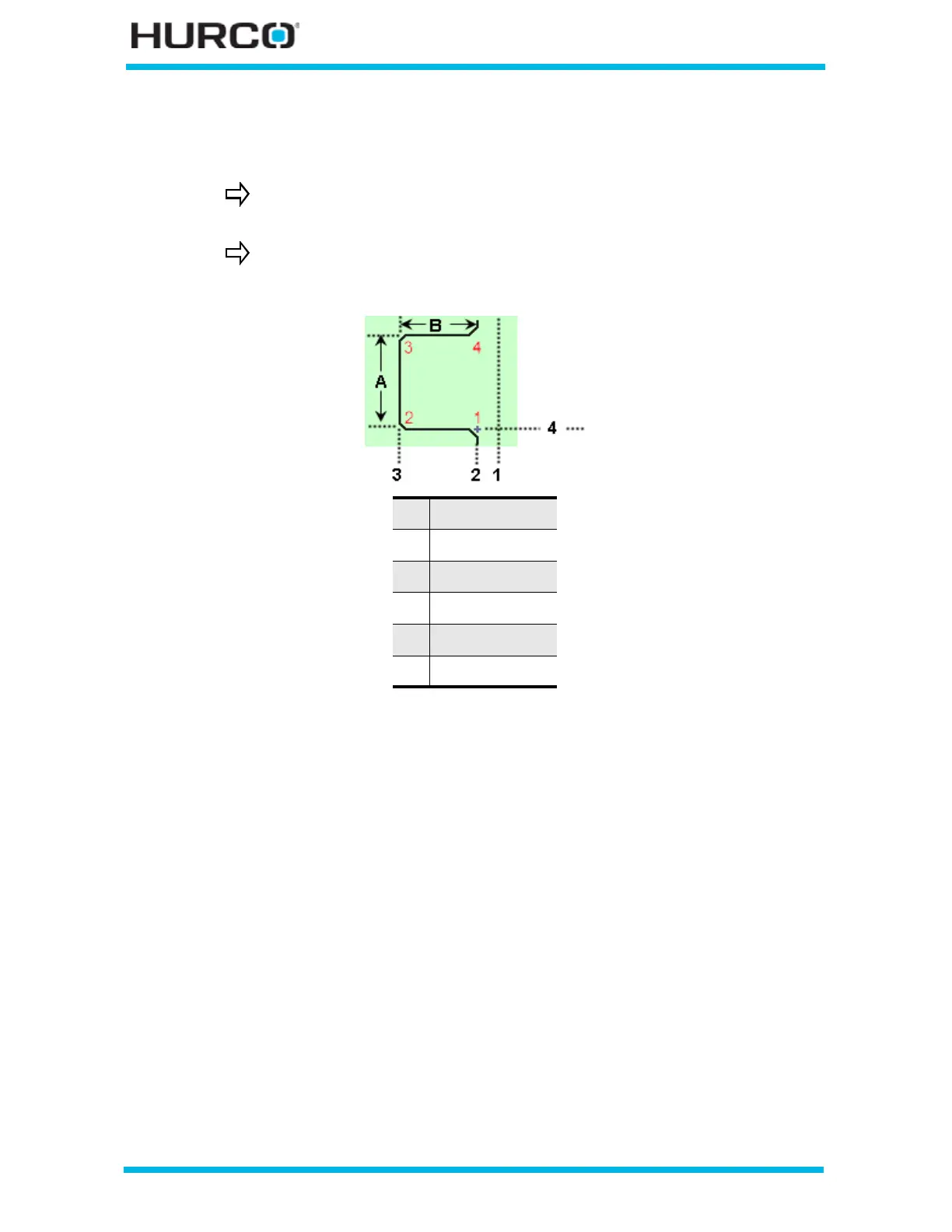
Figure 2–47. Z Bottom dimension (Face Orientation)
• TAPER 1-2 and 4-3—define the angles of the two groove walls.
• CORNER 1, CORNER 2, CORNER 3, CORNER 4—use these fields for
defining each corner:
• CORNER TYPE—indicates the type of groove corner as either Square,
Chamfer, or Radius.
• CHAMFER LENGTH—defines the length of the chamfer. This field is
active when Chamfer is selected for the Corner Type field.
• CHAMFER ANGLE—defines the corner chamfer angle. This field is active
when Chamfer is selected for the Corner Type field.
• RADIUS—defines the corner radius of the chamfer. This field is active
when Radius is selected for the Corner Type field.
The start point is indicated by a cross hair next to Corner 1 in the on-
screen graphic.
The depth of the groove is determined by subtracting Z Bottom from
Z Start. This dimension is shown as B in the following figure.
1 Part Zero Z
2 Z Start
3 Z Bottom
4 X Start
A Groove Width
B Groove Depth



 To Next Page