3.7 Data Backup
115
Chapter 3
Restore
This function is used to repair or restore all or part of data.
There are two Restore methods.
• Restoring the settings for the system
• Restoring patient / study data
z
Restoring the settings for the system
1
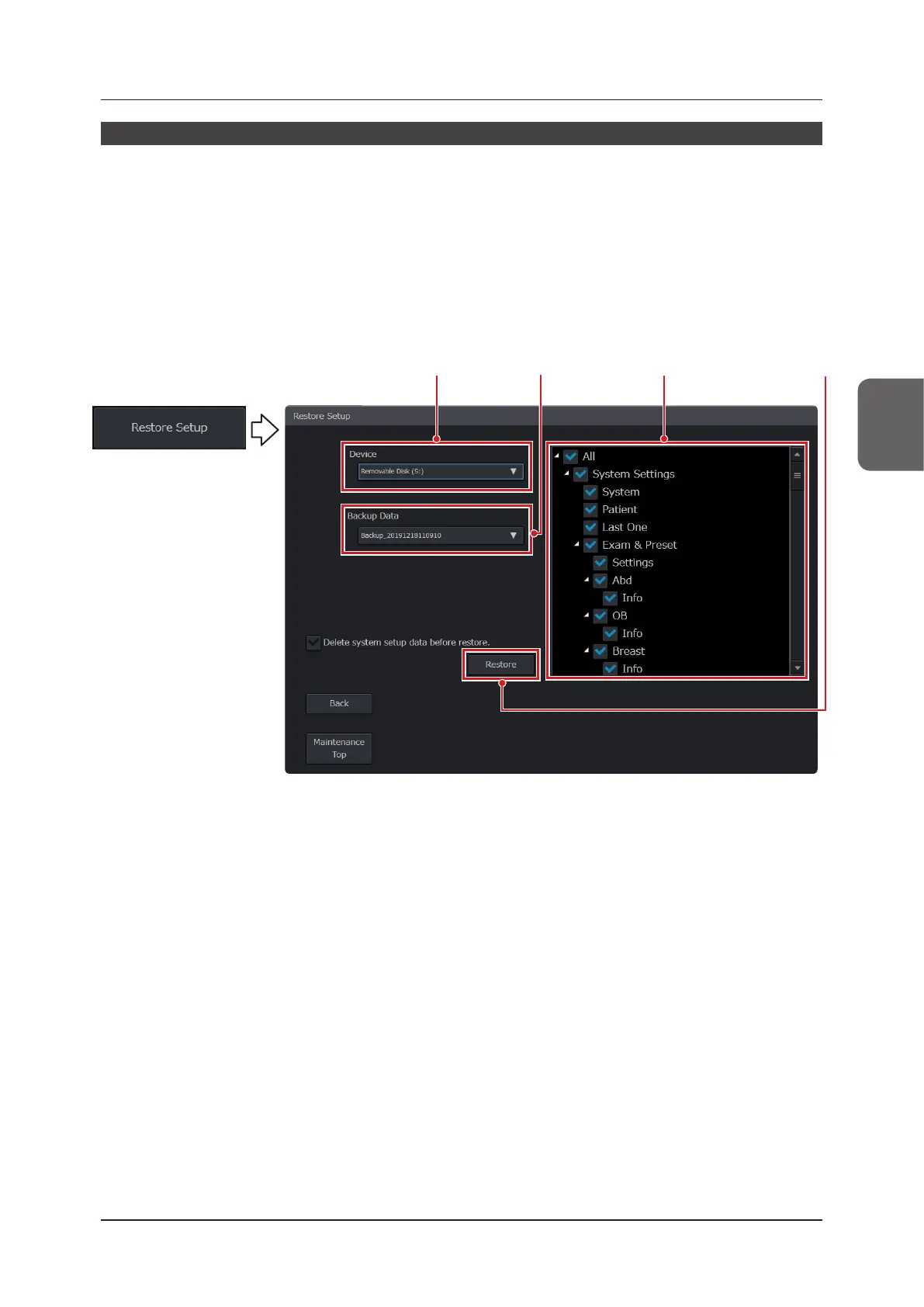
Press the [Restore Setup] button on the [Backup / Restore] screen.
• The screen changes to the [Restore Setup] screen.
• Connect an external storage medium.
Step 2 Step 3 Step 4 Step 5
2
Select a backup destination from the [Device] pull-down menu.
• When [Temporary Backup] of [Device] has been selected, data is restored from Internal Storage.
3
Select data to be backed up from the [Backup Data] pull-down menu.
4
Check a category box to be restored.
5
Press the [Restore] button.
• When restoring data after having deleted the system’s data, check the [Delete system setup data before re-
store.] box before pressing the [Restore] button.
• When a restoring operation has been completed, a message screen appears. When you press the [Restart]
button, the system restarts.
• To return to the [Backup / Restore] screen, press the [Back] button.



 To Next Page