Model 831 Manual Session Log Tab 5-27
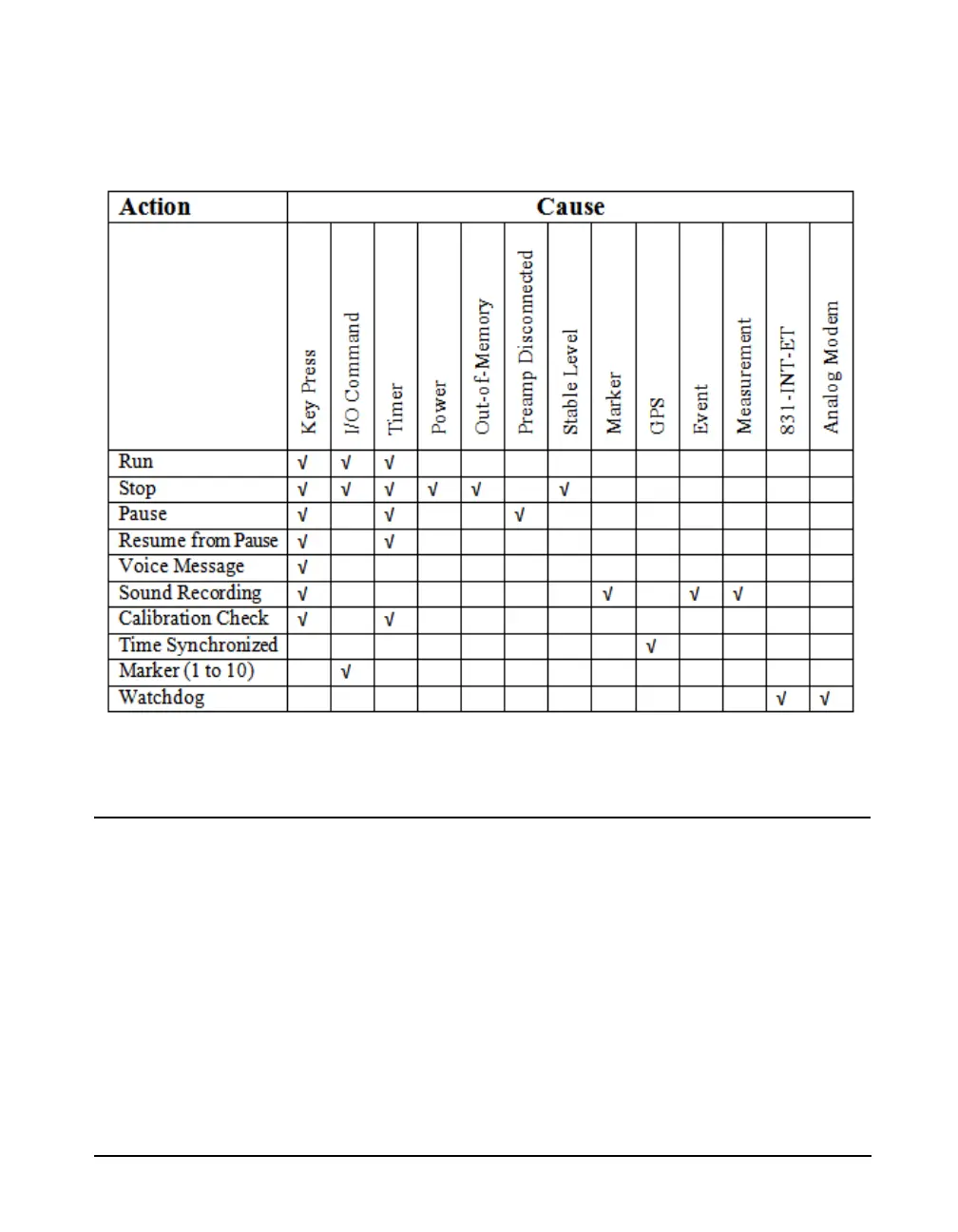
FIGURE 5-28 presents a list of all actions and the valid
causes for each of them.
FIGURE 5-28 Session Log Actions and Causes
Voice Message/Sound Recording Playback
Note that voice messages, which are
recorded using the Voice Recorder
Page of the Control Panel, can also
be played back from there. For more
detail, see Chapter 10 "Vo ic e
Recording” on page 10-1. There are
a number of alternative ways to
playback sound recordings. See
"Sound Recording Playback" on
page 16-20 for more detail.
Voice messages and sound recordings can be played back
from the Session Log tab. Highlight the desired voice
message or sound recording, indicated by the Voice
Message/Sound Recording Icon shown in FIGURE 5-
26 "Session Log Tab” on page 5-25. A highlighted voice



 To Next Page