Model 831 Manual Powering the Model 831 2-11
Power Control Page
The estimated battery run time is
only shown after running on
batteries for more than one minute,
which permits the battery voltage to
stabilize.
If the Model 831 is ON, pressing the
0 (ON/OFF) key
displays the Power Control screen.
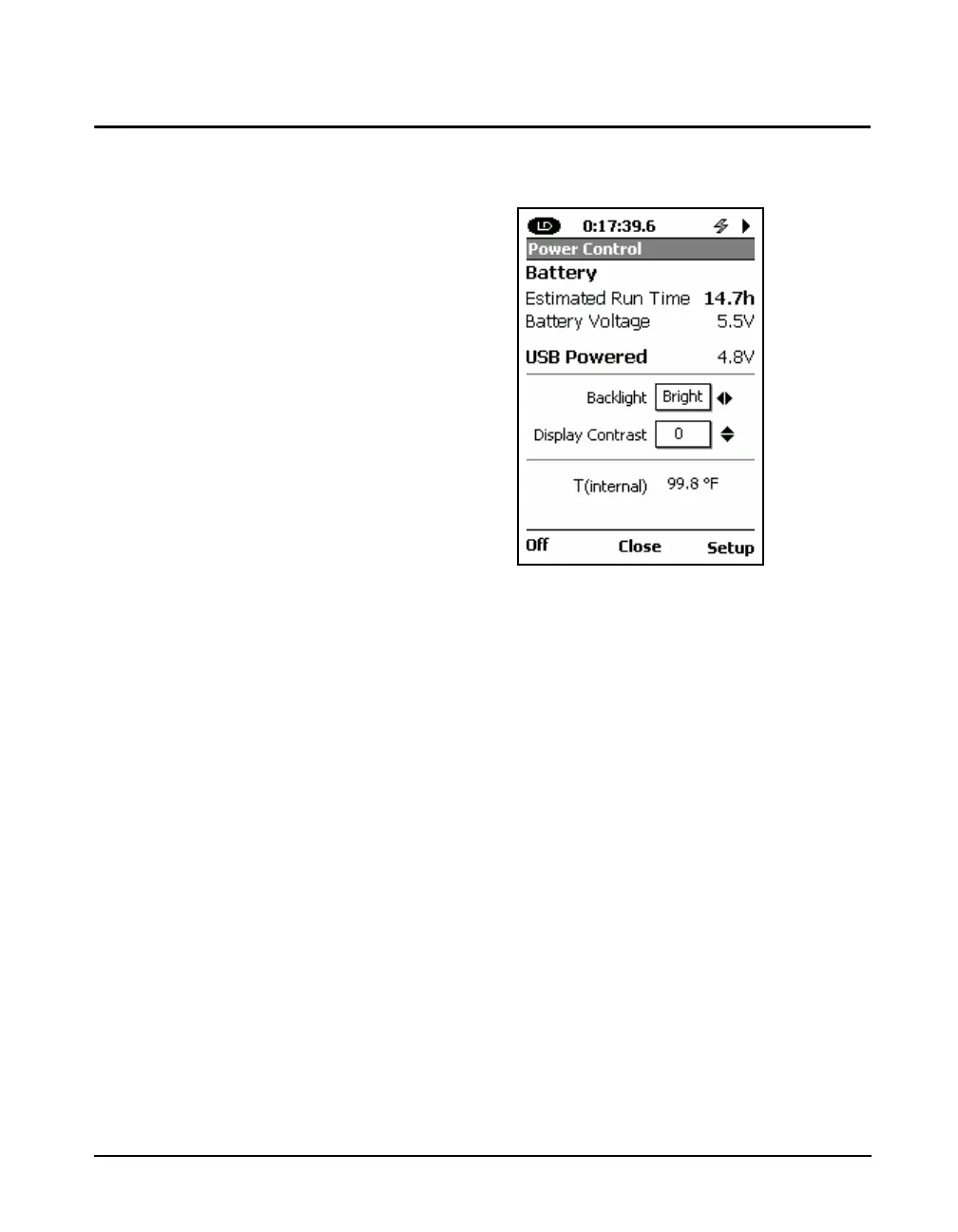
FIGURE 2-11 Power Control View
Located on the first section of this screen is the Estimated
Battery Run Time (calculated using the voltage of the
installed batteries), Battery Voltage and the USB Powered
voltage.
For more information on Backlight
and Display Contrast, see the
"Backlight" on page 18-9 and
"Display Contrast" on page 18-9.
Next, Backlight and Display Contrast are adjusted using
the 4, 6, 8 and 2 keys. Backlight provides three
options: Off, Dim and Bright, which are adjusted using the
4 and 6 keys. The Display Contrast has a range of -9 to 9,
which is adjusted using the 8 and 2 keys.
The units of the temperature display
are user-selectable, as described in
“Units” on page 18-22.
The last section displays the Model 831 internal temperature
that is used to automatically adjust the contrast of the display
to compensate for temperature changes.



 To Next Page