MI-42-0001 Rev. 19 149
MAINTENANCE: Service Functions
7.2.10 Option: Dose Check Report
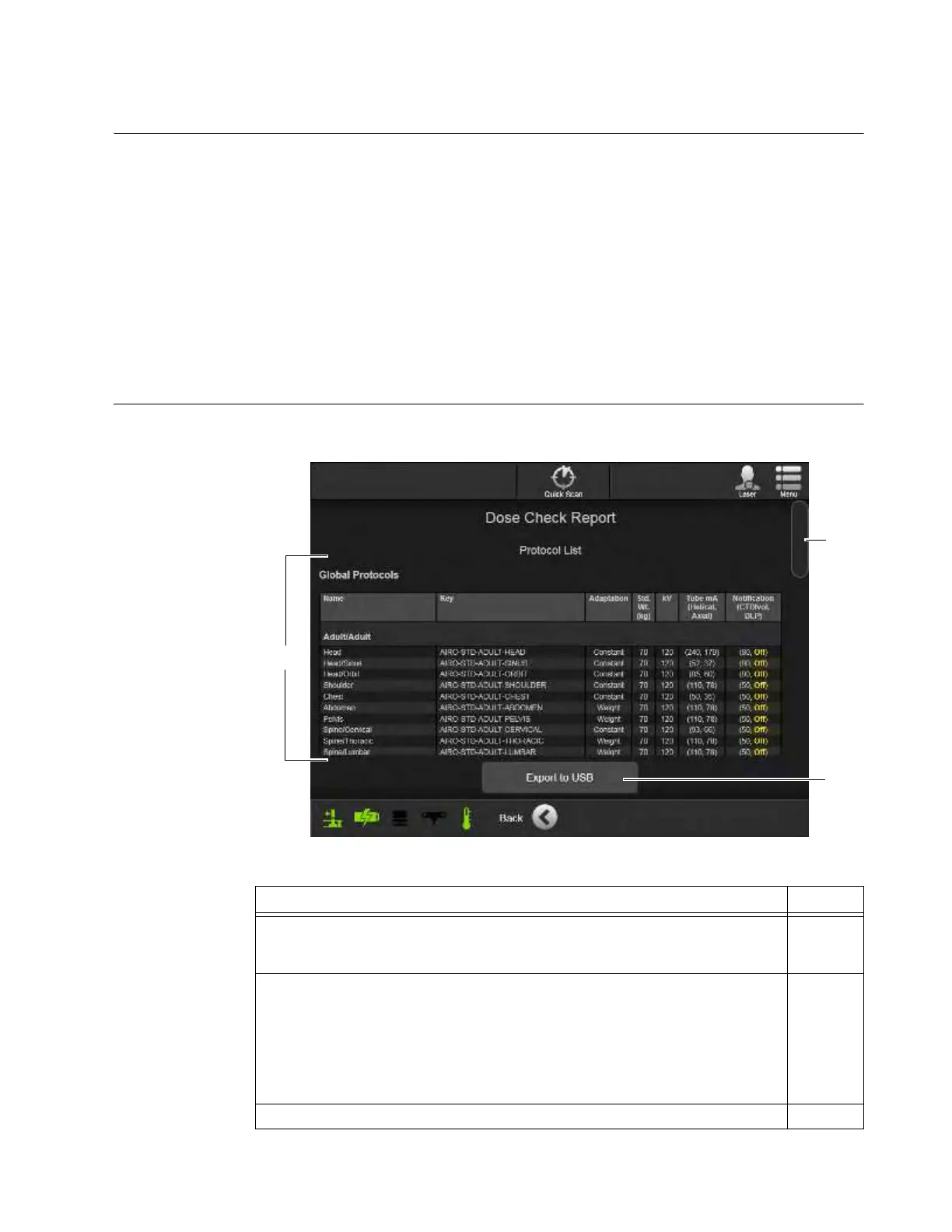
Overview AIRO Dose Check Reports provide system-wide data about X-Ray radiation dosages for system
scans and any dosage alert incidents. The report lists:
• Global Protocols by name/category
• All Local Protocols set up for specific procedures or patients
• Global Alert Settings for CTDI
vol
and DLP
• Notification History
• Alert History
For both Global and Local protocols, the report includes each protocol’s standard settings for patient
weight, kV, mA, and Notification levels for CTDI
vol
and DLP values. For system Notification History
and Alert History, the report includes the date and time of each alert along with its data type, limit
value, and all operator, scan protocol, and session data. As a result, the notification and alert data
can help technicians retrieve scan image data for regulatory or patient follow-up.
How to Access the
Dose Check Report
Users with technician-level or higher passwords can view the system
Dose Check Report
on the
Pendant screen.
Figure 123
Steps See
1. Select Dose Check Report from the Hospital Service screen.
7.2.1
&
7.2.2
2. Using the scroll bar
a
, review report data
s
for:
• Global Protocols scan settings
• Local Protocols scan settings
• Global Alert Settings
• Notifications History
• Alerts History
3. Touch
Back
to return to the Hospital Service screen.



 To Next Page