MI-42-0001 Rev. 19 17
SAFETY: CPR Mode
2.4 CPR Mode
2.4.1 Performing CPR on Patient in System
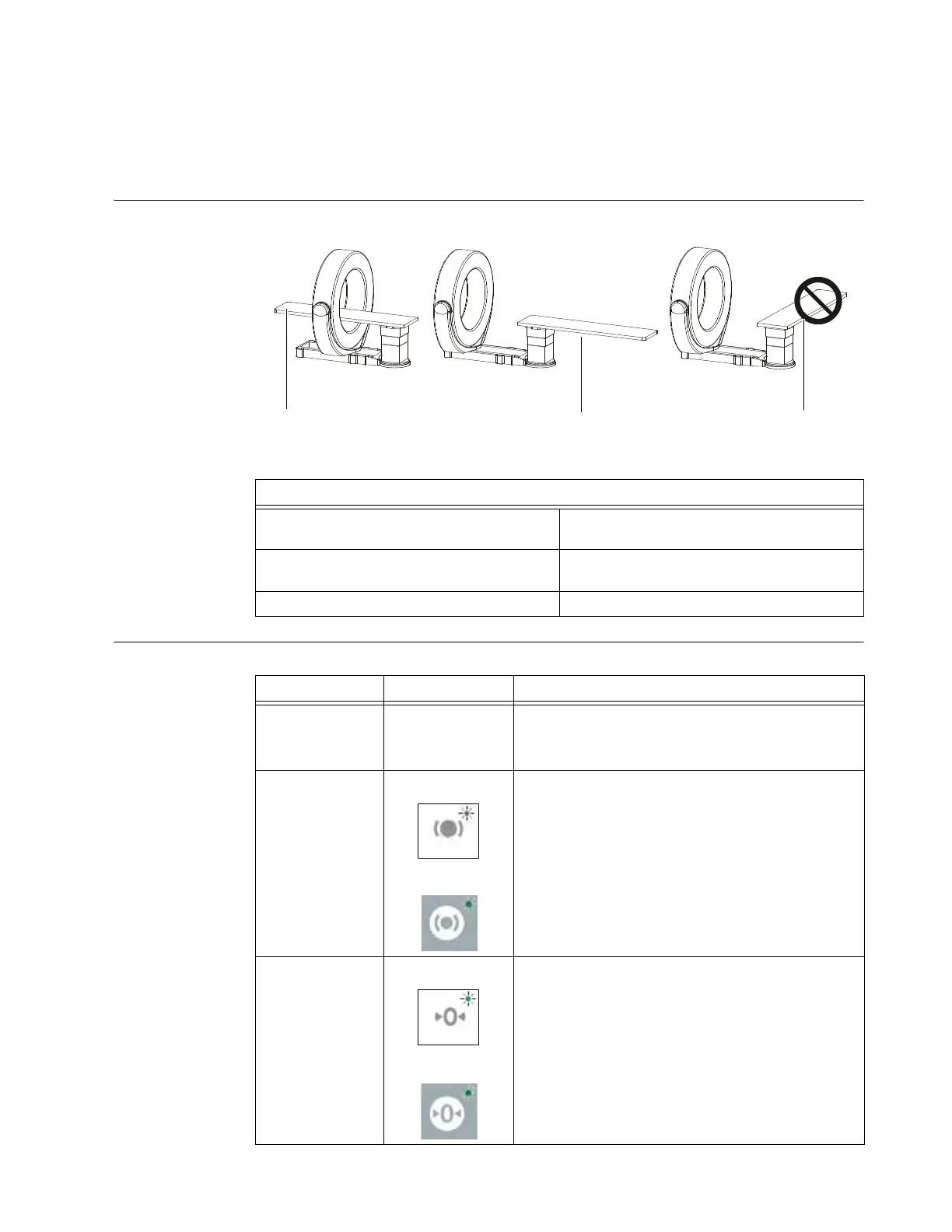
Table Position The equipment positions for performing CPR are
Figure 5
CPR Options
Position of Table for Performing CPR
a Parallel to base, column at lowest shuttle-
accessible position
Acceptable
s Parallel to base, column at lowest shuttle-
accessible position
Acceptable
d Any other orientation Not Acceptable
Option Keypad Buttons Action
Patient is in the
bore of the
system
Move the Ring out of the way.
NOTE: You can use the controls or push the Gimbal
manually to move it out of the way.
The table is not
parallel to the
base
Original Column:
Updated Column:
Rotate the table into a position parallel to the base.
NOTE: If the table will not rotate, release the table
rotation brake. The rotation brake control is on the
column keypad and on the wireless remote control.
The table or
patient support is
not lowered and
level
Original Column:
Updated Column:
Lower and level the table or patient support. See:
• MI-42-0167 AIRO Original Column Supplement
section 2.7.6 Lift and Lower
Or
:
• MI-42-0165 AIRO Updated Column Supplement
section 2.7.6 Lift and Lower
For information about which integrated column your
AIRO features, see chapter 4 COLUMN AND TABLE.



 To Next Page