MI-42-0001 Rev. 19 69
SCANNING: System and Controls
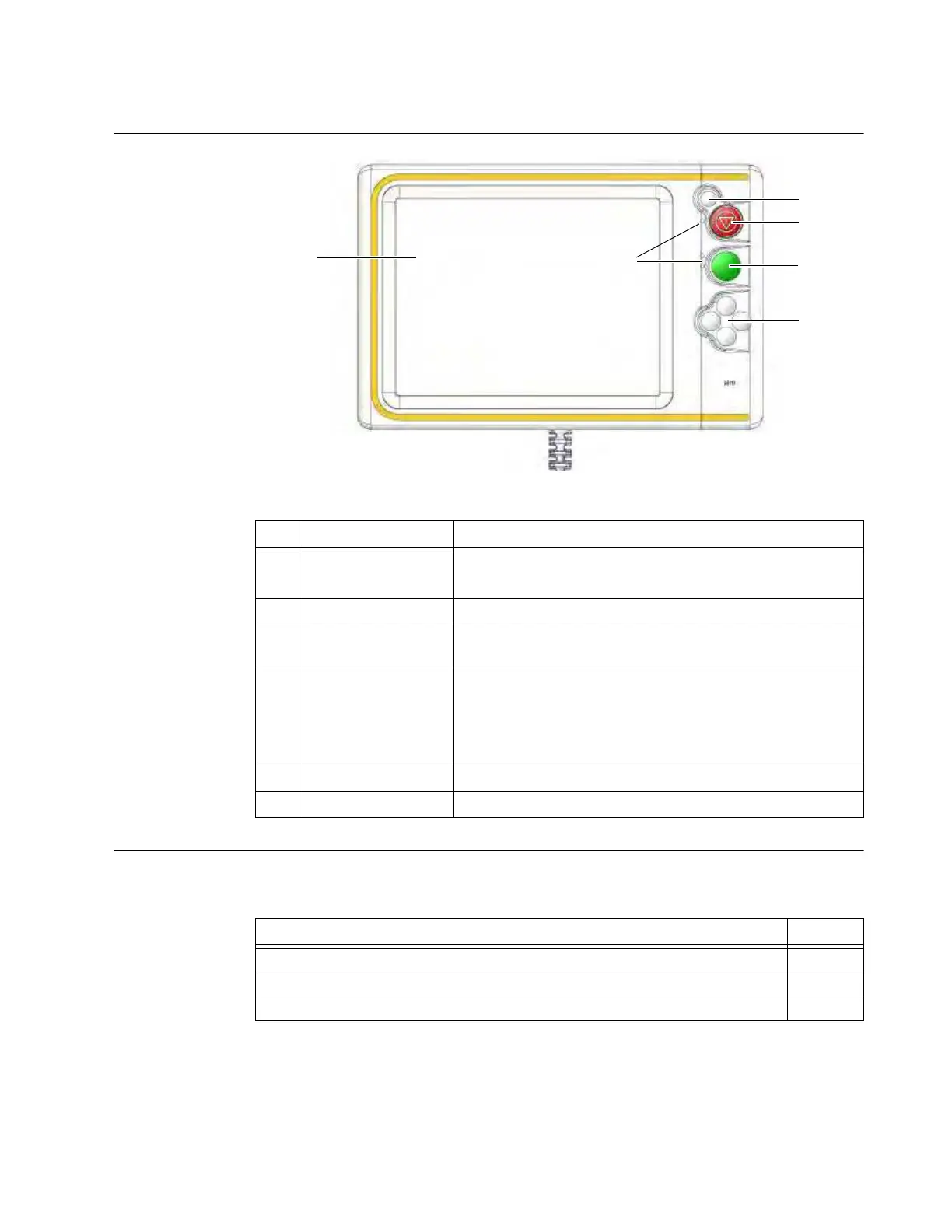
6.2.2 Pendant Display
Diagram of Pendant
Display
Figure 36
Details The CT operator uses the Pendant Display to move the Ring and Gimbal, turn the laser pointer on
and off, set the parameters for each scan, conduct the scan, and interact with the resulting images.
No. Component Function/Usage
a
Touchscreen
Touch to enter data or select functions
Serves as display for camera view
s
Reset Button Press to clear the Emergency Stop
d
Emergency Stop or
E-Stop
Press to halt all scanning and mechanical motion functions
f
LED Lights (3)
• Green – Ready to scan
• Yellow – X-rays in Progress
• Solid Orange – Ring is in motion
• Blinking Orange –
E-Stop
button has been pressed. Turn off
E-Stop by pressing the Reset button
s.
g
Scan Button Press to conduct a scan
h
Directional Keys Used to move Ring and Gimbal
Options See
Move the Ring and Gimbal 6.4
Scan 6.8
Use Laser for Positioning 6.8.11



 To Next Page