8 MI-42-0001 Rev. 19
GENERAL INFORMATION: Overview of Components
1.5 Overview of Components
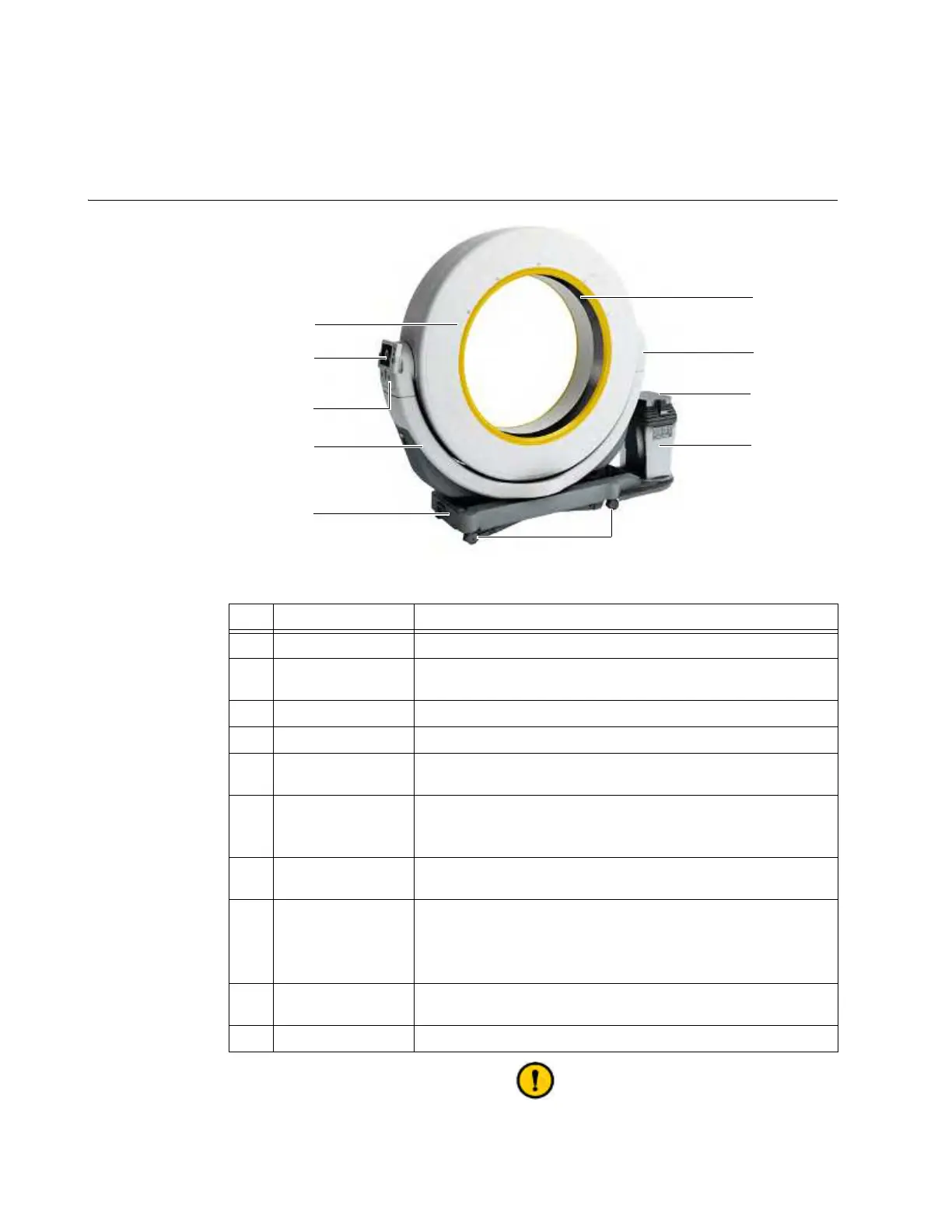
1.5.1 Transport Mode
Diagram: Transport
Mode
Figure 2
The inside of the Ring is not designed to support weight. When transporting,
operating, cleaning, or disinfecting AIRO, do not lean, sit, or kneel on the inside of the
No. Component Function/Usage
a
Ring Scans patient and sends data to Pendant.
s
Pendant Display
Touchscreen that controls system movement, imaging, and data
storage.
d
Power Panel Key switch and
On
button, USB port.
f
Gimbal Holds the Ring and Pendant Display.
g
Base
Supports and moves the system. Power and network
connections.
h
Casters
Allow system to be moved.
NOTE: Not shown: A mechanically driven main drive wheel
located under the base. The main drive wheel powers the motion.
j
Column
Holds some models of Trumpf surgical tabletops and other patient
supports (see parts list for specific part numbers).
k
Column Interface
Provides power and motion to some models of Trumpf surgical
tabletops and other patient supports.
For information about which integrated column your AIRO
features, see chapter 4 COLUMN AND TABLE.
l
Front View Camera
Allows operator to see path on display. Used when moving the
system for safe transportation.
;
Window Opening in bore through which scan is taken.



 To Next Page