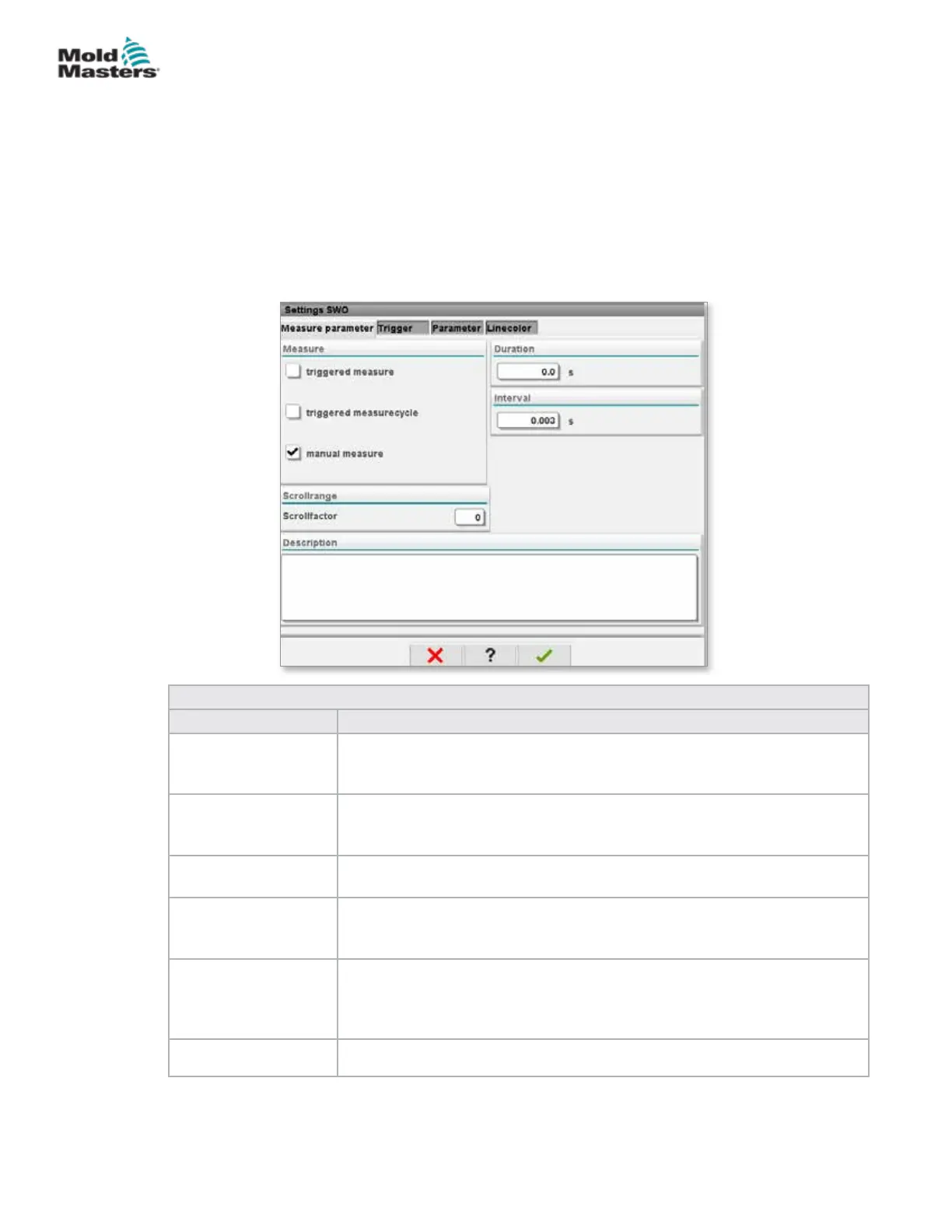
7.19 Software Oscilloscope
This dialog is accessed by choosing the Setup, then [Conguration]
button. There are four tabs: Measure parameter, Trigger, Parameter
and Line color. These will be described below and other graph screen
conguration is very similar.
7.19.1 Measure Parameter
Used to set the measurement recording parameters like trigger, interval and
duration.
Table 7-32 Measure Parameter Tab Fields
Field Description
Triggered Measure Starts a single set of measurements from the trigger signal for the set
duration.
The display is maintained until a graph is activated again.
Triggered Measure
Cycle
Starts a set of measurements from the trigger signal for the set duration.
A new set of measurements is started at the rst trigger after the set
duration is reached.
Manual Measure A single set of measurements is made when manually triggered by the
operator.
Duration Species the total measurement duration (seconds).
This eld can only be modied when the measurement is stopped.
NOTE: This also deletes all trends, references and measurement curves.
Interval Displays the time period between two measurements (seconds). This is
automatically calculated by the system.
Scroll Range Denes the area for scrolling around the fully drawn graphic.
7-54
© 2020 Mold-Masters (2007) Limited. All Rights Reserved.
E-MULTI CONTROLLER HMI INTERFACE
E-Multi Controller User Manual



 To Next Page