7.13 Overview Screen
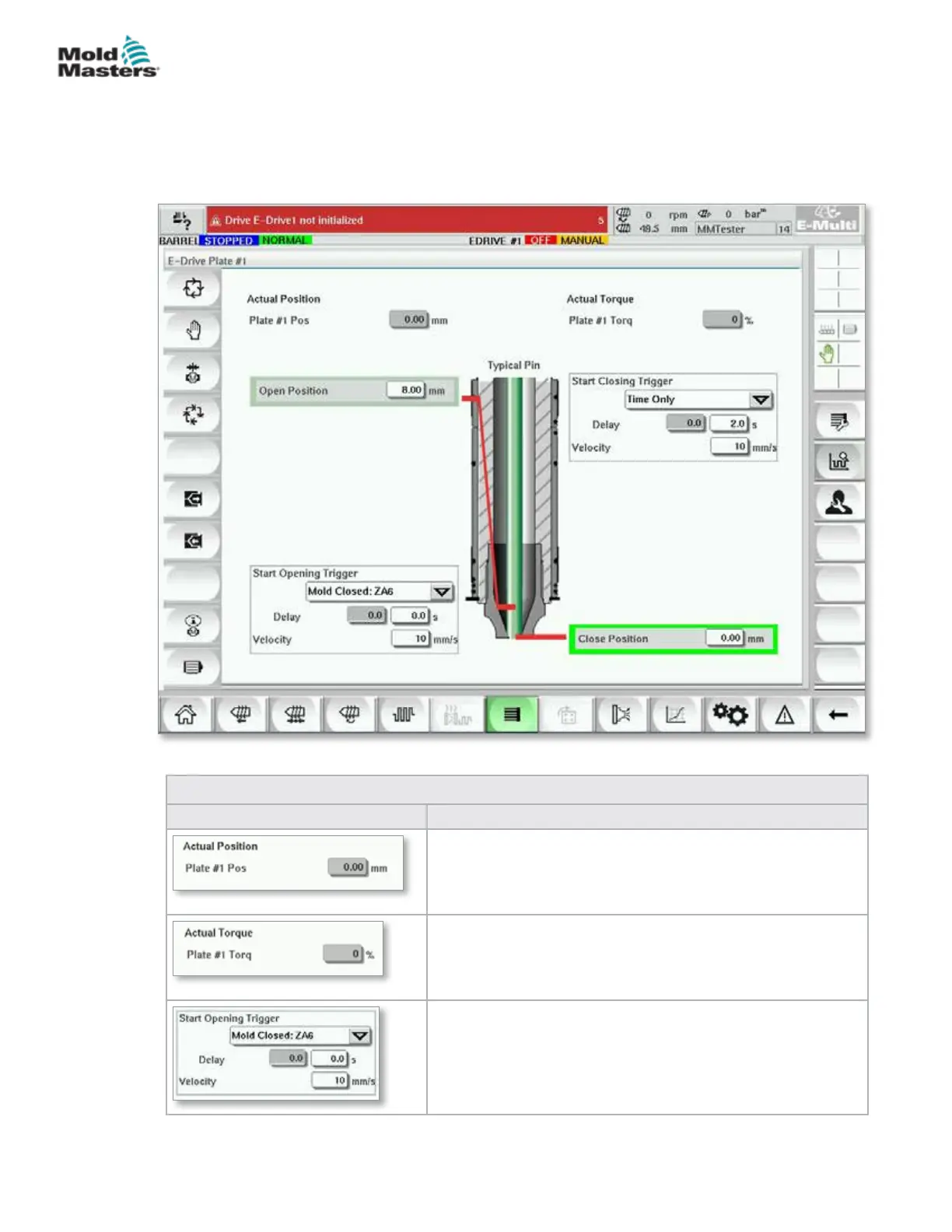
This screen gives an overview of the Integrated E-Drive operation. If more
than one E-Drive plate is in use, additional context menu buttons will be
accessible on the right. However, if Master mode is used, any slaved plates
will not be accessible on the right, only master plates.
Figure 7-14 E-Drive controller overview screen
Table 7-23 E-Drive Overview Screen Elements
Screen Elements Description
This eld shows the actual plate position relative to the
forward hardstop position when the plate was last referenced
(See Homing on next page).
This eld shows the real-time motor torque for the plate 1
motor.
The [Start Opening Trigger] is selected from the drop down
list. See Trigger Conguration.
A time delay may also be added.
The [Set Velocity] button opens a dialog where users may
further adjust settings.
7-39
© 2020 Mold-Masters (2007) Limited. All Rights Reserved.
E-MULTI CONTROLLER HMI INTERFACE
E-Multi Controller User Manual



 To Next Page