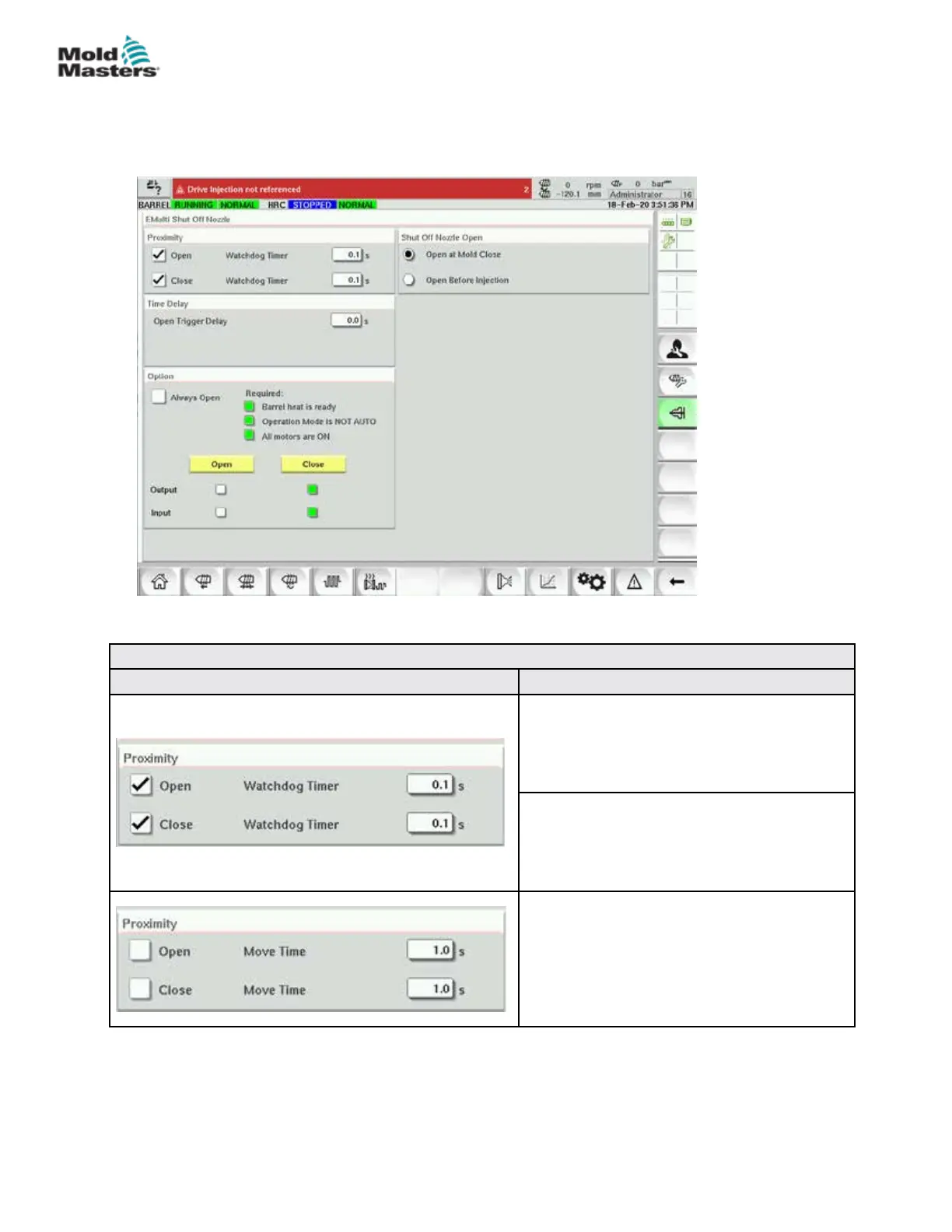
7.16 Shutoff-Nozzle Settings Screen
The shuto-nozzle settings screen is used to congure an optional shuto nozzle:
Table 7-27 Screen Elements of Shuto-Nozzle Settings
Screen Element Descripon
Proximity
When the open or close boxes are checked,
the shuto nozzle has sensors to indicate that
the nozzle is in the open or closed position.
Watchdog Timer
When sensors are present, the watchdog
timers set the maximum time for the shuto to
change state after the trigger is received.
Move Time
When sensors are not present, the watchdog
timers change to move timers. These timers
add a delay to the process to allow the shuto
nozzle to open or close before the process
continues.
7-45
© 2020 Mold-Masters (2007) Limited. All Rights Reserved.
E-MULTI CONTROLLER HMI INTERFACE
E-Multi Controller User Manual



 To Next Page