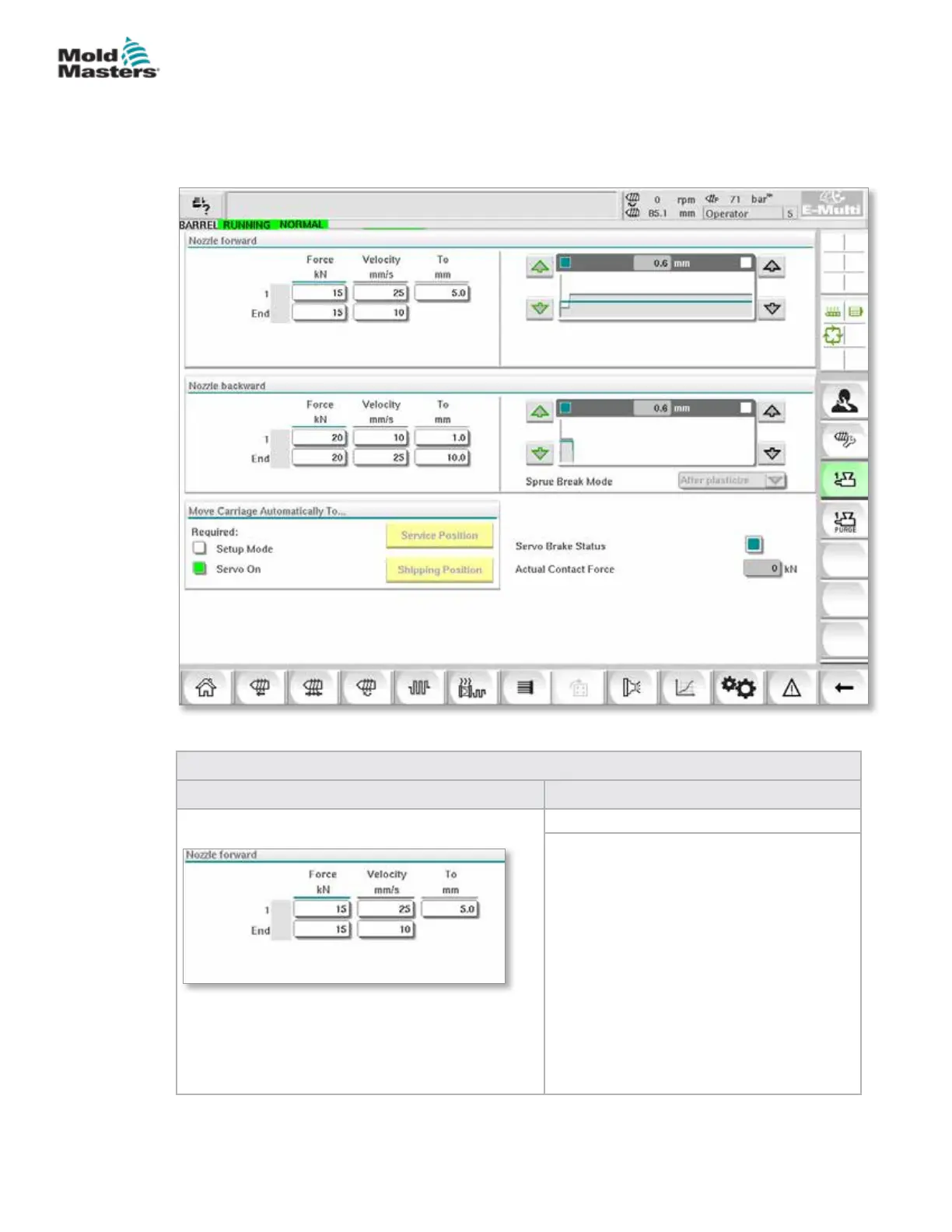
7.23 E-Multi Radial / Servo Carriage Screen
This screen is used to congure the carriage operating mode and carriage
contact force on E-Radial and servo carriage systems. This screen does not
appear for standard carriage models.
Figure 7-27 E-Multi Radial / Servo carriage screen
Table 7-38 E-Multi Radial / Servo Carriage Screen Components
Screen Element Description
Nozzle Forward / Backward
Pressure and Velocity Input Fields
These settings can be adjusted by entering
values directly into these elds.
Used for setting the pressure and velocity
of the nozzle during the cycle. The eld
labeled 1 controls the movement in the rst
stage, when the nozzle is moving towards
the mold, and the eld labeled end controls
the nozzle movement when the nozzle is
making contact with the mold.
7-64
© 2020 Mold-Masters (2007) Limited. All Rights Reserved.
E-MULTI CONTROLLER HMI INTERFACE
E-Multi Controller User Manual



 To Next Page