Table 7-16 Legacy Style Barrel Temperature Setting Screen Context Menu Buttons
Reference Settings
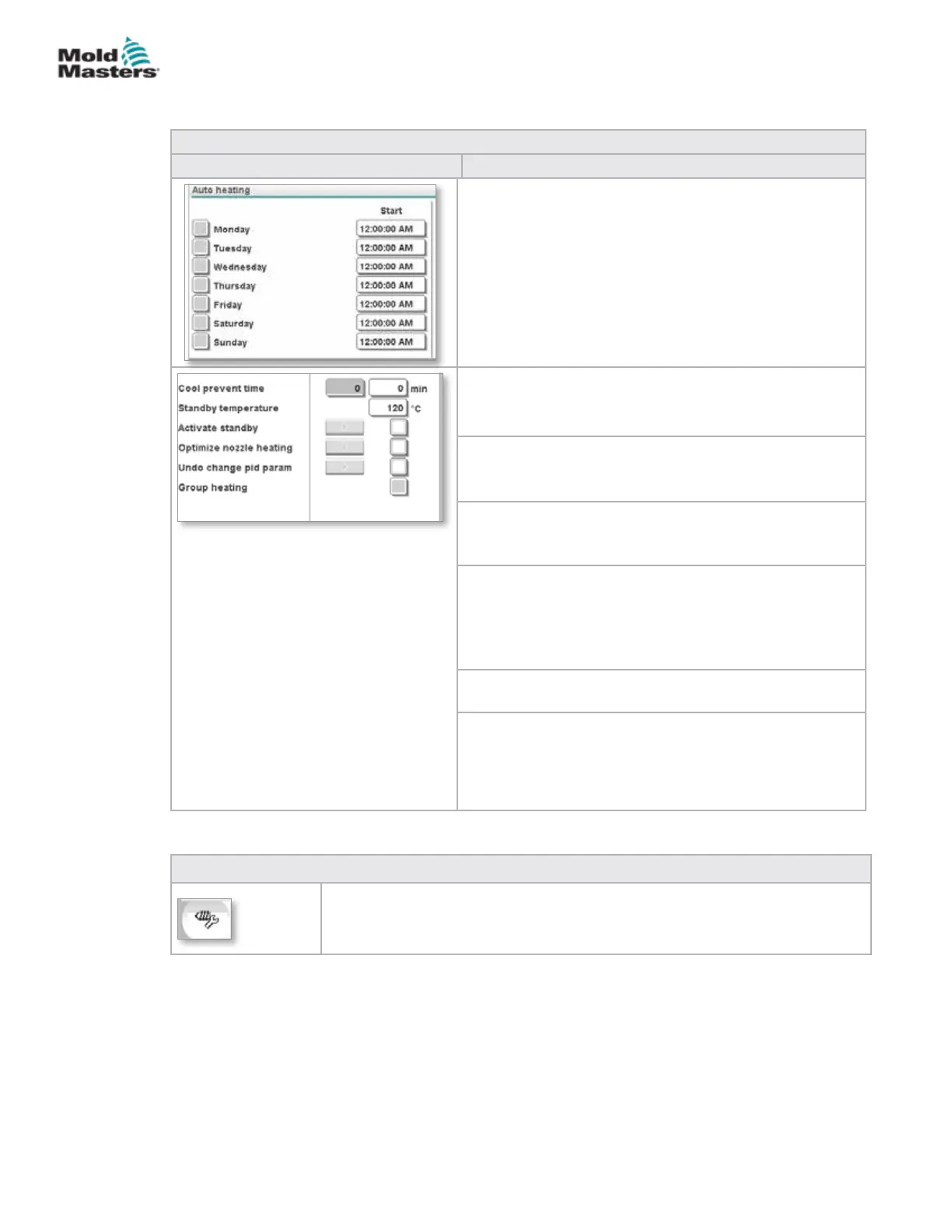
Table 7-15 Legacy Style Barrel Temperature Setting Screen Components
Screen Component Description
Auto Heating
Barrel heats may be switched on automatically using this
feature.
Check the box next to the day to enable auto heat for that
day.
Barrel heats will turn on at the specied time.
Note: Heaters will stay on until manually turned o.
Soak Time
This is the amount of time the unit has to be at process
temperature before the screw can move.
Standby temperature
Temperature setpoint when Activate Standby is checked.
Activate standby
Barrel heating is switched to standby mode.
Standby temperature setpoints are used.
Optimize nozzle heating
Used to optimize heat zone PID tuning after adding a
heater, replacing a heater, changing the mold or after a
software update.
Optimization can only be done when the barrel is cold.
Undo change pid param
Reset heater PID tuning to pre-optimization values.
Group heating
When enabled, Group Heating monitors heat zones when
they are rst heated to process temperature and ensures
that all zones heat up at the same rate.
This feature is not required for standard congurations.
Barrel Temperature Settings - Legacy Controllers* -
continued
7-22
© 2020 Mold-Masters (2007) Limited. All Rights Reserved.
E-MULTI CONTROLLER HMI INTERFACE
E-Multi Controller User Manual



 To Next Page