7.3 E-Multi Touchscreen Interface
The E-Multi is a complex controller but the main screen is organized to
simplify navigation and to show those parameters which are most useful to
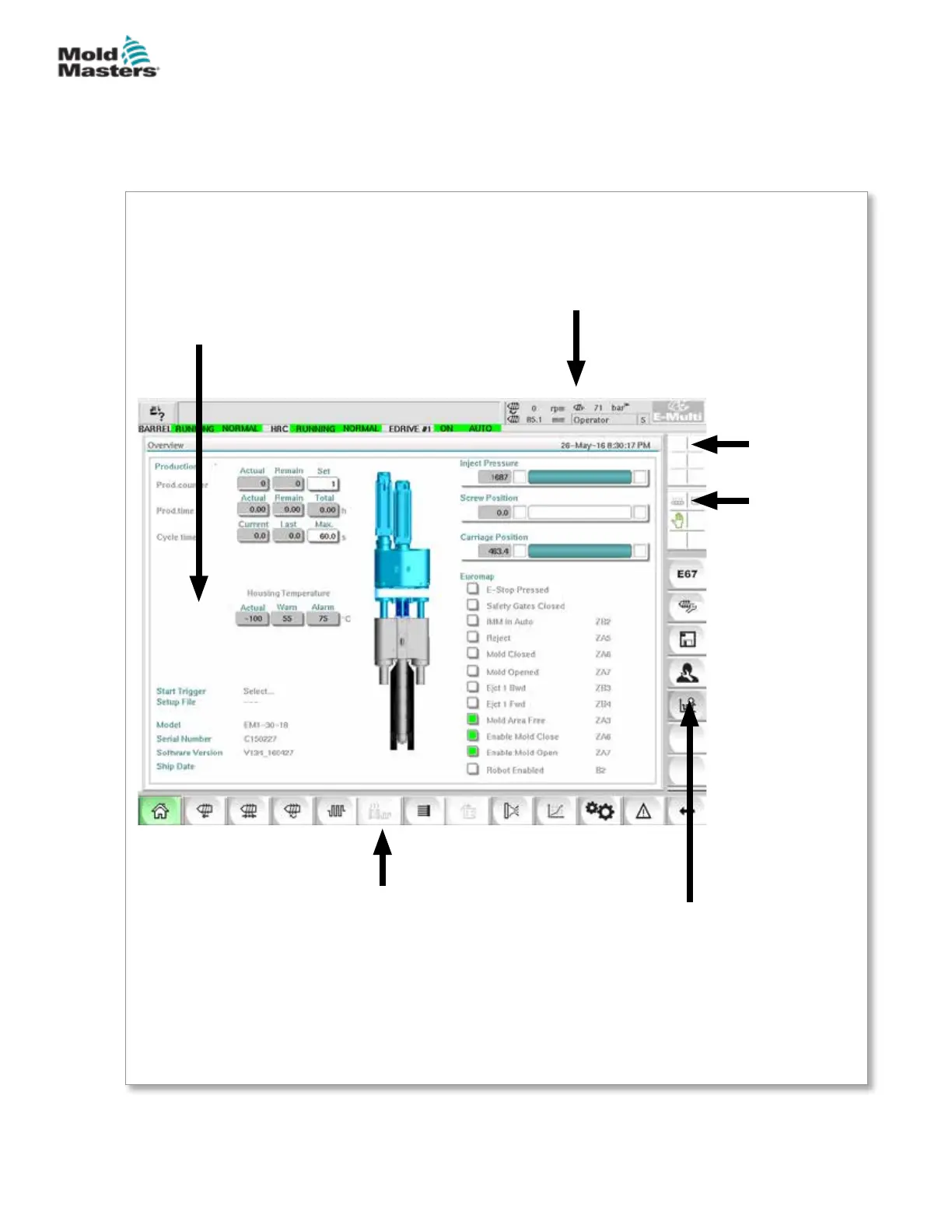
monitor. The main parts of the screen are shown here below.
Main Screen
The main screen area may display
information, have elds for entering or
displaying information and have touch
sensitive areas to select or deselect
options.
Right Bar - Context Menu
Buttons
This bar displays system information
at the top and touch buttons below
that give quick access to commonly
used functions. Some buttons will
be screen specic.
Bottom Bar - Screen Navigation
Buttons
The bottom bar navigates to the main HMI
screens: Overview, Valve Gate Settings, Injection
Settings, Hold Settings, Recovery Settings, etc.
Top Bar - Status Display
This area displays current live status
for screw position, screw revolution and
injection pressure. It also displays the
current user and user level.
Active
Movement
Icons
Status
Icons
Heater on / o,
Motor on / o,
etc.
7-3
© 2020 Mold-Masters (2007) Limited. All Rights Reserved.
E-MULTI CONTROLLER HMI INTERFACE
E-Multi Controller User Manual



 To Next Page