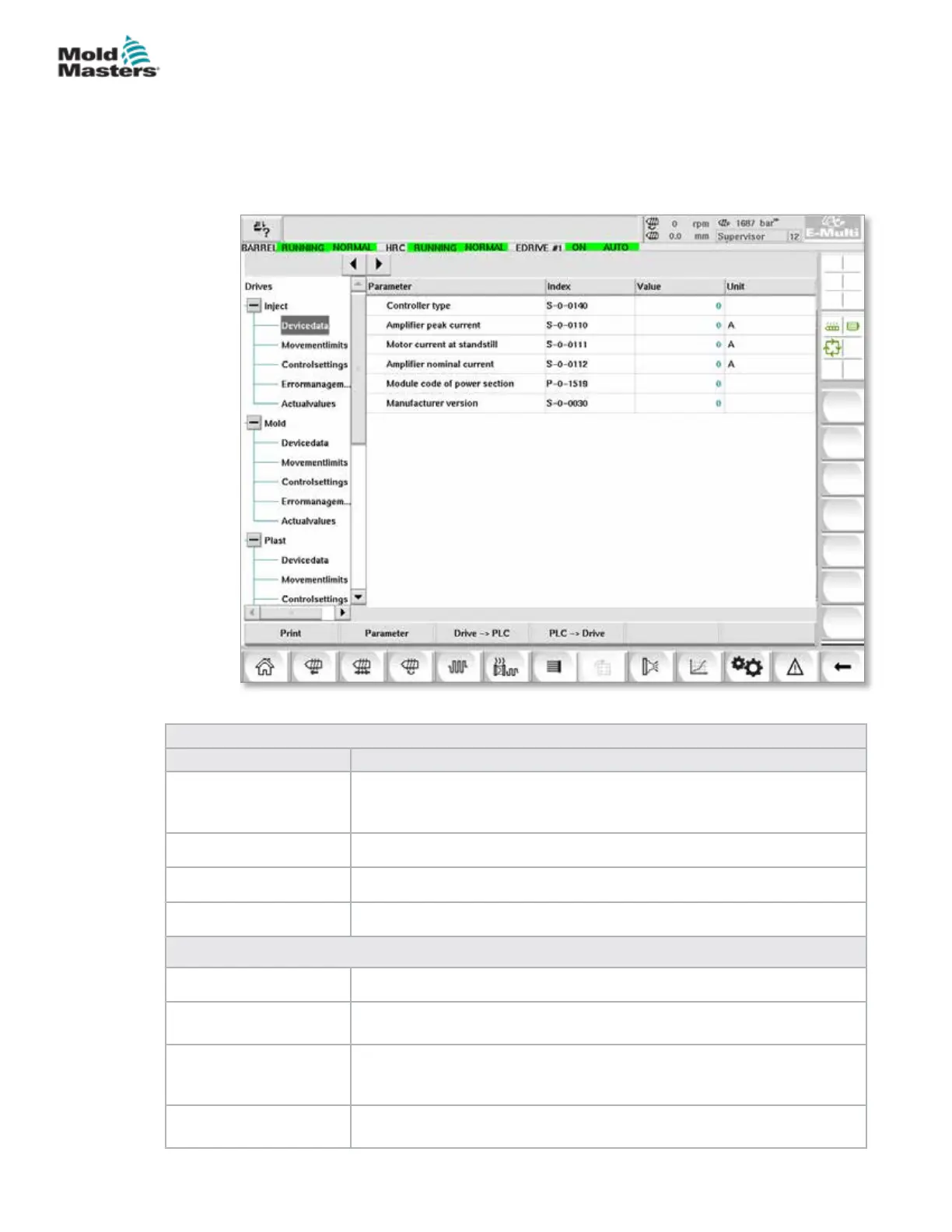
7.30 Drive Parameter Monitor Screen
Parameters of electrical drives may be displayed in this screen and their
values changed. The left part of the screen shows the existing drives in a tree
structure. By expanding the structure, the individual parameter groups may
be selected. The right part of the screen shows the parameters of selected
groups in tabular form.
Table 7-48 Drive Parameter Monitor Screen Components
Screen Components Description
Parameter (Column) Designation of the parameter.
If the parameter is an array, the structure may be expanded with the [+]
button that is in the same line.
Index Unique index of the parameters (including Sub-Index).
Value Value of the parameter.
Unit Unit of the parameter.
Menu Buttons
Print Printout of the displayed parameters.
Parameter This button is used to open a dialog for the direct display of a parameter
(Parameter selection).
Drive -> SPS The entire parameter set of the selected drive may be stored in a le
(*.vda) here.
The le name can also be specied besides the storage location.
SPS -> Drive The entire parameter set from a le (*.vda) may be loaded into the
selected drive here.
Figure 7-35 Drive parameter monitor screen
7-77
© 2020 Mold-Masters (2007) Limited. All Rights Reserved.
E-MULTI CONTROLLER HMI INTERFACE
E-Multi Controller User Manual



 To Next Page