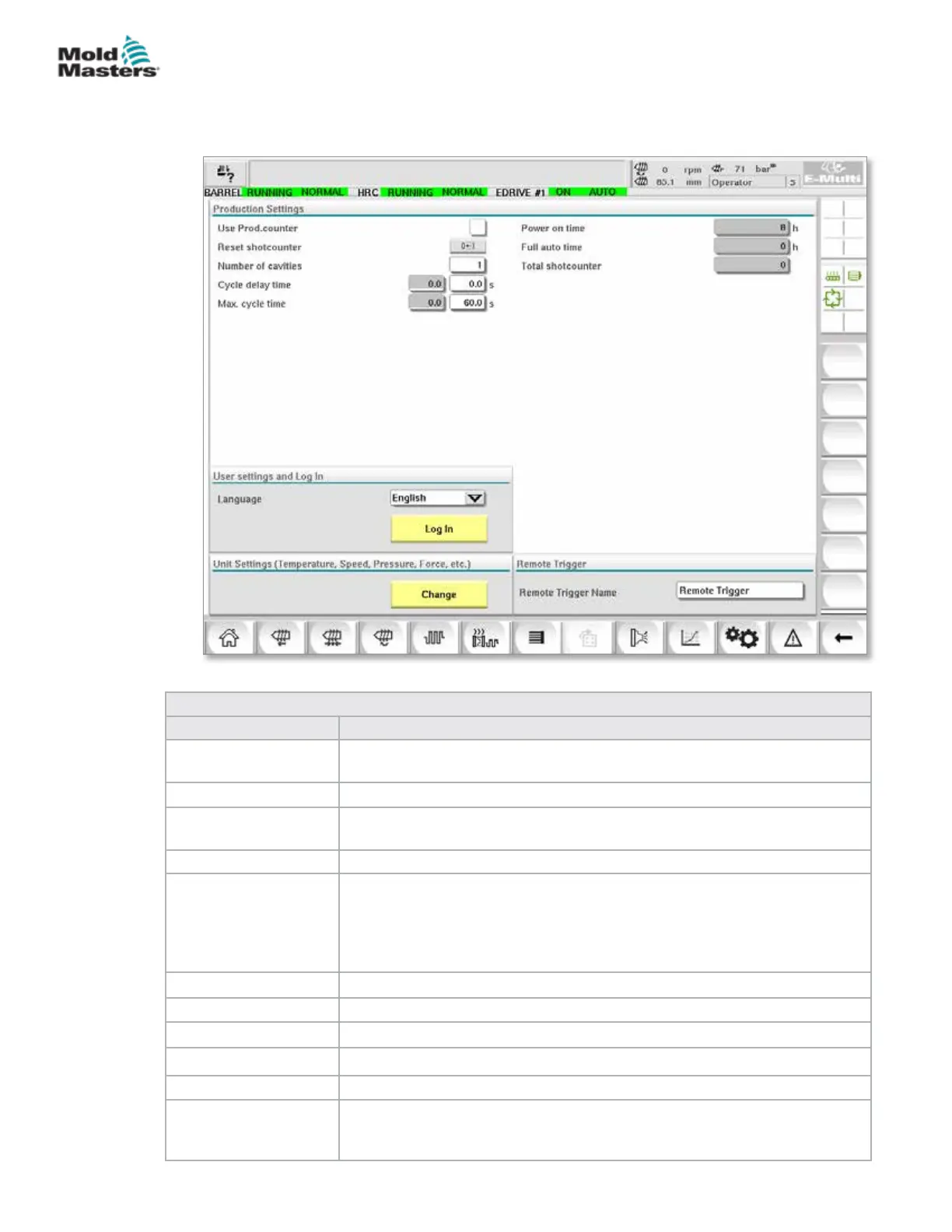
7.27 Production Settings Screen
This screen oers settings for functions as well as display and setting options
for the production process.
Figure 7-32 Production settings screen
Table 7-46 Production Settings Screen Components
Screen Components Description
Use Prod.counter Activates / deactivates the use of the production counter limit on the home
screen. See Overview screen.
Reset Shotcounter Resets the production counter to 0.
Number of Cavities Sets the number of cavities in the mold.
The production counter is incremented by this amount every cycle.
Cycle Delay Time Denes a delay time between production cycles in automatic mode.
Max. Cycle Time In the left eld (grey) the period of the current production cycle (in seconds)
is shown.
In the right eld (white), the maximum cycle time can be set.
If the production cycle exceeds this time, the process is stopped and an
alarm is triggered.
Power On Time Display of the machine's total runtime in hours.
Full Auto Time Display of the machine's total runtime in automatic mode.
Total Shotcounter Total shotcounter. Not resetable.
Language Combobox Used to select the language displayed on all screens.
User Settings Button Displays the user login dialog.
Unit Setup Button Displays the measurement unit settings dialog.
This dialog can be used to change the measurement units for the system
and save or load custom unit templates.
7-73
© 2020 Mold-Masters (2007) Limited. All Rights Reserved.
E-MULTI CONTROLLER HMI INTERFACE
E-Multi Controller User Manual



 To Next Page