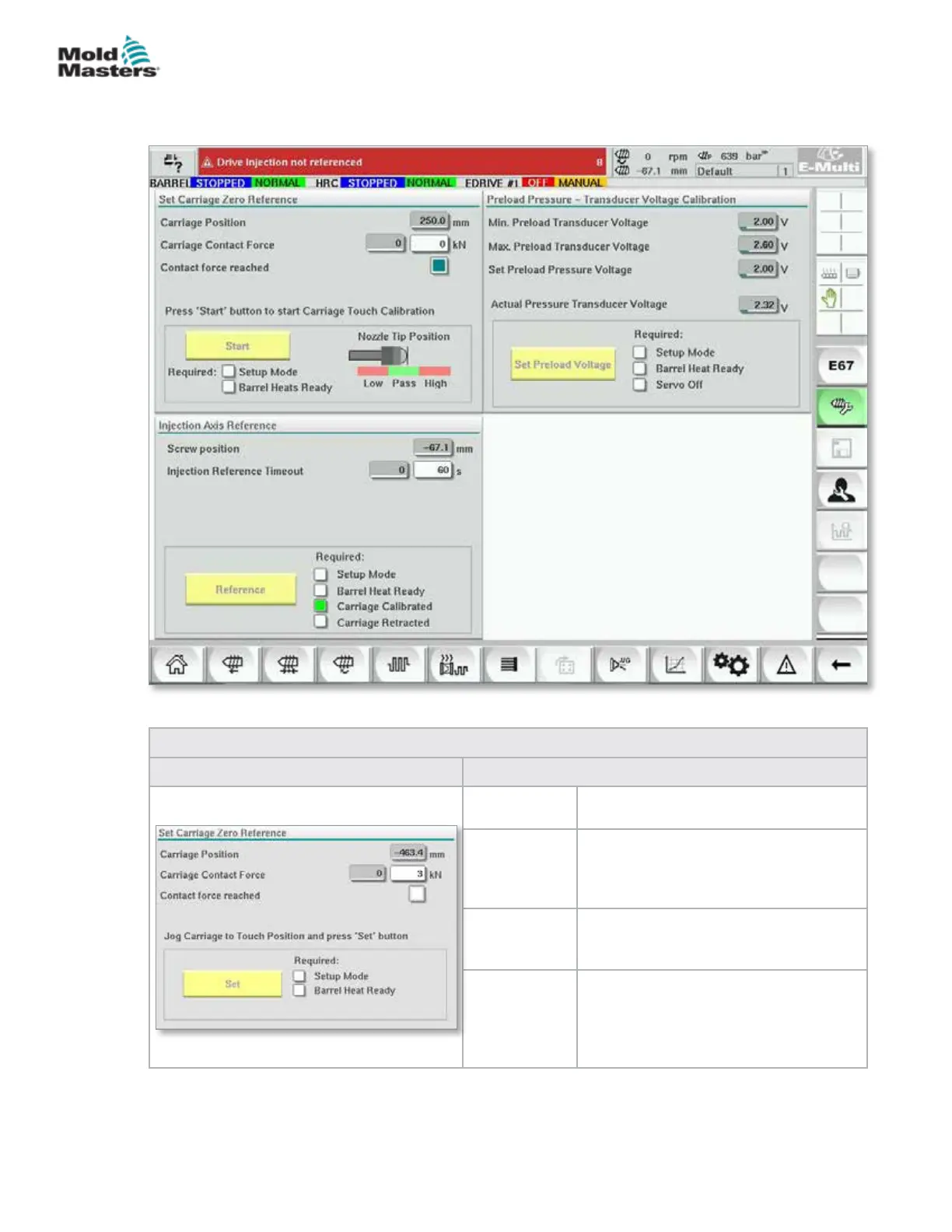
7.32 Reference Settings Screen
This screen shows all of the reference values set for the E-Multi system.
Figure 7-36 Reference settings screen
Table 7-50 Reference Settings Screen Elements
Screen Component Description
Carriage
Position
Relative position of the nozzle to mold
inlet.
Contract
Force Set
The left eld, with the grey background,
shows the current nozzle force. The
right eld, with a white background,
shows the contact force set point.
Contact force
reached
It is an indicator to acknowledge the
nozzle contact force has reached the
set point.
Set Carriage
Zero
Reference
This is used during the carriage setup
and is only visible in setup mode.
Tap the button to reset the nozzle
position to 0 when the nozzle is just
touching the nozzle inlet on the mold.
7-79
© 2020 Mold-Masters (2007) Limited. All Rights Reserved.
E-MULTI CONTROLLER HMI INTERFACE
E-Multi Controller User Manual



 To Next Page