7.17 Shutoff-Nozzle Settings Screen—Kortec
The following screens are used to congure the shuto nozzle on Kortec co-injection systems.
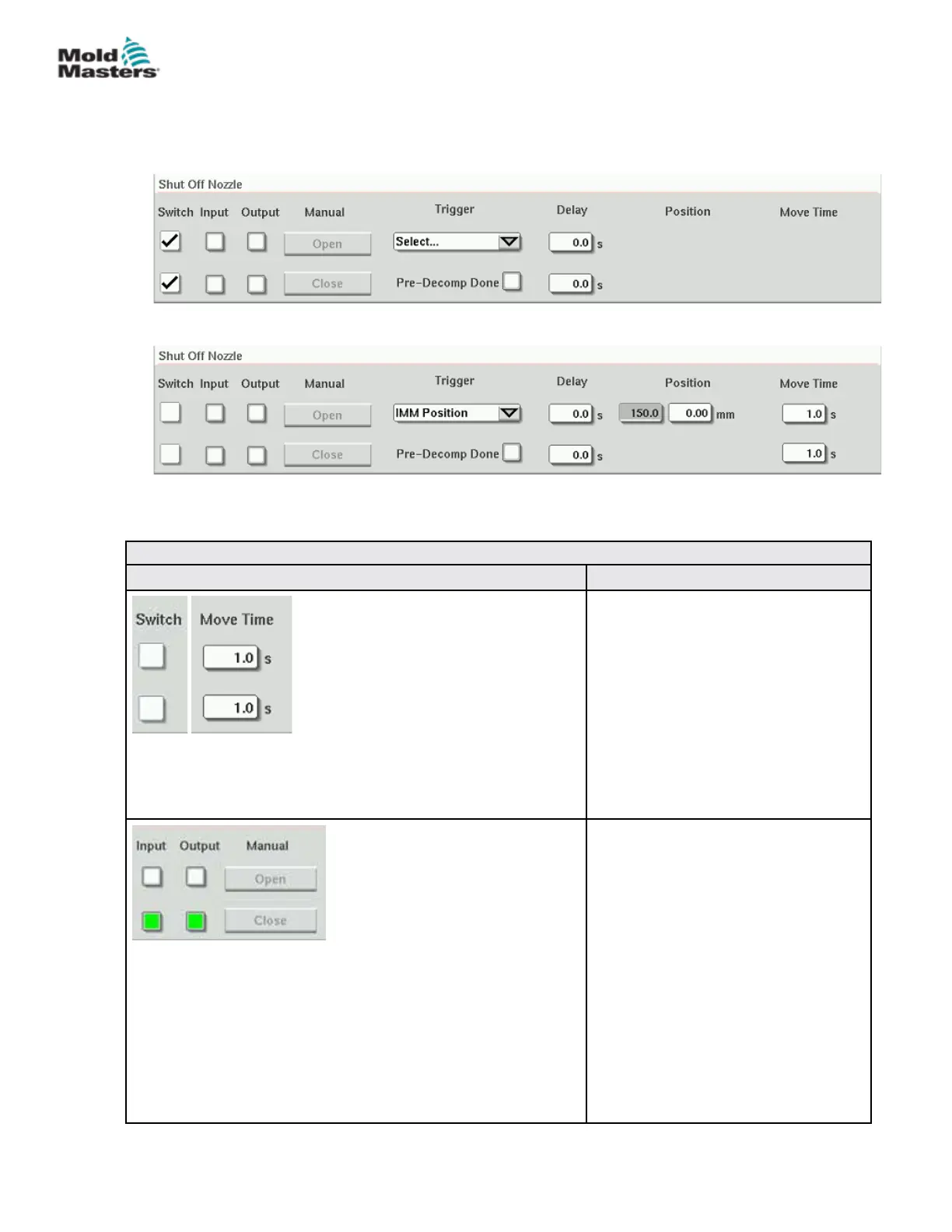
Figure 7-17 Kortec shuto-nozzle conguration with sensors
Figure 7-18 Kortec shuto-nozzle conguration without sensors
Table 7-28 Screen Elements of Shuto Nozzle Settings
Screen Element Descripon
Switch
When the open or close boxes are
checked, the shuto nozzle has
sensors to indicate that the nozzle is in
the open or close position.
Move Time
When sensors are not present, the
move timer elds appear and these
timers add a delay to the process to
allow the shuto nozzle to open or
close before the process continues.
Manual Operation
Tapping the Open or Close buttons in
will open or close the shuto nozzle if
the movement conditions are met.
With Sensors
The Output indicators show the status
of the PLC outputs to the hydraulic or
pneumatic valve.
The Input indicators show the status of
the sensors.
Without Sensors
Only the Output indicators are shown.
7-48
© 2020 Mold-Masters (2007) Limited. All Rights Reserved.
E-MULTI CONTROLLER HMI INTERFACE
E-Multi Controller User Manual



 To Next Page