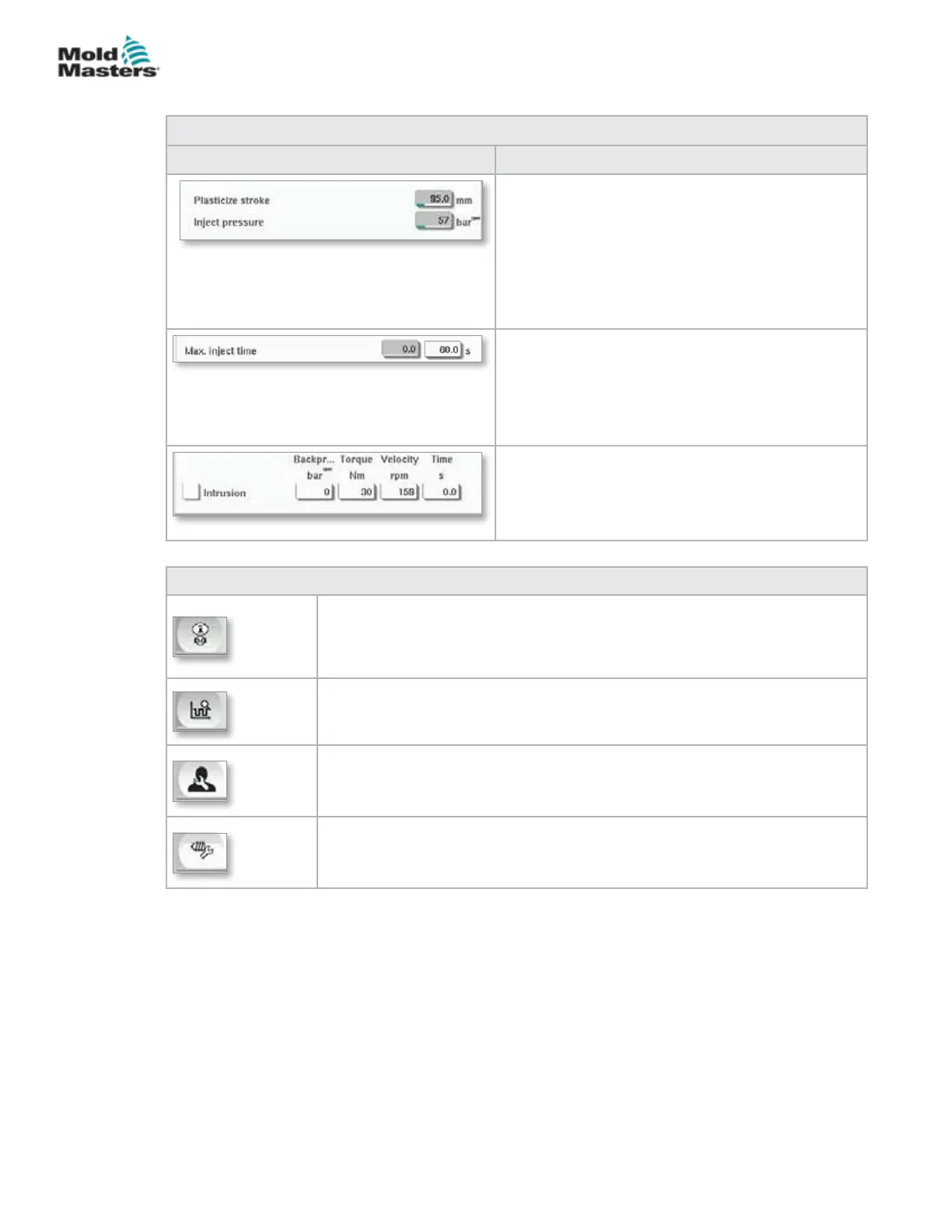
Table 7-9 Injection Settings Screen Components
Screen Components Description
Inject pressure:
Displays the current Injection pressure.
Plasticize stroke:
Displays the current plasticize stroke.
The plasticize stroke is the value of the last
plasticizing stage plus the position value of
'Decompression after plasticize' in the plasticizing
screen.
Max. inject time:
The left eld displays the inject time of the current
cycle. In the right eld, the maximum inject time
(without delay time) can be set.
If this time is exceeded an alarm will be raised and
the cycle will be stopped.
Intrusion:
The elds to the right will be used for setting
Pressure, Velocity and Time for the intrusion (screw
rotation before Inject).
Table 7-10 Injection Settings Screen Context Menu Buttons
Motor or Drive Information Screen
Production Graph - Congurable View
Production Settings
Reference Settings
Injection Settings Screen - continued
7-15
© 2020 Mold-Masters (2007) Limited. All Rights Reserved.
E-MULTI CONTROLLER HMI INTERFACE
E-Multi Controller User Manual



 To Next Page