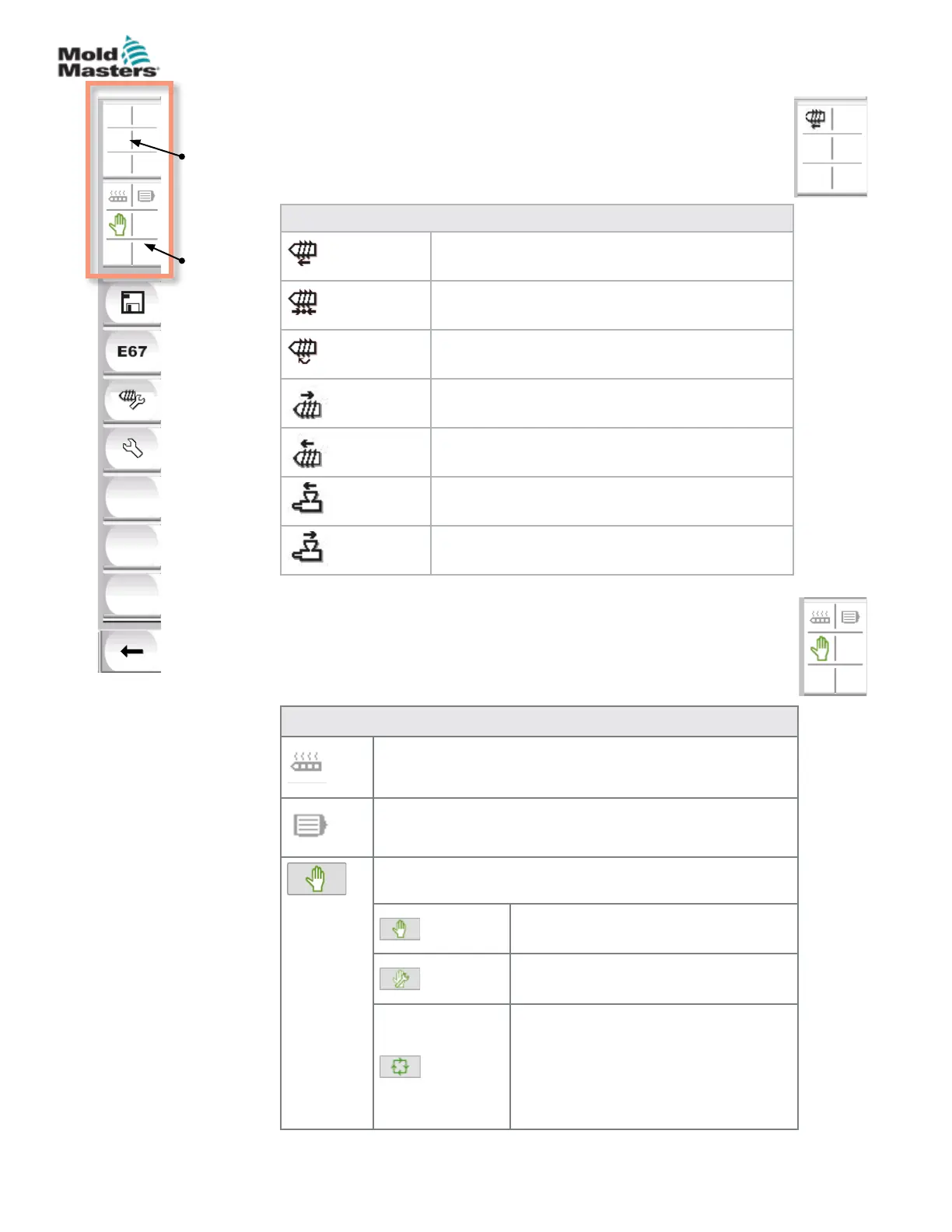
Table 7-3 Active Movement Icons
Screw injecting
Screw holding
Screw rotating (plasticizing)
Screw moving backward
Screw moving forward
Carriage moving forward
Carriage moving backward
Active
movement
icons
Status
icons
7.3.2 Active Movement Icons
These icons are displayed above the side bar while the E-Multi
is running. These icons give the user valuable information on the
current status of the E-Multi. If the icon is green, it is active. If the
icon is greyed out, it is inactive.
7.3.3 Status Icons
These icons display the current machine operation status.
Table 7-4 Status Icons
Barrel Heat Status - grey (shown) when barrel heaters are
o and green when barrel heaters are on. Same as [F8]
button LED.
Servo Motor Active - grey (shown) when servo motors are
o and green if on
Mode Indicator - An icon indicating the current machine
mode
Manual Mode. Machine jogs at full
speed.
Set up Mode. Machine jogs at set up
speed.
Automatic Mode. Machine will operate
automatically when the molding
machine provides the proper trigger
and the EuroMap connections from the
molding machine and robot are correct.
7-5
© 2020 Mold-Masters (2007) Limited. All Rights Reserved.
E-MULTI CONTROLLER HMI INTERFACE
E-Multi Controller User Manual



 To Next Page