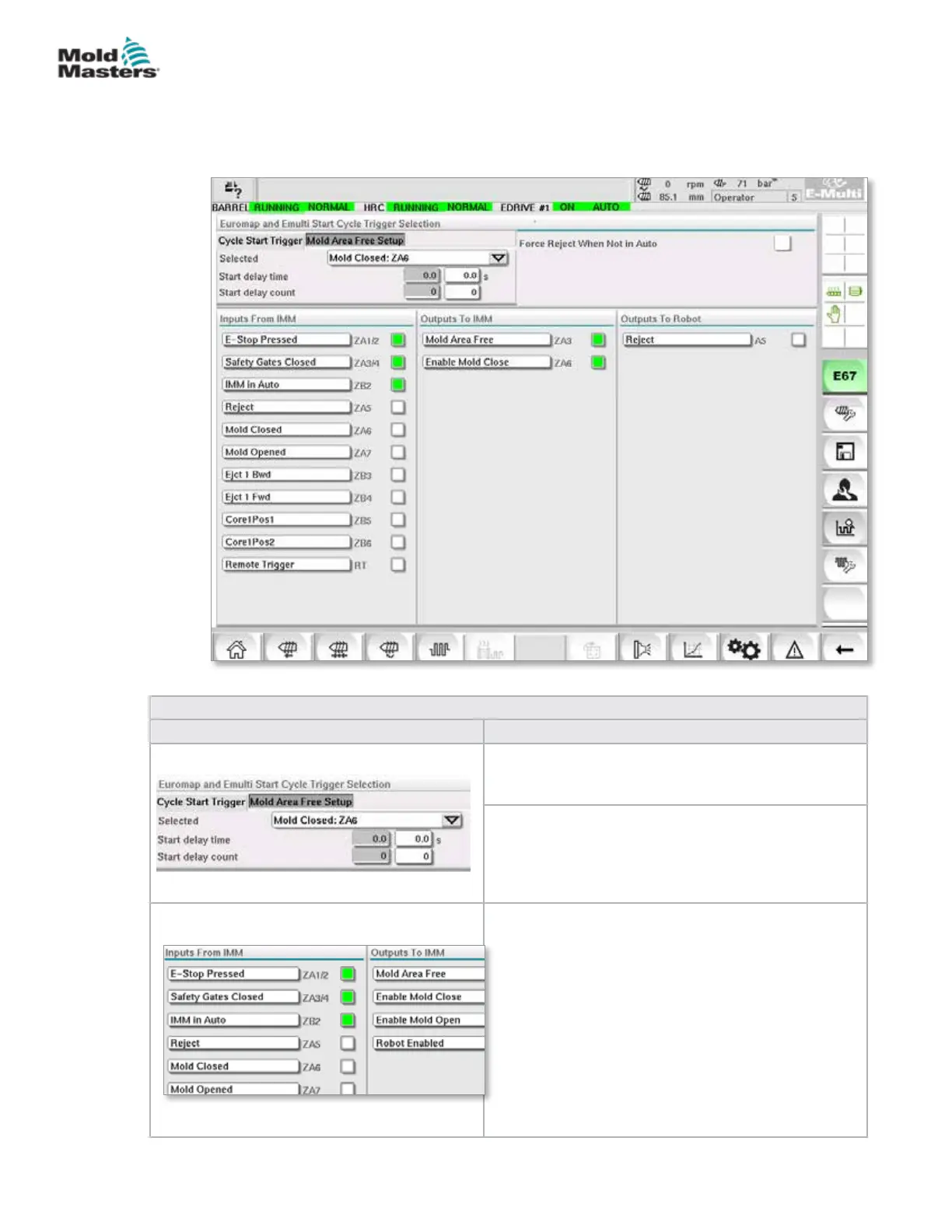
7.39 Euromap E67 Screen
This screen allows the user to monitor the hard wired I/O that is between the
molding machine, E-Multi and the robot. The screen may be accessed by
pressing the E67 button on the contextual menu bar from the home screen.
Table 7-59 Euromap E67 Screen Components
Screen Components Description
Start Delay Time
Delay between the trigger signal from the IMM and
the start of E-Multi injection cycle.
Start Delay Count:
Used to delay E-Multi injection by ignoring the trigger
signal for the specied number cycles.
Useful for transfer molding when the IMM cavity is
empty for the rst shot.
Input and Output Signals:The lower part of the
screen provides an overview of E67 signals. When a
signal is ON, the indicator turns green.
Indicators may be renamed to match IMM naming
conventions or I/O names.
Reject to Robot is depended on the following
conditions:
1. If there is a reject signal from the IMM.
2. If the option for ‘Reject Tracking’ is selected in
Factory settings and if there is an E-Multi alarm.
3. If SPC is being used and there is a bad part
detected.
Figure 7-44 Euromap E67 screen
7-90
© 2020 Mold-Masters (2007) Limited. All Rights Reserved.
E-MULTI CONTROLLER HMI INTERFACE
E-Multi Controller User Manual



 To Next Page