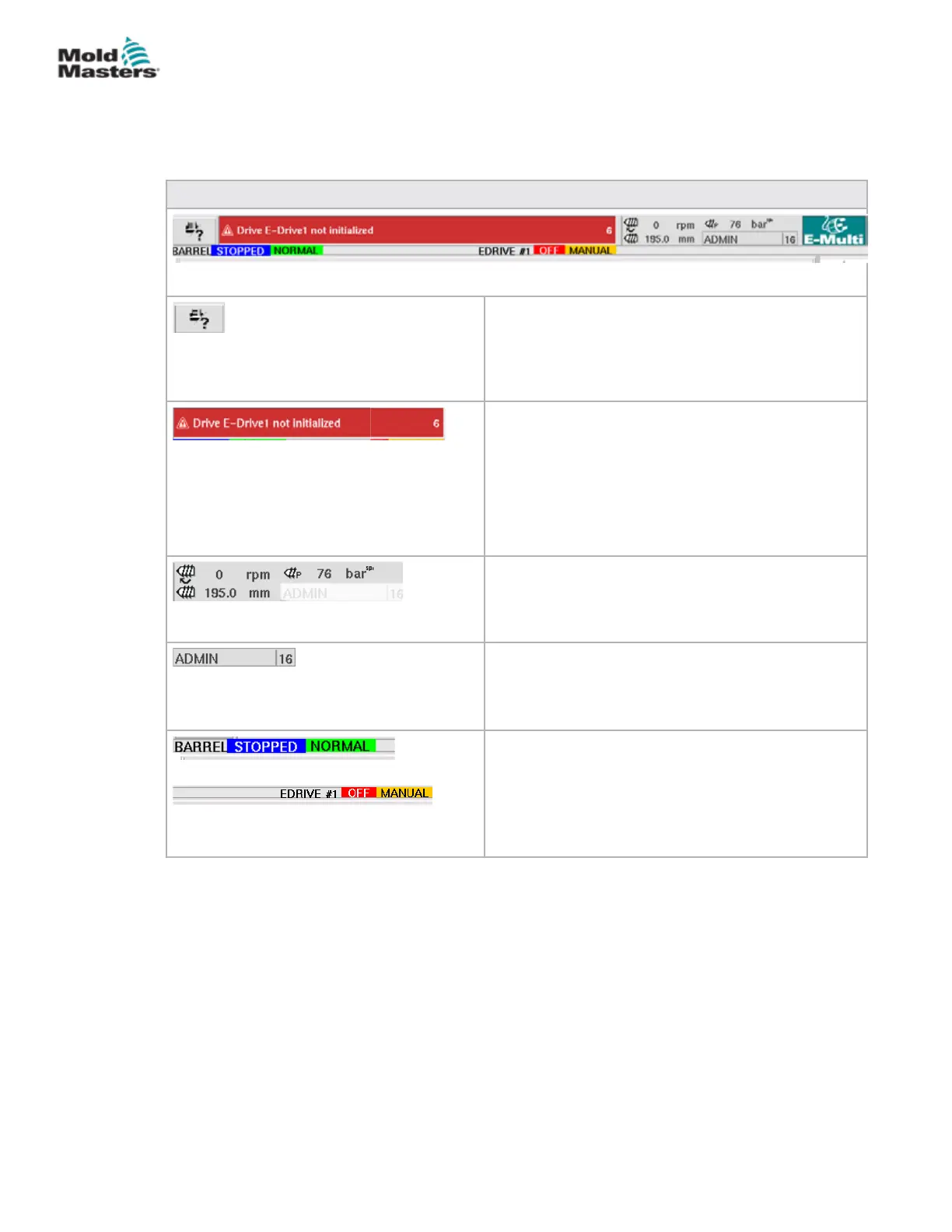
7.3.1 Top Bar - Status Display
The status display is located at the top of the screen and is always shown.
The status display has 5 boxes of information:
Table 7-2 Top Bar - Status Display
Print Command
Useful to obtain a screen picture or printed record
of production information and settings, or for
communicating with service people.
Warning / Error Status Messages
If an alarm occurs, this box shows red with a
description of the alarm.
If two or more alarms occur, they are counted at
the right hand side. Six alarms are shown in this
example.
To see all active alarms tap the red message bar or
the [Alarm] button.
Current Live Status
Live status on screw speed and position and injection
pressure.
User Level
Shows current user and current user access level.
Mode and Status Window
Shows what systems are active, their status and if
any alarms are present.
7-4
© 2020 Mold-Masters (2007) Limited. All Rights Reserved.
E-MULTI CONTROLLER HMI INTERFACE
E-Multi Controller User Manual



 To Next Page