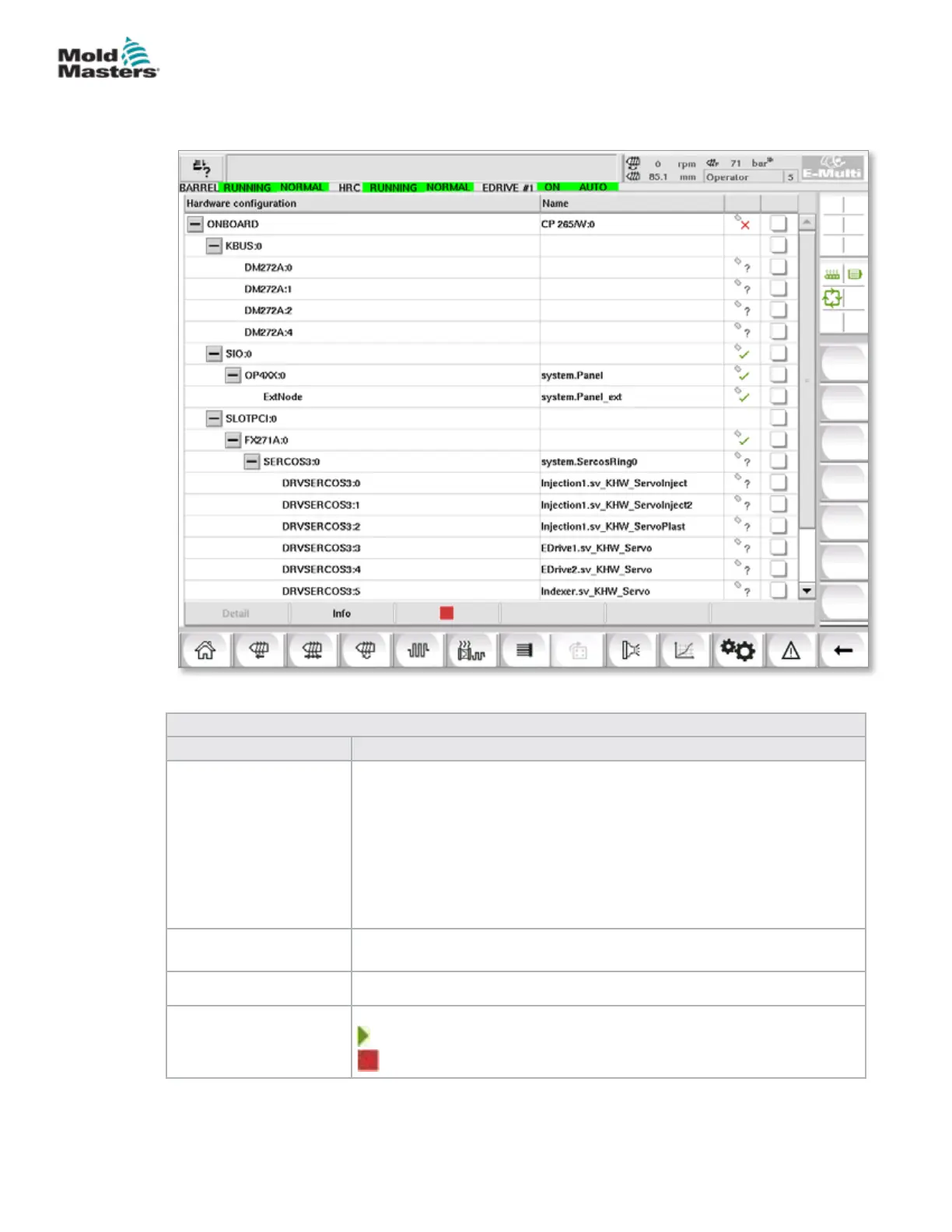
7.26.1 I/O Monitor Screen
The I/O monitor screen displays the status of the inputs and outputs of the
hardware modules.
Table 7-45 I/O Monitor Screen Components
Screen Components Description
Main overview screen The overview screen is used for the selection of one or more hardware
modules. The modules are represented hierarchically in a tree structure,
as they are integrated in the system (connections of CPU module via bus
coupler, K-Net, K-CAN, SIO,... to the hardware modules).
The modules required can be selected by clicking on the checkbox in
the right column. Selecting one structure element will mark all elements
located below.
To deselect a module, click on it again.
Info This dialogue displays information about the selected module (e.g.: BIOS
version, Operation hours counter, etc.).
Detail Switches to the detail view of the selected module.
Start / Stop Indicator The state of the CPU is displayed as follows:
CPU is started.
CPU is stopped.
Figure 7-31 I/O monitor screen
7-72
© 2020 Mold-Masters (2007) Limited. All Rights Reserved.
E-MULTI CONTROLLER HMI INTERFACE
E-Multi Controller User Manual



 To Next Page