3 Connecting Up and Starting to Use the Device
Narda SRM-3006 25
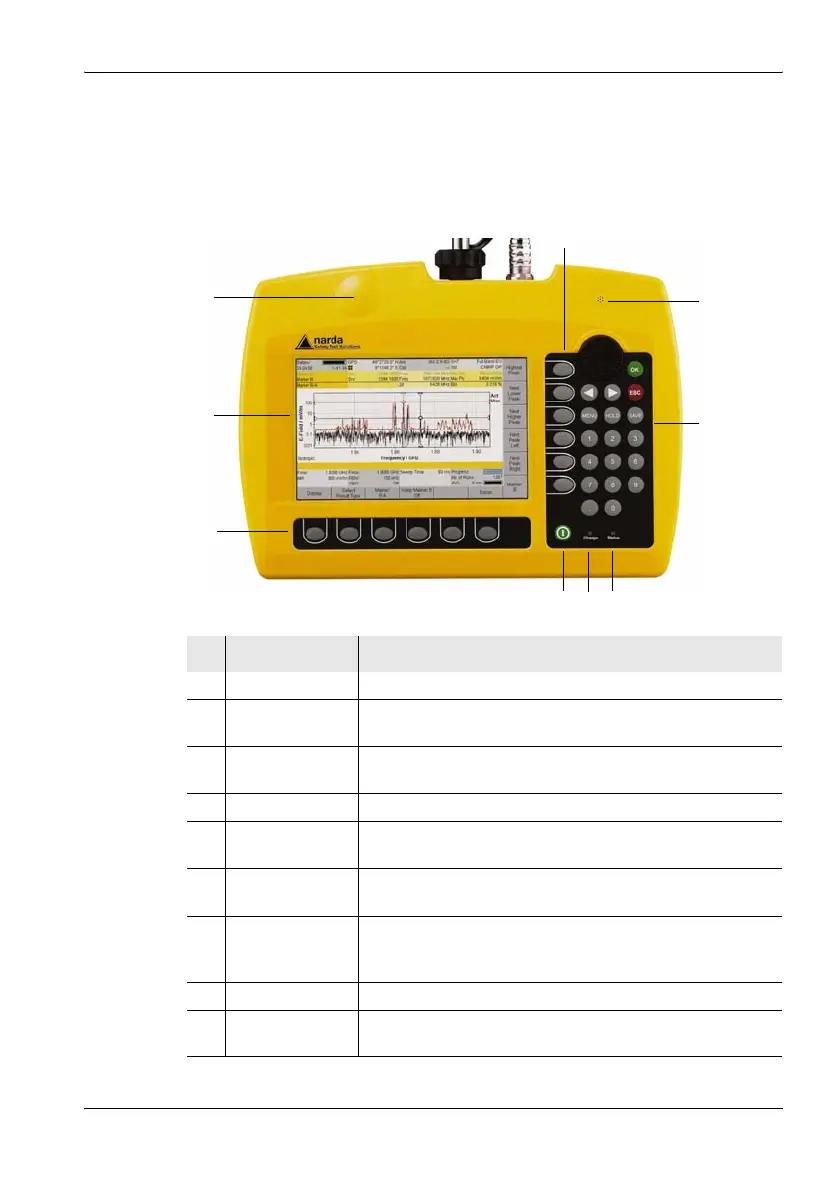
3.2 Device overview
3.2.1 Display and control panels
No. Element Function / Description
1LCD panel Screened, high-resolution liquid crystal display.
2 GPS receiver GPS receiver antenna area.
Do not attach any metallic stickers to this area.
3 Vertical
softkeys
Context-dependent, operating mode and function
selection, changing settings.
4 Microphone For recording voice comments.
5 Keypad and
rotary control
Navigation, changing settings, entering values, confirming
or cancelling entries.
6 Status display • LED green: device is ready for use.
• LED red: device is initializing or device error.
7Charging
indicator
• LED red: Battery is charging.
• LED green: Charging cycle finished or AC adapter /
charger still connected to device charging socket.
8 On/Off key Switches device on or off (hold down key).
9 Horizontal
softkeys
Context-dependent, function selection, changing settings.
1
9
3
5
786
2
4



 To Next Page