7 Safety Evaluation Mode
Narda SRM-3006 101
Changing the displayed units
Safety Evaluation • Display • Unit
1. Press the Display softkey.
2. Press the Unit softkey.
3. Use the rotary control to select the desired units and press the OK key.
4. Press the ESC key to return to the measurement menu.
Changing the sort order
Safety Evaluation • Display • Sort
1. Press the Display softkey.
2. Press the Sort softkey.
3. Use the rotary control to select the desired sort order and press the OK
key.
ª The list is re-sorted.
4. Press the ESC key to return to the measurement menu.
7.3.2 Percentage display
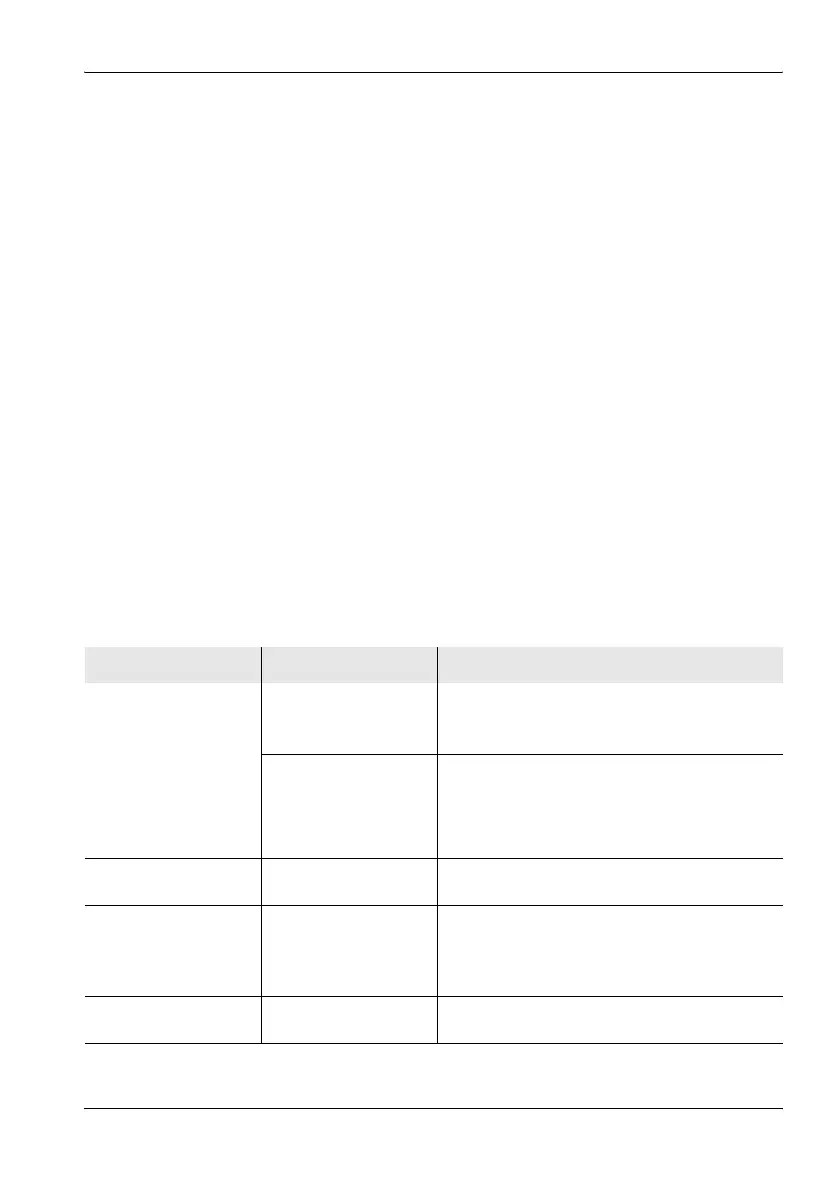
The SRM-3006 can also display values as percentages in various menus.
These values express different factors depending on the context. These
various uses are explained in the table below:
Application Selection Explanation
Safety Evaluation •
Table View
Unit = %
Displays the result
types Act, Max, ...
The measured values for the result types
indicate the percentage of the selected
measurement standard limit value.
Unit = %
Displays the result type
Std
Because the measurement standard is the
reference quantity in the corresponding
frequency band (e.g. 60 V/m), the result type
Standard will always show 100% if percentage
units are selected.
Safety Evaluation •
Distribution
– The measured value shows the percentage
contributed by the service to the overall level.
Safety Evaluation • Bar
Graph: Marker
Spectrum: Marker
Marker: Single:
(Delta B-A is active)
Unit = V/m, A/m, W/m,
mW/cm
2
, %
The difference is displayed as a percentage.
Spectrum • Peak Table – Actual measured value as a percentage of the
maximum value.



 To Next Page